What device does VLC use? In your screenshot, Ardour still uses hw:PCH,1. So VLC uses a different one?
Can you select the text and copy that (instead of making a screenshot)? The output is cut short otherwise.
What device does VLC use? In your screenshot, Ardour still uses hw:PCH,1. So VLC uses a different one?
Can you select the text and copy that (instead of making a screenshot)? The output is cut short otherwise.
That’s my XR18 mixer, not an Intel HDA. I posted it as another example of the dialogue the OP should see.
Cheers,
Keith
As Robin has said, can you copy and paste the actual text, not a screen shot of it. Like this:
========================================
Part I: ALSA
Advanced Linux Sound Architecture Driver Version k6.8.0-51-generic.

Card 0 (PCH):
  * Playback Device 0 (ALC269VC Analog):
    - Subdevice 0 (hw:PCH,0,0):
      used by: ArdourGUI (PID 19160)
      access: MMAP_INTERLEAVED
      format: S32_LE
      subformat: STD
      channels: 4
      rate: 48000 (48000/1)
      period_size: 256
      buffer_size: 512

  * Playback Device 3 (HDMI 0):
    - Subdevice 0 (hw:PCH,3,0):
      closed

  * Playback Device 7 (HDMI 1):
    - Subdevice 0 (hw:PCH,7,0):
      closed

  * Playback Device 8 (HDMI 2):
    - Subdevice 0 (hw:PCH,8,0):
      closed

  * Playback Device 9 (HDMI 3):
    - Subdevice 0 (hw:PCH,9,0):
      closed

  * Recording Device 0 (ALC269VC Analog):
    - Subdevice 0 (hw:PCH,0,0):
      used by: ArdourGUI (PID 19160)
      access: MMAP_INTERLEAVED
      format: S32_LE
      subformat: STD
      channels: 2
      rate: 48000 (48000/1)
      period_size: 256
      buffer_size: 512

========================================
Part II: jack/pipewire
   1362 ?        Ssl    0:44 /usr/bin/pipewire
   1364 ?        Ssl    0:00 /usr/bin/pipewire -c filter-chain.conf
   1367 ?        Ssl    0:40 /usr/bin/pipewire-pulse
pipewire
Compiled with libpipewire 1.0.5
Linked with libpipewire 1.0.5
To format it like I have done, put 3 “backtick” characters at the start and end. The “backtick” character is the single quote character that is usually on the key to the left of the digit 1 on the keyboard.
```
Like this
```
Cheers,
Keith
Back to the problem, one thing I have noticed with some HDA hardware is that the headphone output does not always switch properly.
On the laptop I’m using now, if I start the ALSA driver in Ardour without the headphones plugged in, then if I plug them in afterwards, I get no audio. If I stop and start ALSA then I get audio. The reverse happens with the laptop speakers.
On my hardware, I get 4 outputs on the HDA Device as shown:
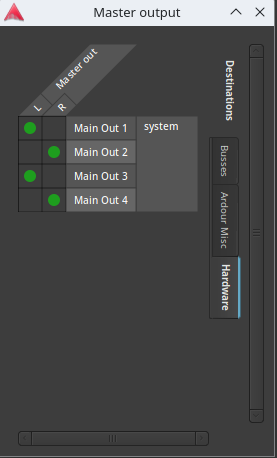
In my case, Main Out 1 and Main Out 2 are the stereo headphone outputs, and Main Out 3/4 are the laptop speakers. In the screen shot above I have both selected but, as I pointed out above, only one works at a time (at least for me).
Note that, when using the ALSA system, Ardour takes exclusive control of the audio device.
In general I would advise against using the onboard HDA device on any computer with Ardour. HDA is somewhat quirky and the audio quality from it is often compromised. It can, and usually does, work and is useful for output purposes, but I really wouldn’t use it for recording and I would recommend getting a decent external audio interface, which tend to be more reliable and higher quality.
A decent option is the Behringer UMC204HD which is a good quality audio interface that works well on Linux, and which doesn’t cost much.
Cheers,
Keith
Doesn’t that script output indicate that PCH,1 is the digital output? PCH,0 is the analog output which seems more likely to be what drives the headphone out.
BASH OUTPUT WITH VLC RUNNING
paul@paul-iMac12-1:/tmp$ bash /tmp/adevices.sh
========================================
Part I: ALSA
Advanced Linux Sound Architecture Driver Version k6.8.0-50-lowlatency.

Card 0 (HDMI):
  * Playback Device 3 (HDMI 0):
    - Subdevice 0 (hw:HDMI,3,0):
      closed

Card 1 (PCH):
  * Playback Device 0 (CS4206 Analog):
    - Subdevice 0 (hw:PCH,0,0):
      closed

  * Playback Device 1 (CS4206 Digital):
    - Subdevice 0 (hw:PCH,1,0):
      closed

  * Recording Device 0 (CS4206 Analog):
    - Subdevice 0 (hw:PCH,0,0):
      closed

  * Recording Device 1 (CS4206 Digital):
    - Subdevice 0 (hw:PCH,1,0):
      closed

========================================
Part II: jack/pipewire
   2177 ?        S      0:01 /usr/bin/jackdbus auto
   2125 ?        S<sl   0:02 /usr/bin/pipewire
   2126 ?        Ssl    0:00 /usr/bin/pipewire -c filter-chain.conf
   2132 ?        S<sl   0:01 /usr/bin/pipewire-pulse
jackdmp version 1.9.21 tmpdir /dev/shm protocol 9
pipewire
Compiled with libpipewire 1.0.5
Linked with libpipewire 1.0.5
========================================
Part III: jack-dbus config
--- status
stoped
paul@paul-iMac12-1:/tmp$


BASH OUTPUT WITH ARDOUR RUNNING
Part I: ALSA
Advanced Linux Sound Architecture Driver Version k6.8.0-50-lowlatency.

Card 0 (HDMI):
  * Playback Device 3 (HDMI 0):
    - Subdevice 0 (hw:HDMI,3,0):
      closed

Card 1 (PCH):
  * Playback Device 0 (CS4206 Analog):
    - Subdevice 0 (hw:PCH,0,0):
      closed

  * Playback Device 1 (CS4206 Digital):
    - Subdevice 0 (hw:PCH,1,0):
      used by: ArdourGUI (PID 19077)
      access: MMAP_INTERLEAVED
      format: S32_LE
      subformat: STD
      channels: 2
      rate: 48000 (48000/1)
      period_size: 1024
      buffer_size: 2048

  * Recording Device 0 (CS4206 Analog):
    - Subdevice 0 (hw:PCH,0,0):
      used by: ArdourGUI (PID 19077)
      access: MMAP_INTERLEAVED
      format: S32_LE
      subformat: STD
      channels: 2
      rate: 48000 (48000/1)
      period_size: 1024
      buffer_size: 2048

  * Recording Device 1 (CS4206 Digital):
    - Subdevice 0 (hw:PCH,1,0):
      closed

========================================
Part II: jack/pipewire
   2177 ?        S      0:01 /usr/bin/jackdbus auto
   2125 ?        S<sl   0:02 /usr/bin/pipewire
   2126 ?        Ssl    0:00 /usr/bin/pipewire -c filter-chain.conf
   2132 ?        S<sl   0:01 /usr/bin/pipewire-pulse
jackdmp version 1.9.21 tmpdir /dev/shm protocol 9
pipewire
Compiled with libpipewire 1.0.5
Linked with libpipewire 1.0.5
========================================
Part III: jack-dbus config
--- status
stoped
Seemed impossible … this says that with VLC running, none of your audio interfaces were in use. Was VLC actually playing audio when you ran the command?
VLC was open. No audio files were open.
For the output to be useful, the program (VLC in this case) must be playing. We need to understand the difference between the way that VLC (or whatever) is using the device vs. the way Ardour is.
With vlc playing a track

paul@paul-iMac12-1:~$ cd /tmp && wget https://ardour.org/files/adevices.sh
--2024-12-20 01:10:23--  https://ardour.org/files/adevices.sh
Resolving ardour.org (ardour.org)... 54.235.123.47
Connecting to ardour.org (ardour.org)|54.235.123.47|:443... connected.
HTTP request sent, awaiting response... 200 OK
Length: 2347 (2.3K) [application/octet-stream]
Saving to: ‘adevices.sh.6’

adevices.sh.6 100%   2.29K  --.-KB/s    in 0s

2024-12-20 01:10:23 (517 MB/s) - ‘adevices.sh.6’ saved [2347/2347]

paul@paul-iMac12-1:/tmp$ bash /tmp/adevices.sh
========================================
Part I: ALSA
Advanced Linux Sound Architecture Driver Version k6.8.0-50-lowlatency.

Card 0 (HDMI):
  * Playback Device 3 (HDMI 0):
    - Subdevice 0 (hw:HDMI,3,0):
      closed

Card 1 (PCH):
  * Playback Device 0 (CS4206 Analog):
    - Subdevice 0 (hw:PCH,0,0):
      used by: pipewire (PID 2125)
      access: MMAP_INTERLEAVED
      format: S32_LE
      subformat: STD
      channels: 2
      rate: 48000 (48000/1)
      period_size: 1024
      buffer_size: 32768

  * Playback Device 1 (CS4206 Digital):
    - Subdevice 0 (hw:PCH,1,0):
      closed

  * Recording Device 0 (CS4206 Analog):
    - Subdevice 0 (hw:PCH,0,0):
      closed

  * Recording Device 1 (CS4206 Digital):
    - Subdevice 0 (hw:PCH,1,0):
      closed

========================================
Part II: jack/pipewire
   2177 ?        S      0:04 /usr/bin/jackdbus auto
   2125 ?        S<sl   0:13 /usr/bin/pipewire
   2126 ?        Ssl    0:00 /usr/bin/pipewire -c filter-chain.conf
   2132 ?        S<Lsl   0:15 /usr/bin/pipewire-pulse
jackdmp version 1.9.21 tmpdir /dev/shm protocol 9
pipewire
Compiled with libpipewire 1.0.5
Linked with libpipewire 1.0.5
========================================
Part III: jack-dbus config
--- status
stoped

With Ardour Playing a track
paul@paul-iMac12-1:/tmp$

Part I: ALSA
Advanced Linux Sound Architecture Driver Version k6.8.0-50-lowlatency.

Card 0 (HDMI):
  * Playback Device 3 (HDMI 0):
    - Subdevice 0 (hw:HDMI,3,0):
      closed

Card 1 (PCH):
  * Playback Device 0 (CS4206 Analog):
    - Subdevice 0 (hw:PCH,0,0):
      closed

  * Playback Device 1 (CS4206 Digital):
    - Subdevice 0 (hw:PCH,1,0):
      used by: ArdourGUI (PID 47545)
      access: MMAP_INTERLEAVED
      format: S32_LE
      subformat: STD
      channels: 2
      rate: 48000 (48000/1)
      period_size: 1024
      buffer_size: 2048

  * Recording Device 0 (CS4206 Analog):
    - Subdevice 0 (hw:PCH,0,0):
      used by: ArdourGUI (PID 47545)
      access: MMAP_INTERLEAVED
      format: S32_LE
      subformat: STD
      channels: 2
      rate: 48000 (48000/1)
      period_size: 1024
      buffer_size: 2048

  * Recording Device 1 (CS4206 Digital):
    - Subdevice 0 (hw:PCH,1,0):
      closed

========================================
Part II: jack/pipewire
   2177 ?        S      0:05 /usr/bin/jackdbus auto
   2125 ?        S<sl   0:13 /usr/bin/pipewire
   2126 ?        Ssl    0:00 /usr/bin/pipewire -c filter-chain.conf
   2132 ?        S<Lsl   0:15 /usr/bin/pipewire-pulse
jackdmp version 1.9.21 tmpdir /dev/shm protocol 9
pipewire
Compiled with libpipewire 1.0.5
Linked with libpipewire 1.0.5
========================================
Part III: jack-dbus config
--- status
stoped
As @ccaudle hinted at, you are using the wrong device with Ardour
If you look at the two outputs, when using vlc:
This is the analogue output.
When using Ardour:
This is some sort of digital output which might be a digital spdif output, or it might not even be a physical port.
Try setting the output device in the Audio/MIDI setup in Ardour to HDA Intel PCH instead of HDA Intel PCH (hw:PCH.1) like you have in the screenshot you provided.
Cheers,
Keith
To add clarification to this, it is likely an optical S/PDIF that is built in to the same 1/8" jack as the headphone output. I haven’t looked for it in some time, but Macs used to do this, hadn’t thought about it till your comment though.
Seablade
I have sound. Thank you for your patience.
Thank you for your help.
This topic was automatically closed 91 days after the last reply. New replies are no longer allowed.