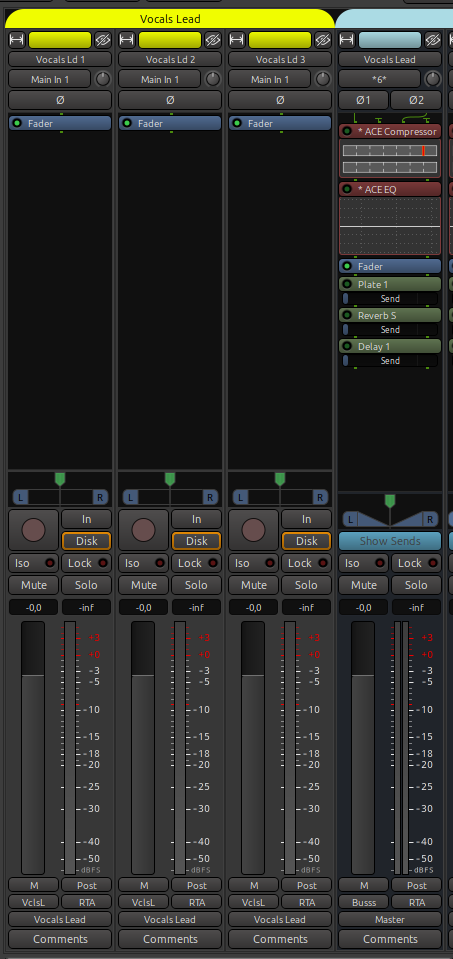
Recently I discovered the feature: Mixer Strip Template as outlined here:
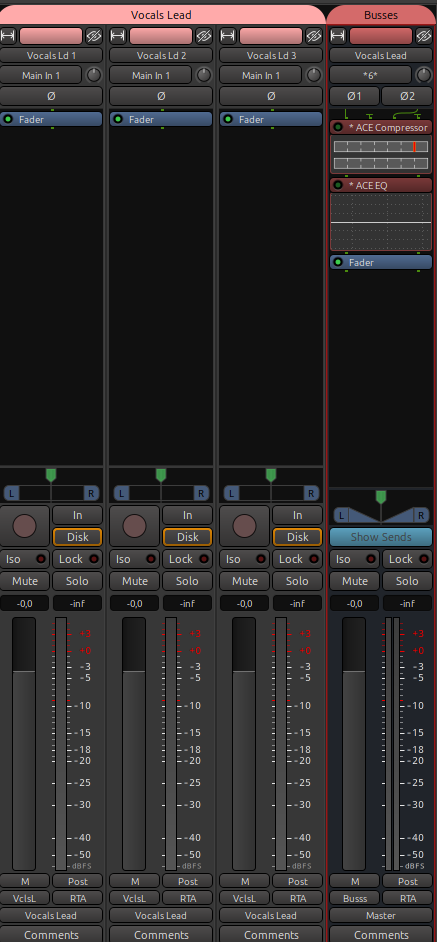
I exported a group of strips and re-imported them into a new session, everything went fine except the aux send processor boxes that were in my initial strips were gone (e.g. for reverb, delay etc.)
I think I made sure that the target busses for the effects did exist on the mixer.
I checked the related routestate file and they seemed to be inside. (as far as I can tell: Vocals Lead.routestate - file will be removed from storage after a while)
How can I get them into my new session?
(Ardour 9.5 / Linux)
Original session, saved the 3 vocal strips plus the vocal sum
Yes aux-sends are not supported as part of the route templates. We should document this.
(It can work if you use the same session, re-import state and the bus still exists.)
The Aux-send's state saves the unique ID of the target bus. But that ID is unique for every session and there is no trivial way to map it. Then there is also the issue that bus needs to be created before a send can be added to the bus..
Eventually we might come up with a solution for this, but … it’s complicated.
That has been my process so far.
But for maintenance reasons this template has grown huge over time.
(various drum configs, all sort of instruments …)
So I spend some time to remove lots of stuff again for a specific project.
No worry, I can get along …