Every time I try to start a project with Ardour I hit 234980 barriers and waste 2375429348h trying to do again something I’ve done before 234764 times… let’s go again…
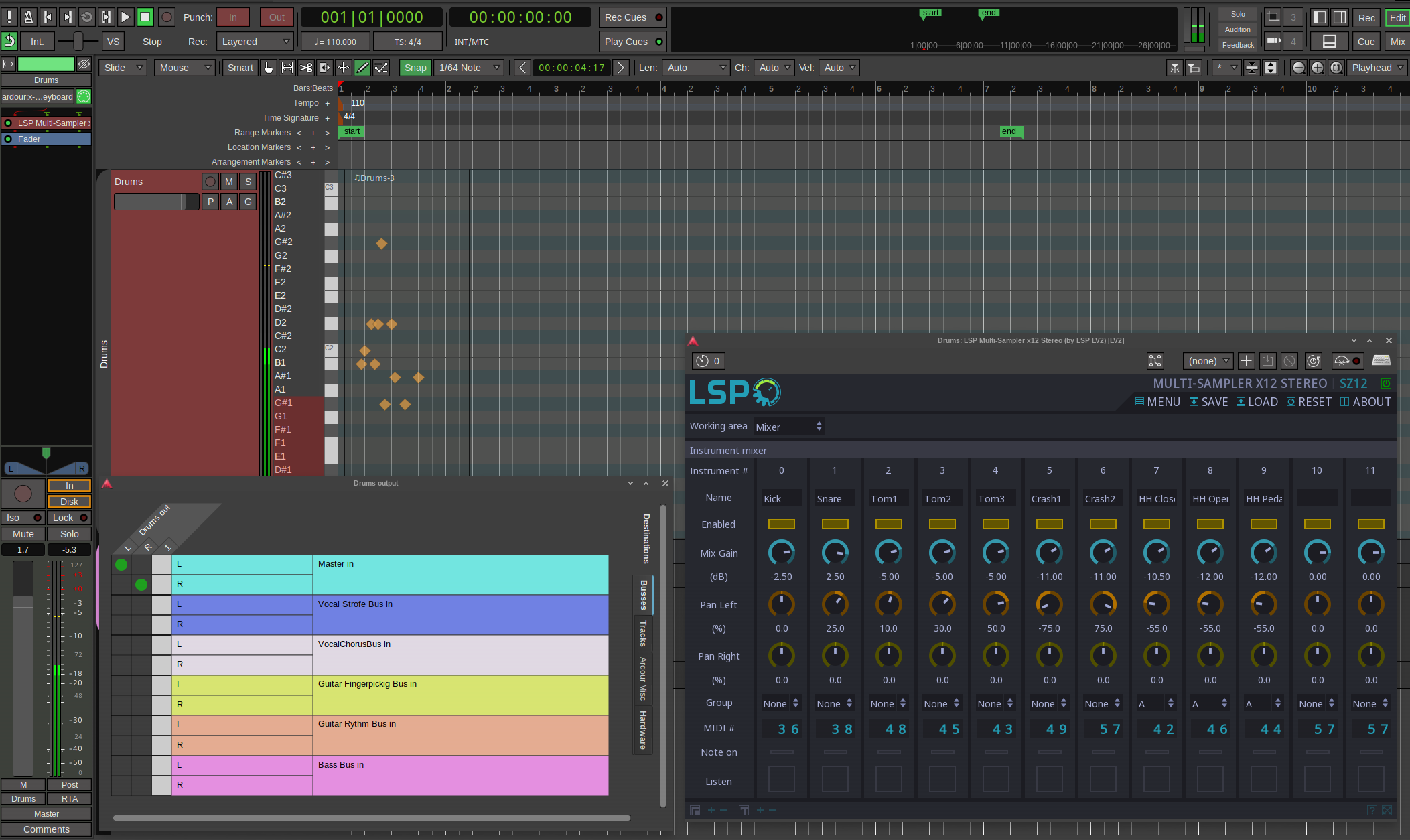
I saved an older project as Template. Loaded. There is a Track with Midi Drums. It is empty. I add some notes. The Gauge reacts when I do, indicating that I’m setting the correct notes. I’m using LSP Multisampler for this Drum set. It finds the samples. In fact, I can click the the “listen” button and it plays the sound of each instrument there.
Everything is hooked to master. It doesn’t play a sound. The meter reacts as if sound is being played. It is not.
It is, very likely, something extremely dumb. It always is. But I always waste 23897424897h on dumb things whenever I have to start a project in Ardour. It is VERY frustrating.
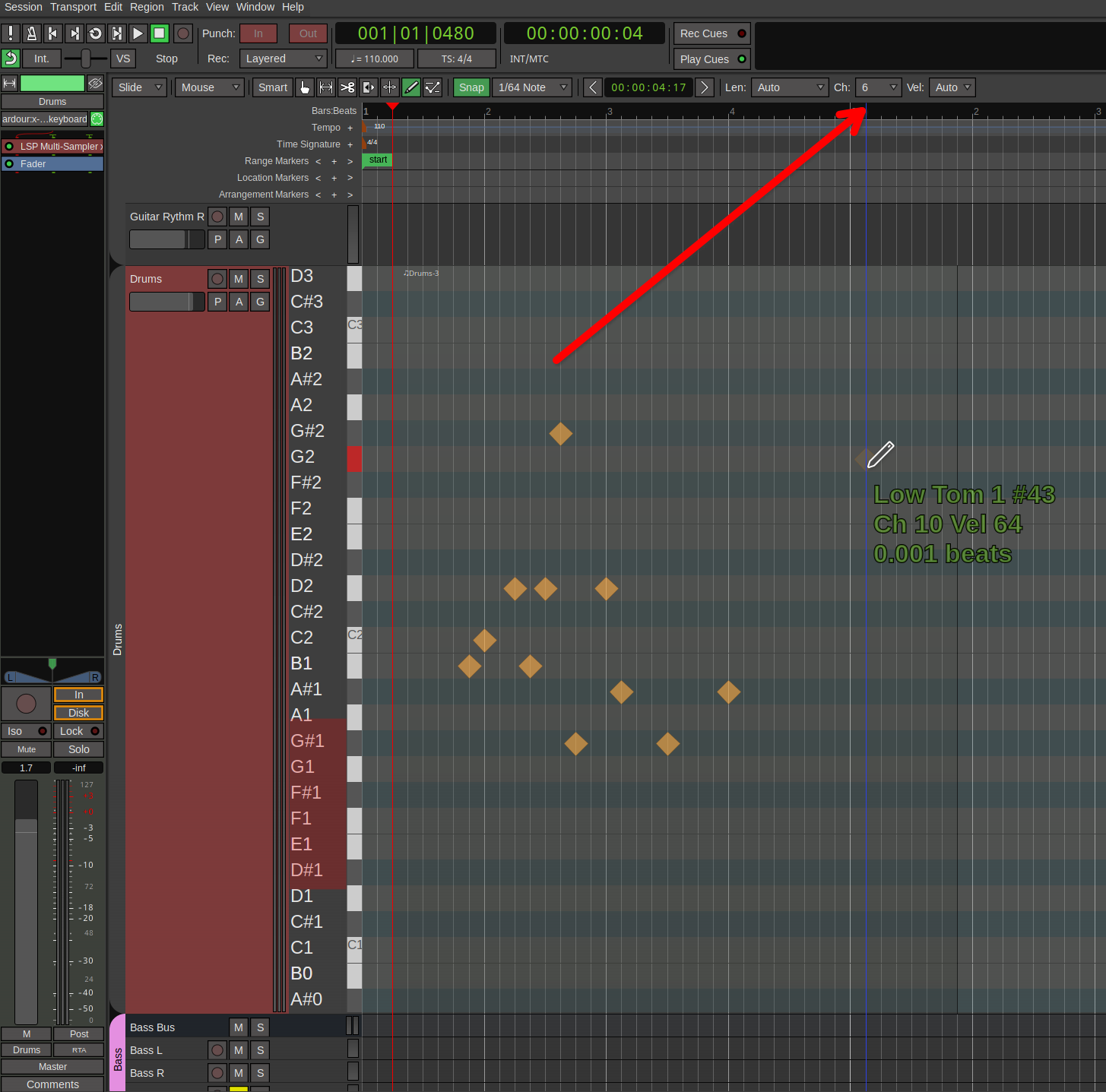
There’s a good chance the LSP multisampler drum set only uses notes on Channel 10 (which is conventionally the channel for drums, though this varies significantly in other plugins and DAWs). By default, drawn notes will be on channel 1. There’s a selector for this in the MIDI tools bar.
My LSP Instruments were listening to Channel 3, not 10. No idea why it was set like that, why it is working in my older project and why the template didn’t set the track to listen to channel 3 automatically, but hey.
Is there any way to set the MIDI Editor to only show the 12 notes/instruments from the LSP Plugin, instead of all of them?
If you spent some of these 23897424897 hours on reading the manual it would be a less frustraing thing to work with ardour (sorry, too obvious, silly joke ).
But it would be nice if the default channel could be set in preferences. I mostly use channel 10 but when editing a track I first need to go to Draw-mode to set the channel to 10, then go to Edit-mode.
If Edit-mode also had a Midi-toolbar that would save one step.
And also this: Channel by default is: Auto
In the manual: “Channel Auto - This value will be inherited from the closest note.”
I don’t know how that is supposed to work but if I insert new notes close to notes with channel 10 (or any channel) it still draws notes in channel 1
(This relates to Inline-editing, Pianoroll works different of course)
As far i observe in a recent nightly builds version of Ardour that was changed (by Robin Gareus). In a given session len/chanel/velocity will be remembered next time you open that very session.
Also as far i can tell if you start a new session, it is set to “default” in the midi-tools-bar, but you only have to change it once then for that session.
So not in preferences, but pretty much as comfortable.
As far i observe: i can sure say it is like that in nightly builds, if it will still be there in the close new release, i can’t say, but assume.
Ardour has had a huge amount of changes in the MIDI implementation in the last two releases. Anything you knew from Ardour in the 7.x and earlier releases is only partially applicable to 9.2.
You are mixing up different items in the same statement.
As you originally pointed out (I assume correctly) the plugin was set to respond to channel 3.
You then wonder why the track did not respond to channel 3, but as you originally noted it is the instrument plugin which needs to respond to the data on channel 3, there is nothing in a “track” which responds on a particular channel. There are settings which can force all data recorded or played back to set a particular MIDI channel, but that doesn’t change the plugin settings.
Plugins typically are responsible for saving their own state, since Ardour as the host does not have any way to inspect the internal state of the plugin, so an Ardour track template cannot save the plugin state.
I am not sure whether an Ardour track template an request a plugin to attempt to load a preset with a particular name, that might be the closest that Ardour could come to restoring a particular plugin setting when instantiating from a template. I’m not sure, I would have to experiment with templates. I know that the ACE instruments start with the same settings when a session is loaded, but I have not tried creating a template from a session with an instrument loaded.
 ).
).