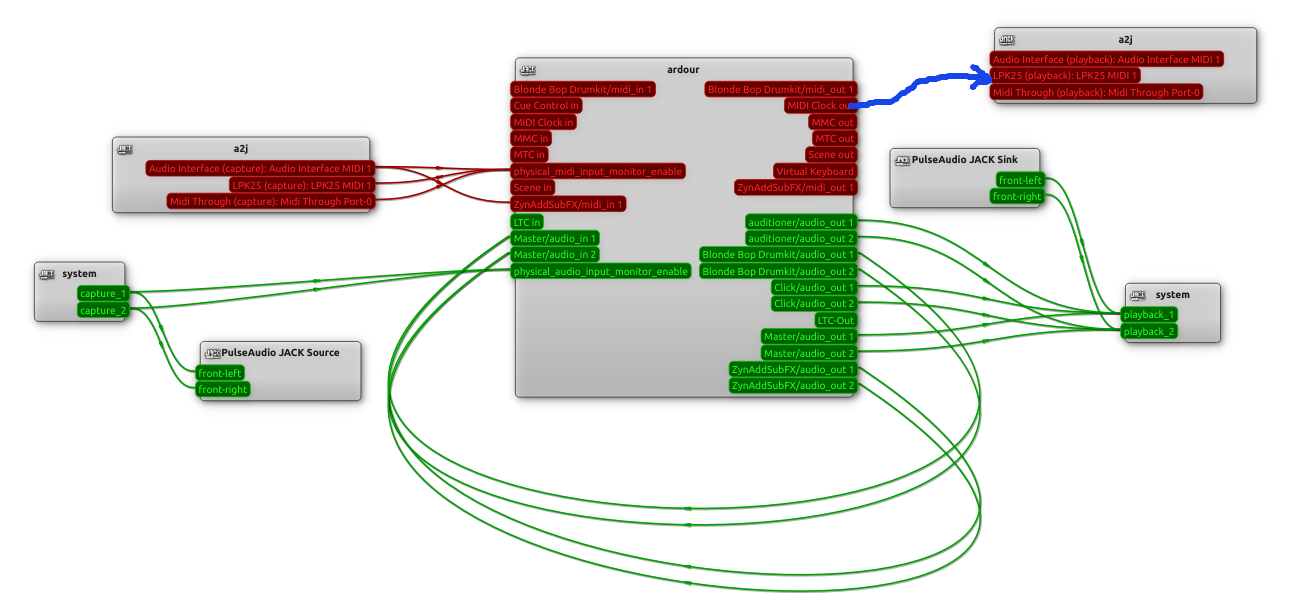
I’ve been looking at syncing external devices with Ardour, having some success with receiving and using the MIDI clock messages. However, whenever I connect “MIDI Clock out” to any device (e.g. an LPK25), the Feedback light turns red and warns of a “No Align”. The log contains:
2025-10-16T16:41:13 [WARNING]: Ambiguous latency for port ‘MIDI Clock out’ (0, 272)
The devices I attach have are not outputting back into Ardour or any other device/service. So there should be no feedback loop.
This warning occurs if I connect either with Jack or the MIDI connection manager within Ardour.
I’ve had a sift through older messages, but similar problems didn’t describe what I’m seeing.
Is there something I should / shouldn’t be doing to avoid this warning?
Hi Chris, thanks for the comment. AFAIK, the clock messages are broadcast to all channels for any device that cares to consume them. However, in this case, it is only connected to one device.
The warning means that Ardour cannot determine a single latency value for the connection path, so has no way to perform proper latency compensation. That typically occurs because one signal takes two different paths which have different latency values, so there is no single compensation value which works for the two (or more) paths.
The message concerns physical connection paths, it has nothing to do with MIDI channels.
OK, but just for full disclosure since I have not interacted with you before, I will tend to believe Ardour over you.
Just to make sure, in the connection manager arrange the tabs so you can see MIDI Clock out, and then click through all of the possible destination tabs and make sure that there is only one dot shown connecting MIDI Clock out to any other possible destination.
Thank you for your additional suggestions and comments. Absolutely believe Ardour before me, I am quite sure it is my error that is causing the warning to appear…
I had been using an existing project, for my MIDI clock experiments, so following your confirmation that it is a me problem, I tried with a completely now/empty project. I no longer get the issue.
The existing project has only one link in the MIDI connection manager:
Audio Interface(capture): Audio Interface MIDI 1 (aj2) → ZynAddSubFX.
If I remove that, the connection from MIDI Clock out → LPK25 no longer gives a warning.
Hi Chris, that is the only connection defined within the nine source/destination combinations in the MIDI connection manager. If I look at the Jack graph, I can see that there is nothing connected to any Ardour MIDI output. The attached image shows the Jack graph. The shonky blue line is the one that causes the Ambiguous latency warning.