MIDI channels fan out to Mixer channels

I do not think this is possible
I made a post about this in the past and also have seen other similar posts but I just wanted to verify something about MIDI channels.

This is a general question for all MIDI tracks but I think a perfect example for this question is the Ace Fluidsynth plugin.

This plugin can load up soundfont files that contain multiple patches, which can be assigned to MIDI channels 1-16.

Is it possible to have one MIDI track for all the MIDI note data from all the 16 channels, but then be able to “fan out” these 16 MIDI channels each to their own Mixer channel, to be processed separately?

I know that plugins designed to support multi outputs can achieve this but I was not sure if this could also be achieved with MIDI channels 1-16.

It was mentioned that you can use the Channel Selector but this as far as I know, just filters out how many of the 16 channels are used in and out.

If someone wanted to achieve this, is the only way to basically manually duplicate MIDI track into the amount needed and then use Channel Selector filter for each duplicate?

Thank You

It won’t be possible because, by definition, if the plugin doesn’t support multiple output channels, then its audio output is going to be a stereo (or mono) mix of all of the rendering of the input channels.

The only way Ardour could create separate audio channels from that would be some sort of stem-separation which is unlikely to go well.

My gut feeling would be to create multiple MIDI buses (up to the number of outputs) and connect filtered outputs from the main track to each of these, and then put the plugin on each of those busses.

There may be better ways to do this, and it may be possible to automate the building of this with LUA (or just create a template).

Cheers,

Keith

Only if the synth has separate audio outputs corresponding to each MIDI channel input. So here 32 Stereo outputs.

What are you actually trying to accomplish? Given that it is easy to write such a synth plugin, but none really exist, there is a very good chance that there is a better solution for your eventual goal.

Hey guys thank you for the responses.
Again I know this is not really possible because I am just associating the multi out (fanned out) capabilities of plugins that are designed to offer this, and I am associating this “concept” (of being able to have each out go to a separate Mixer channel), with how instrument plugins allow for 16 MIDI channels.

So, lets use the example I mentioned with Ace Fluidsynth soundfont player because of how it can in essence can provide a scenario where multiple instruments can be assigned each to their own MIDI channel.

So let’s say you have a soundfont font where
Patch 1 = Piano = MIDI channel 1
Patch 2 = Guitar = MIDI channel 2
Patch 3 = Bass = MIDI channel 3

The benefit of this is that only 1 soundfont player plugin is being used and it is playing 3 instruments.

Now lets say you wanted to assign a different effect to each of those 3 instruments
Patch 1 = Piano = MIDI channel 1 = reverb
Patch 2 = Guitar = MIDI channel 2 = distortion
Patch 3 = Bass = MIDI channel 3 = compressor

The idea would be a way to be able to send each MIDI channel into its own Mixer channel, to be processed differently from one another.

Am I correct in saying that this cannot be achieved?
The only way would be to open 3 separate instances of Ace Fluidsynth in their own MIDI tracks and then process them?

Funny that you mentioned MIDI busses, I never really looked into them because I had not had a use for them, but the other day before typing this original thread post, I was looking into/wondering if they would be able to provide something similar to what I was mentioning.
I was having some trouble visuallizing how they worked, because I am associating them with how I view Audio busses, where multiple tracks are sent INTO them.
I could not visuallize this for MIDI because the MIDI bus track would have to have the instrument plugin inserted into it, but then how would multiple other MIDI tracks be able to send only their MIDI data/notes into it?
I tried it the other day, but did not work for me.
If you create MIDI regions without instruments and then hit Play, does it send the MIDI notes into the MIDI bus?
Because like in my example of Ace Fluidsynth, would a MIDI track without an instrument plugin inserted, but set to use say MIDI channel 3, would it send its notes into MIDI track bus channel 3 to play the bass?

Hopefully some of this makes sense :slight_smile:

Yes, but it’s the track that has the instrument plugin, not the the region.

Well, in this case, the individual notes have the MIDI track number, not the track itself.

I just tried it and, yes, it works. However, by default it will send all MIDI notes for all channels to all busses. So, as an example, I set up a track with no instrument and two busses with the same ACE Fluidsynth plugin on both busses, wired the output of the track to both busses, and inserted some notes on the original track set to channel 1 and channel 2.

In this case both bus 1 and bus 2 get the channel 1 and channel 2 notes. Obviously this isn’t the desired output.

So, I then put a MIDI channel filter in before the instrument plugin on each bus, and set bus 1 to only receive channel 1, and bus 2 to only receive channel 2.

This then achieves what you are describing. And you can then connect the audio out from each of the busses in whatever way you want.

Cheers,

Keith

FalkTX (Filipe Coelho) has a ‘MIDI Split’ plugin as part of Carla, which I think outputs the 16 channels to separate ports. Maybe that plugin can help you.

I apologize, I should not have made those posts the other night, was too tired to make any sense :slight_smile:
The first post explaining my desired result I think made some sense, but not much of MIDI Bus stuff I mention does.

++++++++++++++++++++++++++++++++++++++++++++++++++++++

Majik
Thank you for your responses.
Correct that is not what I meant, what I meant to say is
“If you create MIDI regions that contain MIDI notes, within MIDI Tracks that do not have instruments assigned to them…”

I apologize if I am not correct, but I think what you mentioned as being the solution is a similar way of generating the limitation I was speaking of.
My desire was to somehow only have to use 1 Ace FS plugin and be able to assign different processing to each of its 16 MIDI channels.

I think what you describe is a way to have only 1 MIDI Track, that contains all MIDI data (within its 16 MIDI Channels), and then it gets sent to multiple MIDI Bus Tracks that each have to have an Ace FS plugin inserted. This covers all the MIDI data being in 1 track, but the issue is that the only way to assign processing to each channel of the MIDI channels is to filter each of them into their own MIDI Bus track that has to contain its own instance of the Ace FS plugin.

So in your example it is
MIDI Track containing 16 MIDI channels data > MIDI channel filter fan out > To an instance of Ace FS plugin > processing after each Ace FS plugin

Ace FS plugin receives 16 MIDI channels containing MIDI data > each of the 16 MIDI channels are output (fanned out) > Separate tracks that only contain effects plugins. Which does not seem to be possible.

Am I correct in my assumption of what you are mentioning?
Thank you again for your responses.

++++++++++++++++++++++++++++++++++++++++++++++++++++++

Viviean Sahr
Thank you, I have not tried this.
-I was ideally hoping this would be in some way built into Ardour itself so this would not require a separate MIDI plugin each time I wanted to achieve something like this.
-If this was in the form of a MIDI plugin, this would be the next best option.
-However, this being built in as a part of Carla, to me would not really be desired for various reasons.
Thank again though for the suggestion, at least it sounds like it may be possible / something that someone else was looking to achieve the same use case, enough to go through the effort of creating a plugin for it.
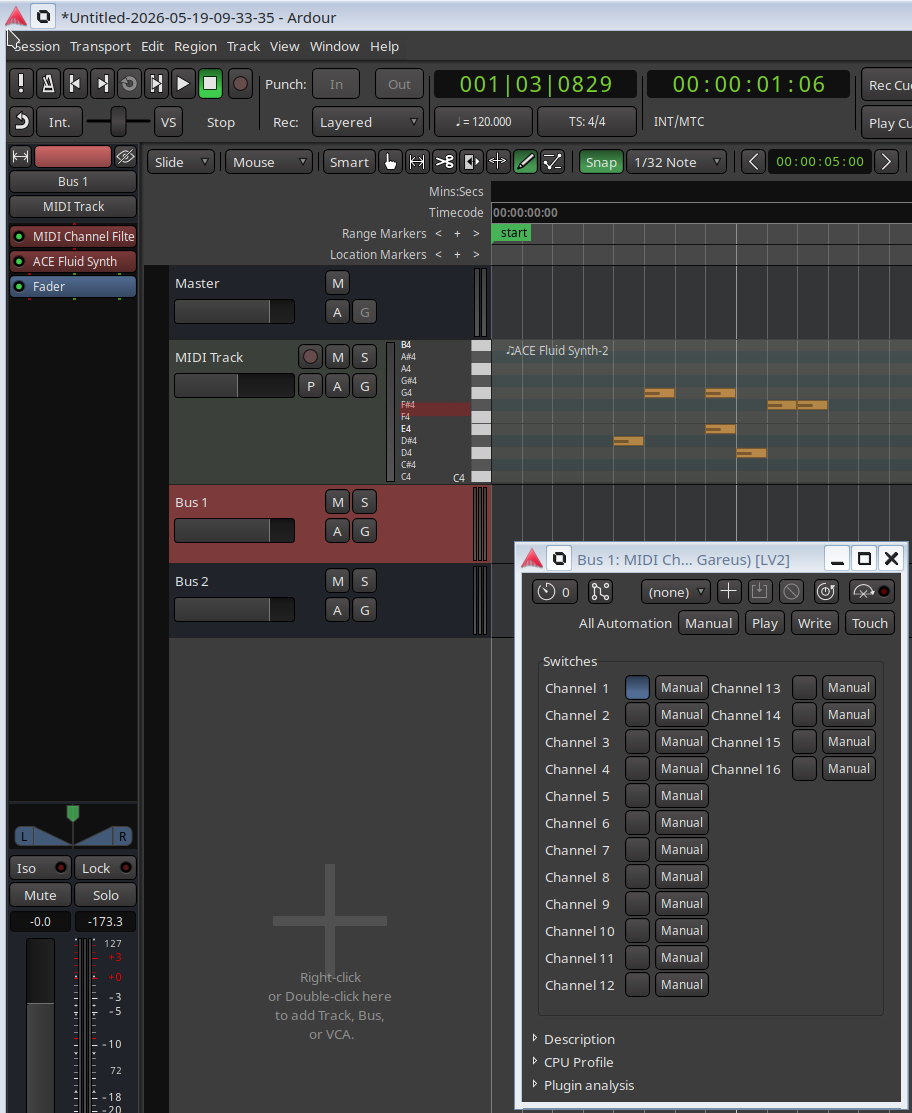
You would need a FluidSynth plugin with 16 audio outputs to do what you want.

You can do that with the stand-along FluidSynth and route it using JACK to multiple tracks, but I don’t know if any of the FluidSynth plugins support multi-channel output.

FluidSynthPlugin has a very minimal interface which allows you to edit the FluidSynth parameters, perhaps that would let you specify the synth.audio-groups and or synth.audio-channels parameters to FluidSynth and fan out to multiple outputs (which you would have to route within ardour as desired).

I think it is a simple plugin you can put on a midi channel, it’s just (in my case at least) distributed with the carla package. At least I can throw it on a track in ardour without carla involved.

Thank you guys for the responses
I will look into what was mentioned.