Same with me. I assume the rest comes in after having purchased a license key?
Have bot tried on my side. I might do, maybe …
I have tried this both without a licence key and with.
I had problems initially because I was using an old Wine/Yabridge install. I thought I had removed it, but I had files in different paths.
Without a licence key, it seems to work fine and I can click all of the drums on the drum kit page and they sound.
When I made a donation (now there’s a native Linux version I may actually use it) and installed the code, it seems to work fine and isn’t in demo mode any longer.
This is with Ardour 8.12 on Kubuntu 24.04 with MTPDK-2.1.0-VST-64bit-for-Linux-Wine-FULL
Cheers,
Keith
1 Like
FWIW, I just tested it out:
- First I installed the dependencies they mention in the
INSTALLdoc i dumped above (i - Then I unpacked the
BETA3zipfile and linked theMT-PowerDrumKit.vstdirectory into~/.vst3/. - I fired up a new Ardour session and ran a plugin scan from the PluginManager window: it found the new plugin fine.
- I created a MIDI track using that plugin, and was able to hear all the kit pieces, both clicking in the GUI and triggering from my keyboard controller.
Edit: I was is running the official Ardour 8.12 on Debian bookworm.
2 Likes
MT Power Drumkit 2:
Version 2.14 Beta5 now works perfectly fine on my machine.
1 Like
… and the official native Linux release of MT Power Drumkit 2 is out!
6 Likes
Wow, project compatibility is a cool feature.
MT Power Drumkit 2
EDIT (2026-02-15):
Manda AUdio has provided a setup file for Ardour now, so ignore everything below
Here is an initial midnam file: MT_Power_Drumkit_2.midnam
It goes into
/home/<user>/.config/ardour<n>/patchfiles
with <n> being Ardours version number (e.g. 9)
Copy the stuff below into a file with the file name above:
<?xml version="1.0" encoding="UTF-8"?>
<!DOCTYPE MIDINameDocument PUBLIC "-//MIDI Manufacturers Association//DTD MIDINameDocument 1.0//EN" "http://www.midi.org/dtds/MIDINameDocument10.dtd">
<MIDINameDocument>
  <Author>Peter Zenk</Author>
  <MasterDeviceNames>
    <Manufacturer>Manda audio</Manufacturer>
    <Model>MT Power Drumkit 2</Model>
    <CustomDeviceMode Name="Drumkit Keymap">
      <ChannelNameSetAssignments>
        <ChannelNameSetAssign Channel="1" NameSet="Names"/>
        <ChannelNameSetAssign Channel="10" NameSet="Names"/>
      </ChannelNameSetAssignments>
    </CustomDeviceMode>
    <ChannelNameSet Name="Names">
      <AvailableForChannels>
        <AvailableChannel Channel="1" Available="true"/>
        <AvailableChannel Channel="10" Available="true"/>
      </AvailableForChannels>
      <UsesNoteNameList Name="Notes"/>
      <PatchBank Name="User Patches">
        <PatchNameList Name="User Patches"/>
      </PatchBank>
    </ChannelNameSet>
    <NoteNameList Name="Notes">
      <Note Number="35" Name="(Kick)"/>
      <Note Number="36" Name="KICK"/>
      <Note Number="37" Name="SIDE-STICK"/>
      <Note Number="38" Name="SNARE"/>
      <Note Number="39" Name="(Snare)"/>
      <Note Number="40" Name="(Snare)"/>
      <Note Number="41" Name="TOM LOW"/>
      <Note Number="42" Name="HI-HAT CLOSED"/>
      <Note Number="43" Name="(Tom Low)"/>
      <Note Number="44" Name="HI-HAT HALF OPEN"/>
      <Note Number="45" Name="TOM MID"/>
      <Note Number="46" Name="HI-HAT OPEN"/>
      <Note Number="47" Name="(Tom Mid)"/>
      <Note Number="48" Name="TOM HI"/>
      <Note Number="49" Name="CRASH LEFT"/>
      <Note Number="50" Name="(Tom Hi)"/>
      <Note Number="51" Name="RIDE"/>
      <Note Number="52" Name="CHINA"/>
      <Note Number="53" Name="RIDE BELL"/>
      <Note Number="55" Name="SPLASH"/>
      <Note Number="57" Name="CRASH RIGHT"/>
      <Note Number="58" Name="CRASH RIGHT CHOKED"/>
      <Note Number="60" Name="HI-HAT OPEN"/>
      <Note Number="61" Name="HI-HAT HALF OPEN"/>
      <Note Number="62" Name="HI-HAT CLOSED"/>
      <Note Number="63" Name="(Hi-HAt closed)"/>
      <Note Number="65" Name="HI-HAT PEDAL"/>
      <Note Number="83" Name="CHOKE ALL CYMBALS"/>
    </NoteNameList>
   </MasterDeviceNames>
</MIDINameDocument>
6 Likes
Underwhelmed by native virtual drum options in Linux, i’m often thinking about sampling my own drums. But, i’m not sure does it even make sense? Here’s why…
Even in windows i only like a few drum vsti’s. Mostly i apreciate large sample libraryes with many layers/round robins (Old but good NI Studio Drummer - Session Kit, or new versions of BFD and Studio Drummer, and some other here and there). The rest i find not realy convincing as a real drums replacement especialy when used in faster tempos. The problem i see is mostly not the general sound of drumkits itself, but a lack of convincing multi-sampling.
Here’s a list of my dilemmas:
- Does it make sense to deep-sample Yamaha Stage Custom series kit which i own, even if i personaly think it realy sounds good?
- Does it make sense to book studio time (i know a great, not too distant and not so expensive studio with an SSL console and a good set of microphones) to sample that kind of drumset, or would you do it just with what you’ve already got (some basic average Joe’s small mixers and budget microphones)?
- What destination format would you aim for - Hydrogen kit, DrumGizmo kit, SFZ library or something else and why?
- Would you try to make it an original self-contained plugin and why? (considering DrumGizmo, Sfizz etc are already there) And if not, why not?
- Is there a way to release such a thing as a floss/CC0 but strictly forbidd it to be used for machine learning or AI agents use?
Now, i know my answers to most of those dilemmas but i would realy like to hear your thoughts on this subject.
1 Like
Hi
Well if you’re not happy with most other drum offerings then I think you have no choice but to sample your own kit and the better you sample it likely the more satisfied you will be with the result. That said I don’t think you need a Studio for this. If you have a multi i/o interface then I would set up the mics like you were going to record the drums live. Your money might be best spent on renting some good mics if you don’t have what you need. Then sample each piece with all mics on and going to the DAW and when you mix down and export the samples you can blend the mics for what sounds best to you. As far as final formats I would make an SFZ because it is supported both as a library type and it also provides the samples in an open and easy way for those who may want to create other formats or use them in a sampler. SFZ is also supported by the Drumlabooh Plugin which will allow you to easily import the SFZ and use it with up to 36 separate tracks.
As someone who has done this a few times those would be my suggestions…
3 Likes
Some sound engineers will sample any drum kit before they start recording a sessions. Mostly it is just a few hits, to have something for replacement, if something needs “fix in the mix”.
If that is the sound you want, and can’t get elsewhere.
Try the cheapest option first, if budget is a concern. If not do both and use the version you prefer in the end.
This does not matter for recording. Even though there are different ways to go about this (manual hits, step motor hits), the recording is best made in a linear fashion. You will end up with a daw project containing all the different mics, spread across tracks and the drums round robins, played at different velocities, across time. I recommend connecting triggers to the drumkit and record them on a midi track. This way you get the force used to hit the drums alongside the matching audio.
All of this needs to be chopped into single samples, named, labeled and organized into a folder structure. Some of this can be automated, with the right tools or scripts.
From there, you can usually create most of those formats. Again, a lot potential for automation, but the “feel” is usually down to manual velocity finetuning (the midi track will help you there).
Wich format specifically depends on factors like openness, availability of players and supported features you expect while playing/programming the kit electronically.
Once you release the samples, I bet everyone will just create the kind of instrument files they might need.
Self contained plug-in only has the advantage to choose your kit straight from the plug-in list. If you want to be proprietary and shady, you could use some form of sample encryption. But that is not the point here, right?
The most important downside of a standalone plugin, comes with the burden of maintenance. Especially if you try to create a cross platform plugin, you will be forced to adjust for m$ and crapple shenanigans, on a regular basis.
As I said about the format choice, in an open project, people will find ways to use the samples in all kinds of way.
It is your project, so you can choose the license. Including to forbid model training. But the sad truth is, those who train, will not respect this. The internet is full of these stories. Heck, ardour had to move the main repository to github, just to lower the impact of scraping assholes on the projects infrastructure.
The only way to protect against this would be hiding and only give the kit to people you trust.
Hope this helps you find some decisions.
2 Likes
Agreed.
I think there are also a whole bunch of subtleties around this area. Licensing, in general, is not black or white.
(I should point out I’m not a Lawyer, so take my comments with a pinch of salt).
Firstly, most licences cover copyright and, unfortunately, it’s very difficult to separate this from AI uses. In theory, existing copyright law covers AI use, but this means different things in different jurisdictions. The following article is worth a read:
The other thing is: what do you mean by “for machine learning or AI agents use” because there’s a wide range of things covered by this. As an example, someone may create a ML-based drum groove generator that is entirely legal and isn’t trained on copyright content. Do you prohibit your samples being used on this?
Another scenario: someone uses your samples to create a new, original, piece of music. Does your licence prohibit that piece of music from being used to train AI?
I would argue “yes, it does” but, the reality is, that is, in practice, unenforceable unless you prohibit the use of your samples to produce any music which doesn’t also explicitly use a similar licence. Which means you would probably need to get involved in policing that, for it to have any meaning.
I would also suggest that, whilst I see the value in restricting AI use for full songs, or even riffs or drum grooves, I’m not sure I see any benefit for drum samples. Individual percussion samples is not the sort of material that AI is normally trained on.
Cheers,
Keith
3 Likes
Great input.
Don’t forget this:
It was actually one of the earliest music adherent generative products. It even ended up in the odd commercial project.
But afaik it was trained on their own drum library, without any scraping or such things.
I guess the reason we do not hear about it anymore, is that drum Generation ist trodden ground by now.
But this is getting OT
2 Likes
There are some realy interesting points made here.
The practicality of recording midi alongside audio using triggers that @GenGen pointed out didn’t even cross my mind, aldo i gathered a lot of experience with recording acoustic drums over the years.
@Majik
I knew licensing part would be the most complicated one to me, simply cause i know least about it.
Regarding AI usage, my initial idea is to somehow release samples for everyone to be used as free as possible (in DAWs, drum modules, audio editors etc), but avoid my samples to be ripped of by things like Suno and other automatic music generators, simply because i find nothing creative in those use cases. And (another case i can forsee) to prevent AI “create” something almost identical to my original samples, and call it its own.
1 Like
Seems like i just got one step closer to record some of my own drum samples…
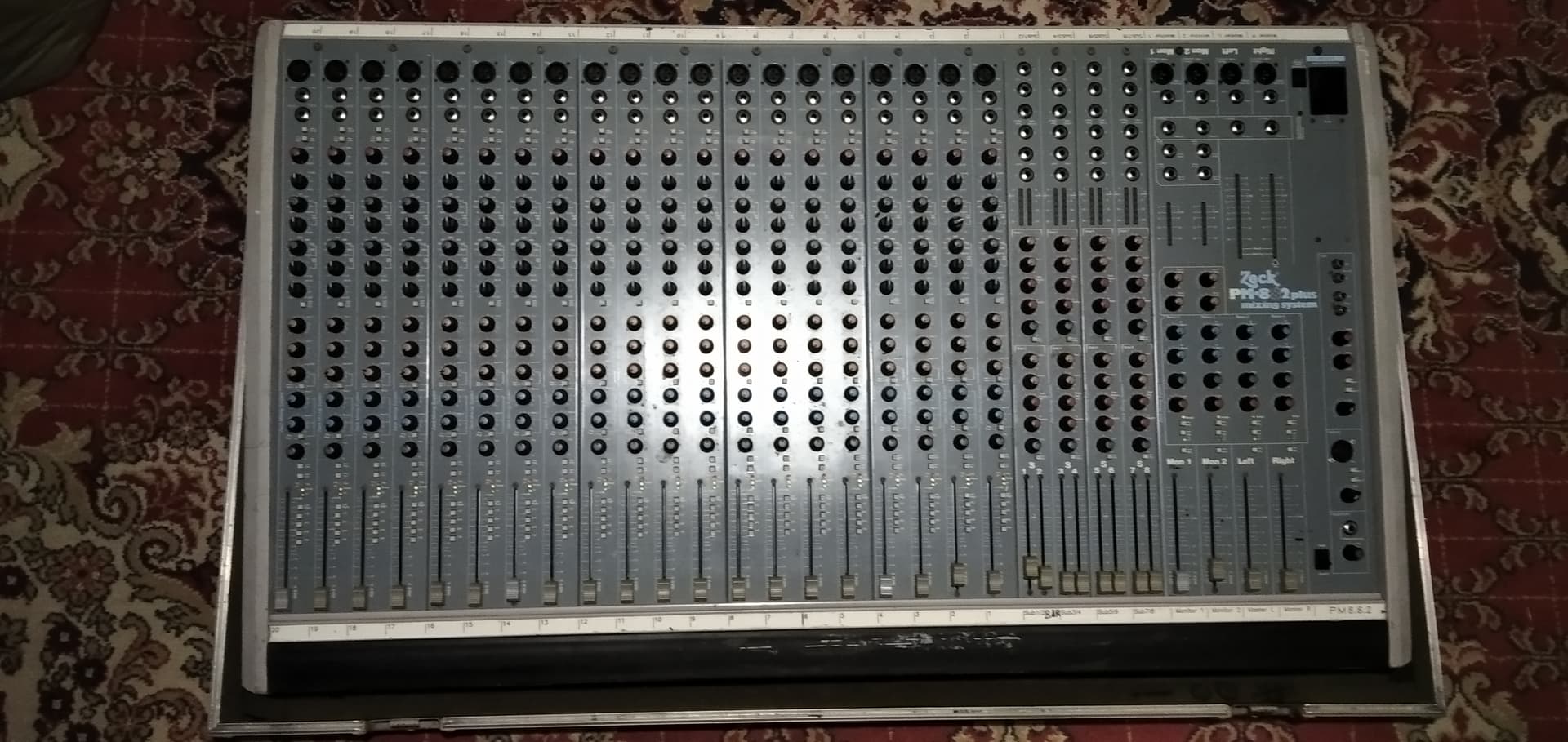
By pure luck of draw, just a few moments ago i scored a beautiful German made, (seems pro-grade) “Zeck PM-882 plus” analog mixing desk in great condition.
Paired with my M-Audio Delta 1010 Rack edition, EV PL33, Shure SM57, Shure Beta 87c, Behringer C-2’s we’re starting to get somewhat decent setup…
Just a few more mics and a somewhat better acoustic treatment of my small basement band rehersal room and i can get started…
Ain’t that just lovely to have in front of you:
5 Likes
Nice! Happy sampling!!
1 Like
Aw man what a beaut, nice one.
1 Like
…Been fiddling ardour with Drum Locker ('70s, Modern Drums, Druminator) this morning.
It took some time to figure out how/where exactly to install what etc - done, it works.
Well, generaly i like 'em, sounds ok, only if they had more round robins, then it’ll all be great.
For demos and such, i think these are awesome. I suspect the finished song with 'em would be a little to machine-like for my liking.
The other thing that’s not realy what i want is - online activation. I wanna be sure that if i do something now, i’ll able to pull it up in project any time later.
I already made one song using the Audio Assault Drum Locker plugin. Link below.
2 Likes
I probably like the 70s drums the best, but not enough shells for my kit (part of my issue with AVL drums). I LOVE the sound of the Modern kit, as a standalone, but it sounds too “processed” (IMO) in context of my music. Druminator is the sweet spot for me. And I’m also not a fan of the online activation crap, but I’m a HUGE fan of the cross platform offerings…Windows, Mac, and Linux. For $5 a kit, I’ll overlook the online activation. JMO…
Sounds good Mika! Which plugin kit?