Dead interesting thread and discussion, thanks for starting it
I wish I had more to add…! Most stuff has already been covered though.
Recently I was on a ‘FOSS-only’ vibe and really enjoyed getting my hands dirty with Drumgizmo, largely because of its raw bleedy nature as opposed to in spite of it - handling drum tracks as real, recorded acoustic drums appeals to me and it’s the kind of music / sound that I like these days.
However, with the release of the latest compressor (an 1176 emu) from the excellent ACMT, I started dabbling with alternative mixes of current projects without the FOSS-only self-imposed limitation (basically just ACMT and Airwindows plugins, a bit of Arboreal Audio too), swapping Drumgizmo for Ugritone drums on all tunes.
And the difference is huge But I like to think that’s just because I’m shit at mixing rather than the fault of Drumgizmo. A lot of the Ugritone kits sound dead good and are mega easy to mix whereas Drumgizmo requires a lot of work. And I’m just not very good at this music, mixing, audio production stuff.
Anyway in the past I set up my own acoustic drum VSTs using Drum Drops samlles in Speedrum and/or Redux but honestly Ugritone just hits the spot for me and sounds best. Drumgizmo is up there in my “favourite drum VST” list too though.
Thanks for chiming in Willy! Especially sharing your experience with Ugritone. I LOVE the tones, but the plugin wasn’t reliable for me. You seem to be one of the guys who PROVE that it’s a great option for some, but not all. Listening to your experience, I’m glad Ugritone works well for you. I LOVE the way their drums sound…i have to do very little to mix them…I think I tinkered with different kicks, snares & cymbals, and blended in some one-shot samples and I was quite pleased. Unfortunately, the plugin itself generated so many xruns that I couldn’t track a song with it. But the drum sounds…EXCELLENT!
There seems to be a consensus forming in this thread that DG is a huge PITA to get dialed in, but once dialed in gives the best drum sounds.
Based on your comments, I think you’d really like the DrumLocker plugins…probably the Metal or Modern kits. I haven’t listened to the Druminator or Vulgar kits yet. If you’re happy with Ugritone, you’ll probably like the DrumLocker sounds, and their kits are like $5 each. Switching kits from within the DrumLocker plugin was seamless; switching kits from within Ugritone usually caused my session to crash, but when I re-opened it, there was my session with the kit I was trying to switch to. DrumLocker “feels lighter” on use of system resources, without sacrificing any tones. FWIW…
The whole point of this thread is to try to aggregate a bunch of options for Linux DrumVSTi plugins that are tried, tested, and true. When I was researching this, I had to cobble together information from various threads on this forum, as well as Reddit, and YouTube videos, and stumbling onto information. I was hoping to find someone who could advise and lead the way, but they never appeared. I hope this thread does it for the next guys who come after us. Pay it forward!
Regarding the latency issue when recording with DrumGizmo. Would it be an option to record the midi without a plugin and monitor from the electric kit and then add the plugin after the midi is in the track?
I recently bumped my RAM from 16GB to 32GB, so decided to give Ugritone another run, but it still crash/freezes and xruns on me. I’m using the Ugritone plugin v3.0.15 (before it was acquired/merged with Loudstakk?) on Ardour 8.4.
You’re using an older version of Ardour with no issues. What version of Ugritone? Maybe Ugritone/Loudstakk(?) fixed issues in newer versions?
I’m not sure how you’d record the MIDI without the plugin(?), but my workaround is similar to your description.
I capture audio AND MIDI simultaneously. I record audio out from my module (using onboard module sounds) as an audio input to Ardour. I also capture MIDI out from my module and route as a MIDI input to DrumGizmo plugin, but I keep DG MIDI buss on “mute” or choose “disk” playback, rather than “input” playback.
When I’m done recording and/or punching in/out, I mute the audio track and work with the DrumGizmo MIDI track. Very similar to what you’re asking (I think?), but with a slight twist.
Actually you don’t need any plugins to record MIDI. You can do that on the console using amidi, arecordmidi or any naked DAW or sequencer that can record MIDI. The “naked” MIDI messages that any controller including MIDI-drumkits sends can be recordes to a MIDI file (on the console) or -track (using a DAW or seq). You can then use a DAW to edit, quantisize or send your MIDI file to a specific VSTi.
I do get some xruns on first playthrough when using the Modern Doom or Tight Studio kits but nothing to write home about and nothing audible in the stems when bouncing the recorded / arranged midi to audio… I use underpowered old hardware (a desktop from 2013, 8GB ram) and always assumed it was just because of that…
Sort of agree I love the idea, the simplicity and flexibility but some of the samples on one or two kits clip at full velocity, some of the hits aren’t hard enough for my liking… Plus I’ve struggled to get a decent drum mix from it But as mentioned, I’d wager that’s down to my crap mixing skills. The drums on that track you shared earlier in the thread sound absolutely fantastic…!
Hmmmm I’ve been curious to try them but not gotten round to it yet. I really really like Amp Locker, if that counts for anything (already have a tonne of Audio Assault’s amp sims) but the demos on the Drum Locker page sound a bit uninspiring and generic…? Cymbals dark and plastic, snares overly boxy and without character… Was your initial reaction the same? Is there a lot of scope and flexibility to mix the individual kit pieces and overall tone etc?
That’s similar to my DG experience…I might get a random xrun on occasion, but nothing audible on stems, and I can’t “see” anything on the stem signals. Ugritone…I watch the xruns increment like a counter until it freezes up, or outright crashes Ardour. @peter.zenk posted his configuration, which is lower-specced hardware than my own, but Ugritone runs great for him. Besides the lower-specced hardware, he is also running a slightly older version of Ardour (8.12 for Peter and 8.40 for me). The biggest differences I see are he is running Linux Mint 22.2 (I am running Lubuntu 24.04 with Ubuntu Studio 24.04 “overlay” for audio configurations); and his Ugritone version is 3.0.21, while mine is 3.0.15. And we are running 2 different soundcards. I have to believe it’s one of those 3 variables.
I don’t know that I’m any good at this mixing stuff, but I think I’m slowly getting better at it. I mix to what sounds good to MY ears, as opposed to some industry standard(s). Is there such a thing…I dunno? Appreciate knowing that someone else thinks it sounds good too, so THANK YOU for that!
As far as the DG kits, volumes & velocities…check your MIDI “lollipops”…that’s what drives your volume moreso than the plugin. Also, check the DG “readme.txt” file and verify you’ve got your mics routed to the correct channel fanout tracks! My DG routes to a kick, snare top, snare bottom, Tom1, Tom2, Tom3, Tom4(?), hihats, ride, ambient room (L&R), and overhead (L&C&R). I haven’t experienced the lack of volume or clipping issues you describe. Maybe it’s different for different kits? I’m using Crocell, although I did adjust the snare samples to a lower tuning, using the guide (almost hidden) on the DG website. Tuned down 200 “cents” and voila…there was the snare tone I wanted!
I wasn’t impressed with sounds on the Audio Assault website…they sounded promising, but I wasn’t blown away. (to be fair, I wasn’t blown away by DG sample sounds, either!) But I LOVE their amp plugins and decided to try DrumLocker based on my AmpLocker experience…and I was willing to burn $5 to try it out! I’m not done shaping DL drums, but there is a LOT of built-in processing right within the plugin…compressors, EQ, dynamics & ambience, panning, etc…all within DL. And from the MIDI page, they have controls to increase or decrease the MIDI velocity, like you mentioned about DG. I haven’t tried to mix & match pieces of kits for a custom kit, but on Audio Assault Facebook page I read a guy comment he added the cowbell from 80s kit to another kit (Druminator perhaps?) and that it was a very cool feature that he liked. The manual hasn’t been written yet, so that will be very helpful once it exists. For $5, I am IN. It’s absolutely worth $5, and I’ll probably spend another $15-$20 to get every kit they have, so I can accommodate the tastes of every drummer who comes to my studio! LOL!
If you decide to give it a whirl, I’m no expert, but I’ll help if I can. BTW…DrumLocker is FREE, and includes a 70s kit. No “trial version”, or time limit on the free. If you like the 70s kit…you’re golden. But curiousity killed this cat for $5…I had to take it further! LOL!
I’m running Lubuntu 24.04, but with Ubuntu Studio “overlay” package to modify for audio production
Ardour 8.40 from repo
Ugritone 3.0.15 from Ugritone website
By most (all?) metrics, my system SHOULD perform better than yours, but reality says otherwise. The biggest variables, IMO, are our operating systems (Mint vs Lubuntu), versions of Ugritone plugin, and our soundcard hardware.
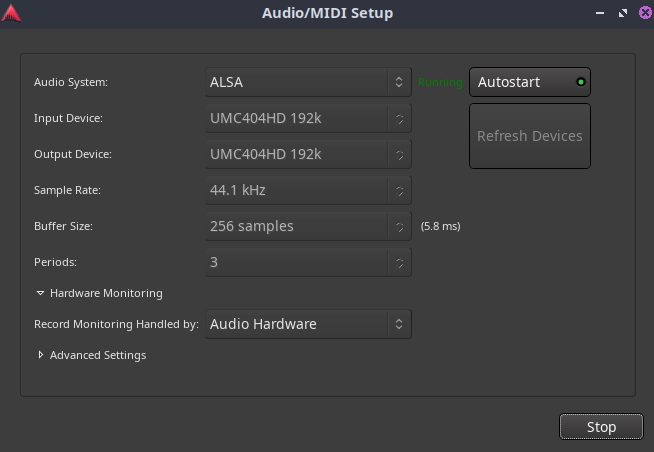
My Ardour parameters are VERY similar to yours:
I notice your samples are much higher than mine, yielding a higher buffer, but that increases my latency too much for live tracking. Everything else seems to be inline. If I was in a troubleshooting mood, I’d probably start with an updated Ugritone version. If that didn’t help, I wouldn’t know where to turn next. But I’m not in a troubleshooting mood, when I’ve solved this issue in another way, with a different plugin. And I don’t want to devolve this thread into a Ugritone troubleshooting exercise.
I’m fine with acknowledging that Ugritone is a viable option for folks, with the caveat that “your mileage may vary” (YMMV). Peter’s system performs flawlessly with the hardware & specs he provided, while mine does not. If I ever figure out why not, and get it fixed, I’ll report back here what the solution was. Otherwise, let’s leave Ugritone troubleshooting for a different thread. But I do THANK YOU for providing a yardstick for a system that runs Ugritone without issue. TY!
Another option would be to try the demo version of Ardour from ardour.org. which can be installed (and removed) in parallel to the one from the distribution.
versions from distributions sometimes behave differently than the one from the developer’s web site.
I understand you have your solution, but it might be useful for other folks
Viruosity Drums seems to be both open source and can be played by a e-drum (see the manual where it is described how to reconfigure it to listen to CC4 for the hihat).
It needs a sfz player, and they mention Sfortzando in several places. Possibly it also works with sfizz. I did not try this.
There is no such version as 8.40, 8.12 is the latest released version. Not particularly important, I just didn’t want someone else reading this to be confused.
What CPU governor? It looks like you may be running on-demand governor. Try performance governor but lock the CPU clock to something lower than maximum (to avoid having the fans running full blast all the time). Something in the range of 2.4GHz to 3GHz should be plenty, and if the processor max is 4.6GHz then you should have some thermal headroom so the fans aren’t screaming the entire time.
You missed a lot of relevant system settings in your list. Things like the CPU governor that I pointed out make a much bigger difference than the relatively minor differences between Mint and Lubuntu.
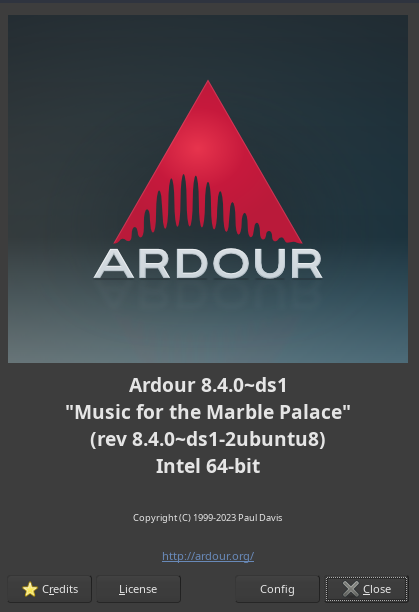
@ccaudle …appreciate you chiming in, because that’s helpful information, but here is my screenshot for “about Ardour”. That looks like a version from ubuntu repos to me:
My CPU governor is actually set to performance. But you lost me at “lock the CPU clock”. I don’t know what that is, or how to do it. I’ll defer to your expertise, but I was trying to identify the "most likely’ variables. At the top of my list would be the version of Ugritone plugin. I think I might include the capture soundcard in that list too, but my Behringer UMC404HD is relatively new, while Peter says his Zoom device is older. I don’t know if that could be a culprit, but I’m otherwise very happy with the Behringer and not inclined to “upgrade” it for a single plugin.
But if I’m missing something that would help performance, I’m willing to be educated.
I’ll second the Virtuosity Drums recommendation. I can’t attest to how it performs with e-drums, but it’s got options with a vintage mic, separate overhead and room mics, makes for a very realistic sounding kit.
Ardour 8.4**.**0 is a released version. That is not 8.40 (minor version 4, sub-minor or release version of 0 rather than minor version 40) which was the original description.
It takes a finite amount of time for the CPU to change clock rates, and execution of software essentially stops until the clock rate is stable again, so for reliable realtime performance you want the clock rate to be constant. Consistency is usually more important than raw instruction throughput, so forcing the clock rate to be constant, but lower than the maximum possible, can often provide consistent realtime behavior, performance which is high enough to do what you need, but does not waste power unnecessarily (which reduces the cooling needed and so reduces the fan noise of the computer).
I believe I may have been mistaken in thinking that the performance governor always runs at the maximum clock, after some reading I now think it just biases the clock settings to the higher range, but does not set the clock to a single frequency.
If you are interested in experimenting to see if you can eliminate xruns at your chosen buffern size I would suggest using the command sudo cpupower frequency-set 2.4G and checking the behavior with a Ugritone session again to see if that eliminates the xruns.
You can also verify the current preemption model in use by a dynamic preempt kernel with this command: sudo cat /sys/kernel/debug/sched/preempt
That will display the available preemption models, with the currently used mode bracketed by parenthesis. If the current mode is “voluntary” then adding preempt=full to the kernel command line when booting would also be a useful experiment. I have seen conflicting information about whether the preemption mode must be changed at boot time or can be changed during runtime, so modifying the kernel command line seems like the most reliable way to make sure the kernel is running in full preemption mode. If you have a new enough kernel (6.13 or later) there is a mode called “lazy” preemption which should be equivalent to full preemption for realtime tasks, so if the current mode is “full” or “lazy” it should be OK, but if the mode is “voluntary” you may get better performance of realtime tasks by changing.
Firstly, thanks for the invaluable write up. It certainly was useful for me, and introduced me to Drumlocker, which I wasn’t aware of before.
I installed it and splashed out the (bargain) $5 for the Modern Drum pack.
First of all, they sound pretty good to my ears, and are responsive and relatively dynamic. I did have to remap a few of them for my TD-1KV kit, but that wasn’t too hard.
Unfortunately, the kits are a little limited compared to DrumGizmo and CrocelKit (my preferred kit). Particularly, the cymbals only have a single note, whilst my cymbals will give separate notes for edge and bow (including on the hihat). I have managed to remap these to other sounds (such as splash) but it’s not the same really.
Also there’s no rimshot on the snare which is, IMO, quite a serious omission. Maybe they’ll add some of these to future kits.
Meanwhile, I don’t regret the $5 and I’m sure I’ll find a use for it, so thanks again.
I’ve not tried Ugritone drums, and I’m not sure I’m prepared to spend $26 (the least expensive) on them without knowing if they are likely to have similar mapping issues. I’ll have to research this a bit more.
You can remap each kit piece in Ugritone and there are plenty of extra ‘cymbals’ which are actually used for things like rim shots, cow bells, tambourines, etc on many kits and can be changed and swapped out as desired. If you’re in no rush to try new drum VSTs then I’d suggest waiting for a sale (although I think Ugritone has a good refund policy, if memory serves correctly).
Note, the Klangmacht drums are Win / Mac only I believe, on account of them needing Kontakt…?
In my opinion though, I think Drumgizmo is a fantastic choice if you’re OK with the kit sounds and whatnot. The devs have done a phenomenal job with it.
Thanks for all the info I think you’ve sold me on it so I’ll try fork out for some (or at those prices, all) of the kits soon and see how it compares.

 But I like to think that’s just because I’m shit at mixing rather than the fault of Drumgizmo. A lot of the Ugritone kits sound dead good and are mega easy to mix whereas Drumgizmo requires a lot of work. And I’m just not very good at this music, mixing, audio production stuff.
 But as mentioned, I’d wager that’s down to my crap mixing skills. The drums on that track you shared earlier in the thread sound absolutely fantastic…!