Layout for spoken word?

I am recording a series of guided exercises (with large proportion of silence). So each part of the series is a number of fragments assembled into one sound file, with silences in-between.

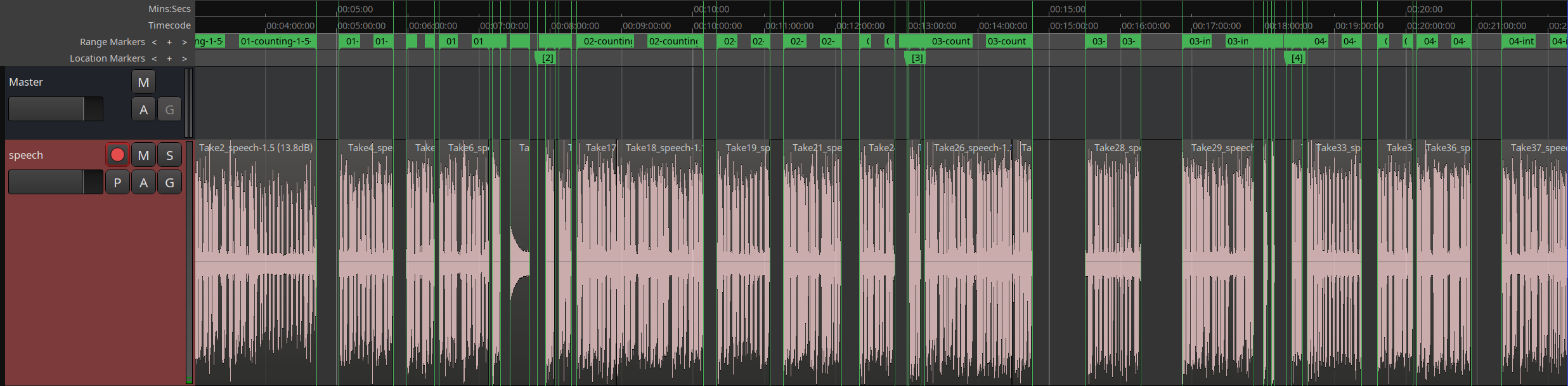
Currently I am recording all the fragments into one track, one after another, with some pauses in-between; each “fragment” is one or a few regions (sometimes I need to cut the speech, correct something etc), then select all regions of the fragment and “Add single range marker” (via a custom short-cut) and call the range something (such as 01-intro etc). There will be about 150 fragments altogether.

The a lua script will export all ranges into wav files, and those will be concatenated with python into the resulting .opus recording, with tags, silences etc. The structure of the recording is defined in python, with name(.wav) and time offset, plus minus. I am quite happy with the python post-processing, that works okay.

I am wondering how to structure the ardour session better, though. Currently I have all those fragments in one track, which becomes difficult to navigate in one long timeline.
Would it be advisable to have each fragment as a separate track (and have the lua script export each track separately into its own .wav)? I could then perhaps use the Recorder window, and see each fragment on its own line. When exporting tracks, how could I apply common filter(s) to each of them individually? (denoise, in this case, with one learned noise profile)

Thanks for comments!

I’m not really into it, but as no one else answered, i’ll comment with the idea to use “location markers” and then the right panel to navigate. You’ll first have to activate the rulers
so you can see location markers, but i can’t explain well how you do that (see picture) You might have considered that already, and it might not help for your use-case. Sorry if i said something pointless.

My first thought was “arrangement markers”, but if you click on them in the right panel, it doesn’t seem to “transport” you there. Still “arrangement markers” might be an idea (as said, i am not into the topic, and i don’t know what applies for your workflow).

Thank you for your answer. I actually opened the right panel now:) it makes it somewhat navigable and better than nothing. Terribly wide though if I want the range name to be visible (thus shortening the timeline).

I tested the track approach, and I am not going back. It feels much more comfortable to have it in 2d (horizontal for time, vertical for fragments). Common filtering pipeline is in the master.

The recording view looks also much more useful:

And FWIW, this is the export script (initially AI-assisted):

SESSION_FILE = arg[1] -- "/path/to/session/session.ardour"
OUT_DIR      = arg[2] -- "/tmp/"
WAV_PRESET   = "75969a1c-3133-4694-864b-a1fa50e43348"
local function log(s) print("[export] " .. s) end
local dir,file=SESSION_FILE:match("(.*/)([^/]+)%.ardour$")
log(string.format("Loading session %s (%s, %s)",SESSION_FILE,dir,file))
local s = assert(load_session(dir, file))
local routes = s:get_tracks()

for r in routes:iter() do
   local t=r:to_track()
   assert(t and not t:isnil(), "Not a track: " .. r:name())
   local out=OUT_DIR .. "/" .. t:name() .. ".wav";
   -- skip already exported
   if os.rename(out,out)==true then
      log(string.format("%s: %s exists, SKIPPED", t:name(), out))
      goto continue
   end
   -- mute everything else
   local mute=ARDOUR.ControlListPtr()
   for x in routes:iter() do mute:push_back(x:mute_control()) end
   s:set_controls(mute, 1, PBD.GroupControlDisposition.NoGroup)
   s:set_control(t:mute_control(), 0, PBD.GroupControlDisposition.NoGroup)
   -- find actual track length
   local len = 0
   for reg in t:playlist():region_list():iter() do
      len = math.max(len, reg:position():samples() + reg:length():samples())
   end
   -- skip empty
   if len == 0 then
      log(string.format("%s: empty track, SKIPPED",t:name()))
      goto continue
   end
   -- export
   log(string.format("%s: %d samples → %s", t:name(), len, out))
   local e=s:simple_export()
   assert(e:set_preset(WAV_PRESET)); e:set_folder(OUT_DIR); e:set_name(t:name()); e:set_range(0, len)
   assert(e:check_outputs());
   assert(e:run_export())
   ::continue::
end
-- close_session()