Hi all!
The note brush in Ardour 9 is really cool, but I can not find a shortcut to set the global quantize.
Is there a way to avoid the edit dropdown menu?
Not currently. But I still want to revisit this design, because I fully acknowledge it’s clunkiness. The problem is that note brushing requires three parameters and I’m reluctant to add another item in the MIDI “toolbar” just for the third … but that might be the only way.
2 Likes
Yea, better avoid additional toolbar elements. How about following the editors snap, instead of the global? That way, the information is visible, existing shortcuts can be used (5,6) and no additional element has to be added into the toolbar.
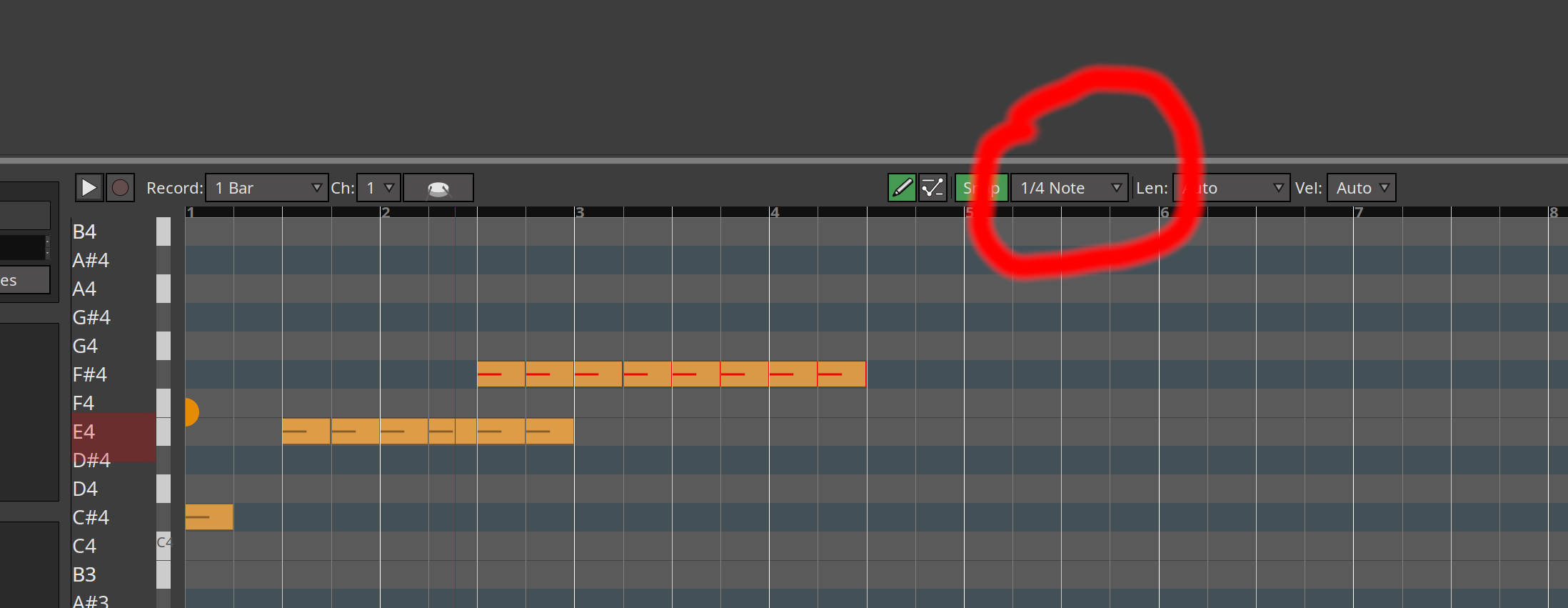
Editor snap is already used, to decide where the first note’s start will begin. Brush requires:
- location of first note start (possibly snapped to a grid)
- note duration
- stride or gap duration
This does not compute with me brain. To me it looks like the information should be available as soon as I draw set the firs note.
snap value (1/4 in the screenshot) = gap duration
length = note duration
Of course I have no clue about the code side of things, but everything seems to be available right there.
where does the first note start ?
Wherever the mouse is clicked, optionally snapped to the grid, just like any other drawn note without holding shift.
Right, but “optionally snapped to grid” means that the snap value is already being used. You might want the note snapped to 1/16ths, but want a gap of 1/8th, etc…
1 Like
Aah, now I understand where you see the conflict.
Tricky, but not sure if the use case is THAT important.
First, let’s have a look at the world out there.
Logic
Modifier: Command (for pen tool) + shift (brush mode)
mouseY: No effect
note on delta: midi editor quantization grid
Note snap: midi editor grid or mouse pointer position, if disabled.
Note length: seems to always fill to the next note on.
Repaer:
Modifier: shift+Alt (brush mode) + command (snap first note to grid)
mouseY: Draw into scale Q grid
note on delta: if snap is on, midi editor grid. If snap is disabled, as soon as there is no overlap on the same pitch.
Note snap: midi editor grid or mousepointer position
Note length: editor grid, allows legato overlap on Y axis.
Cubase
Still the most powerfull midi editor out there. It has so many different ways to spray notes all over the place, it is hard to liste them here.
Notably, it has even a dedicated inspector tab, just for different note length rules.
Conclusion
In those three daws, the brush tool is either very rigid, or complete overkill.
Everybody seems to follow the midi editor grid first.
Going back to my proposal above.
Compared to those three daws, using ardours midi editor note length, would already be an advantage over logic and reaper, as they just fill the gap, without further control. Cubase seems to be beyond scope.
Following the midi editor grid reduces cognitive load, because I have the defining value right infront of me. Not need to split my brain, thinking about a hidden global value.
Idea to solve snap and note on delta conflict
Let’s assume, note brush is a rythm first tool.
From that assumption let’s set the rule, that note overlap, on the same pitch and channel, is illegal for the brush tool.
With those assumptions in place, when I start the brush drag on an existing note, It will not be allowed to create a note in the same place.
Dragging further, will create the next note, starting at the delta time from THAT notes note-on, defined by the grid. Not necessarily ON the grid, just using the grid to calculate delta until next note on.
The existing note, will be shortened to fit the rule.
Applied to your example, the workflow would look like this:
Set snap to 1/16, draw first note. Now switch to whatever grid value you want to brush and drag from that first note.
This solution would allows to paint rigid off grid timings.
It allows on grid painting.
It allows modification of existing rythmic structures, by using them as anchor (that first note rule. We could call it anchor? or brush anchor?).
Future considerations
If the ardour midi editor grid every learns swing or midi groove matching, brush would just follow that rule.
It keeps the door open to do something with pitch, on the mouseY.
the hack
Just add a keyboard shortcut for global quantize setting and I will shut up 
More ideas, adding to the spec above:
Second modifier
You could add a second modifier. As long as that one is held mouseX would add or subtract from the note-on delta. If notes have been drawn already, before releasing shift, that delta change will be applied to them as well. This would help visualize what is going on and intuitively allow a change of speed.
Edit: This could also apply to selected notes. Hold modifier, drag x, will add/sub to spacing between selected notes. If it is the same modifier as used by brush tool, knowledge transfer of the behaviour can be applied intuitively. Think like this, I know modifier a, and i know modifier b. So combining them will allow me to apply them to each other.
Preview
As soon as shift is pressed, a translucent preview of the notes will be shown. Dragging the brush will solidify them on brush over. Changes in delta/position would be visualized immediately.
Hi @paul , did you find a moment to have a look at my idea? Spent some time on the research for this. I know it is unasked for, but would be cool to know what you think. Imho, it would make for a logically consistent, flexible and smooth workflow with the note brush.
This topic was automatically closed 91 days after the last reply. New replies are no longer allowed.