I’m wondering why some (normally MIDI) tracks are kind of more transparent than others, like in this screenshot. Afaict they’re not “locked” or “grouped” or anything similar, they’re just midi tracks among other midi tracks. Just curious 
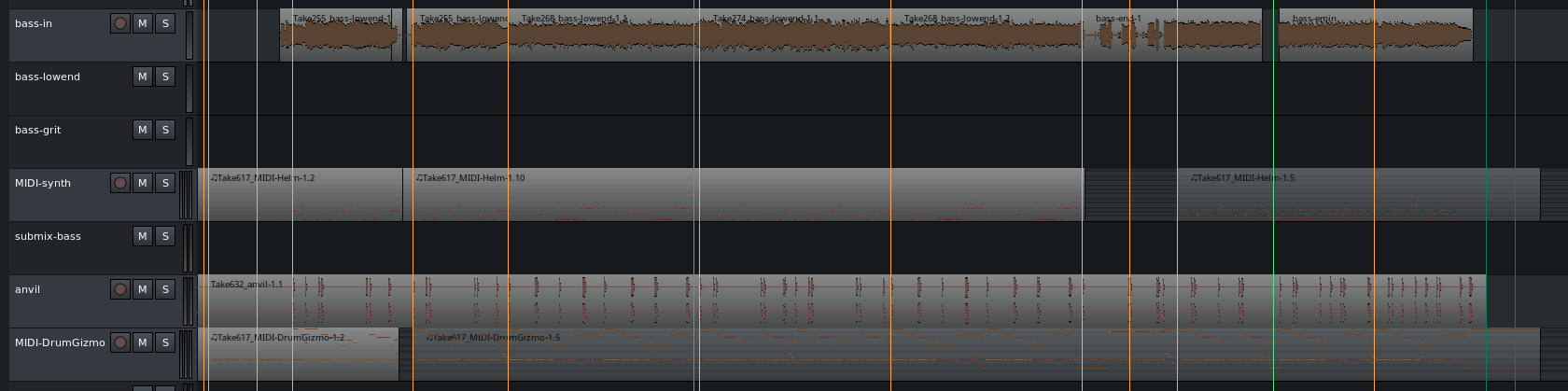
MIDI regions are transparent by default, audio regions are not.
…so, i must have touched something that changed the other (non-transparent) ones?
There is something strange going on with transparency (of midiregions). I’ve experienced this and haven’t been able to lay a finger on what is happening.
Some regions are transparent, most are not.
If you shorten a non-transparent midi-region and then resize it again it becomes transparent. But saving and reopening the project, the region is not-transparent again.
If you switch from stacked to layered this effects transparency also. Even if there are no stacked regions.
I’ve tried several things to get a grip on this. Adjusting settings in Preferences etc… but it won’t go away.
I set it aside thinking there’s something wrong with my installation-configuration but if other people are experiencing this too then there is more at hand. It could be a confguration thing but I haven’t found it yet.
1 Like
I’m trying to figure it out too.
What I learn until now is:
- Recorded and imported MIDI regions are not fully transparent.
- MIDI regions drawn by the “D” tool are transparent.
- Resized or moved MIDI regions receive a “semi transparent aspect”
- If you want to edit a recorded MIDI regions seeing the guidelines, you can use the “R” keyboard shortcut, select the area, click with the right button of the mouse and use the “Consolidate” option. For some reason this region become transparent as it was drawn by the “D” tool.
Same here, to me it all is pretty mystic, i see no clear pattern.
Besides others in this thread i didn’t really try hard (yet) to figure it out. Hence i assumed it was me who simply doesn’t understand it (might still be me, of course, there might be a pattern, and i simply don’t see it. All my midi-regions are created in draw-mode or dragged from editor-list, no imports or records. So pretty basic here ).
I also try to find some pattern but it’s not obvious. And if you manage to get all midi-regions transparent, if you save and re-open the session they can be back to not-transparent.
- Choose Layers:stacked → and all regions are not transparent. You can make them transparent by resizing. But if you save, close and open the session again the regions are back to non-transparent.
- Choose layers: Overlaid → regions are transparent now but as I remember this is not always the case and strangely some regions are transparent and some are not.
Toni Link might be right in observing a difference between moved/copied and drawn regions. If you insert a clip (shift-L-clips) it’s not transparent, even in an Overlayed-track.
It has something to do with opaque-ness.
In Editor-List (shift L) - Regions (or region-properties-gain) you can see the last column is opaque or not.
For some reason imported clips get checked as opaque whereas drawn regions don’t.
If you resize an opaque-checked region, the regions becomes transparent but opaque is still checkmarked. That’s probably why reopening the session means the region is non-transparent again and by resizing transparency is temporary.
In Grab-mode transparent or not is not a problem but in edit-mode it’s very uncomfortable (everything looks hazy, grid mostly invisble).
Note: there is a MIDI-option in the Session Properties: Draw tool creates opaque MIDI regions (de-checked by default).
1 Like
Nice catch.
In my workflow I record and edit a lot of MIDI regions, and it would be better, to my case, that recorded MIDI could be created with the opaque-mode unchecked by default (it’s easier to quantize and adjust notes with the transparent region).
As I said before, I was selecting the recorded regions and using the Consolidate menu, so it was “converted” to non-opaque.
Now I will always uncheck this option on Editor-List. Thank you!
This topic was automatically closed 91 days after the last reply. New replies are no longer allowed.