I fail to see how displaying half tracks could be an issue, if anything it actually tells the container can be scrolled (especially when there’s no vertical scrollbar, another topic that’s been raised several for good reasons I believe).
1 Like
This kinda makes sense, too. -Like a ‘magnetic’ setting you could turn on (in the preferences) where smooth-scrolling is allowed, but the top lane is aligned to the top if it’s close enough.
…
Because, the fact is half-tracks ARE allowed and present in Ardour, -just not at the top:
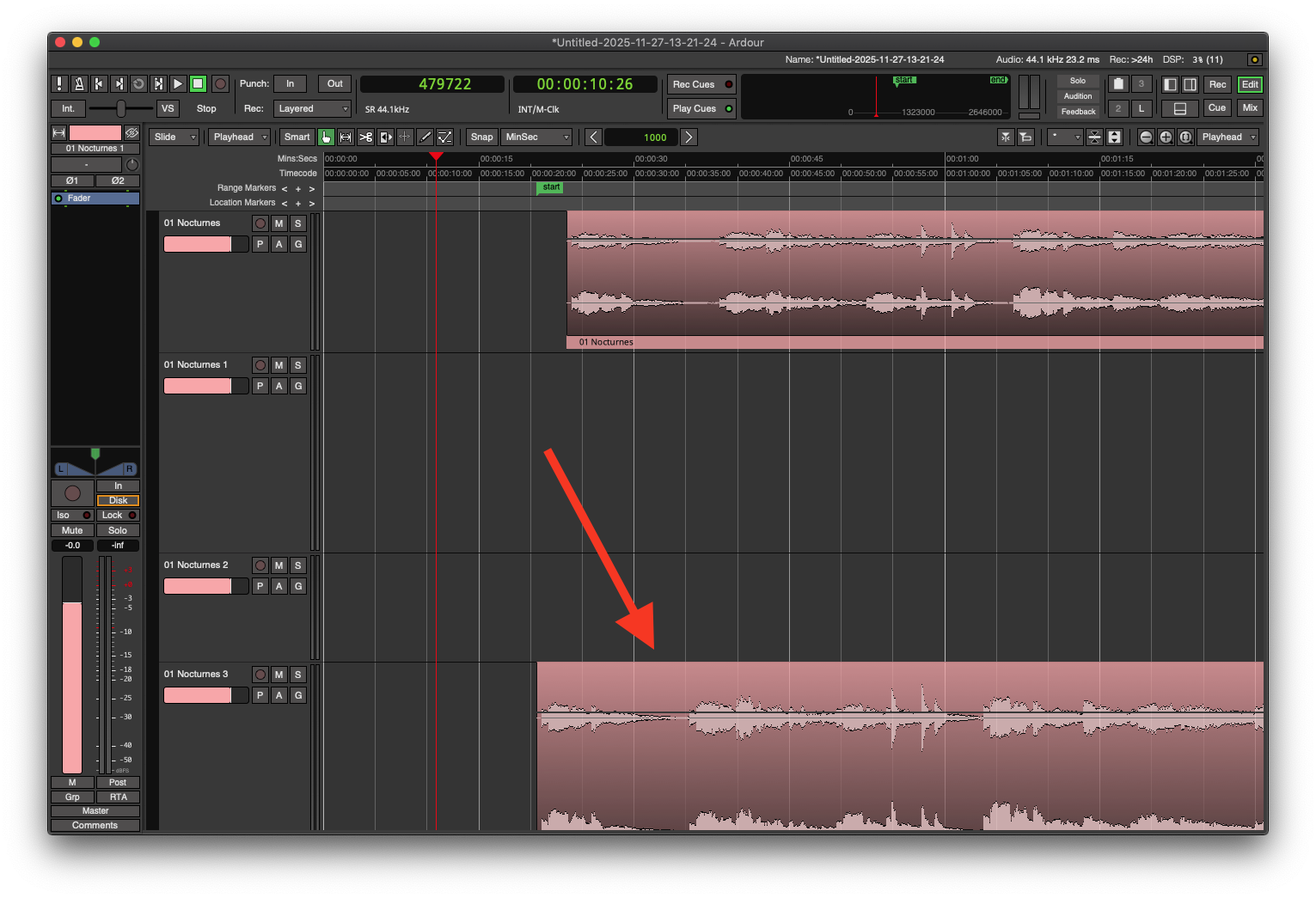
…
This is another reason why this blocky-scrolling is kinda silly:
You still have half-tracks visible regardless. 
 1000%
1000%
3 Likes
Just to add my two cents, I often leave stacks of region visible when I edit but sometime only want the top one of the next track to show underneath the one I edit (for timing reference for instance) and therefor use “half track”. Currently, I resize the height of the track but “smooth scrolling” would make it easier.
3 Likes
Chiming into the chorus of smooth scrolling fans. Not a psychologist, but this jumping detaches the visual focus in a way that makes me avoid scrolling vertically, if somehow possible.
The visual anchor gets lost and my brain is taxed with re-location. This is unnecessary cognitive load, at least for a mouse interface, where movement in space as input, is usually matched by analogous reaction on screen.
It would be different thing if I used key commands. With an up/down 1 track key shortcut or remote control buttons, the current behavior makes 100% sense.
4 Likes
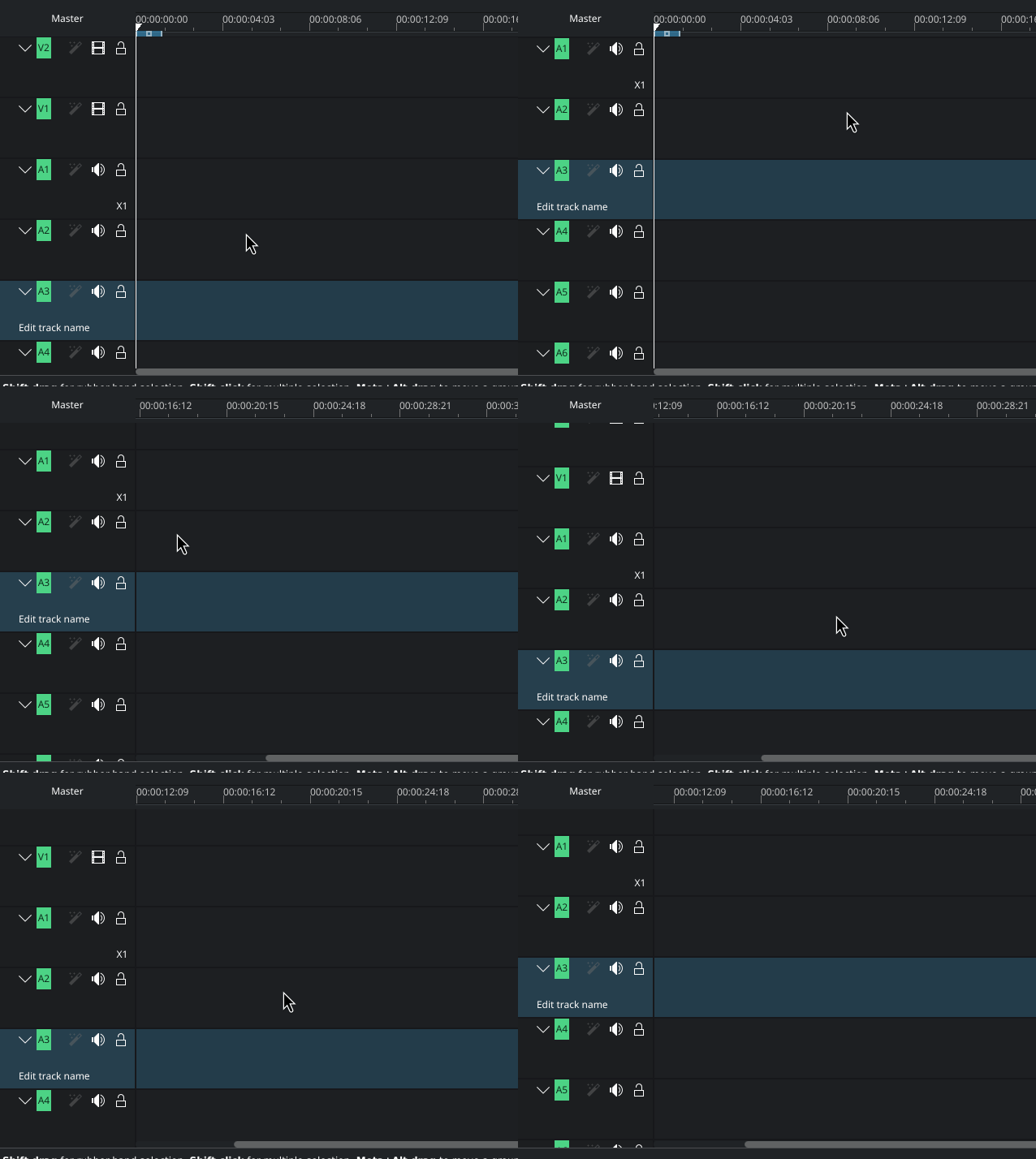
Kdenlive also has really nice smooth scrolling. And you can just hold down the middle mouse button to pan all over which is really nice for one handed operation.
6 Likes
Just to balance things out (and not trying to be contrarian), I see no point in smooth scrolling myself. In my personal opinion, there are so many more important fixes and features I would think should take priority.
But, of course, it is just one person’s opinion…
2 Likes
 Exactly.
Currently, the up/down arrow keys (at least on my setup) are for moving the view up and down single tracks/buses. This makes ‘logical’ sense (to me), and I like it!
Again, I’m all for flexibility.

…
So…
You ~could~ have:
- Option 1: Full blocky/discrete-scrolling (-like it is now).
- Option 2: Full smooth-scrolling (-but still with up/down arrow keys to go up/down lanes or tracks/buses).
- Option 2+: Smooth-scrolling, but with a ‘magnetic’ feel that quickly (not instantly) aligns the topmost lane to the top of the editor when the scrolling comes to a stop (as @erojahn thought of).
Sure, not necessarily a priority, but…
This will remain a fundamental aspect of the program that truly helps define Ardour’s feel, and thus enjoyment level. And if Ardour breaks with a kind of basic, ‘intuitive’ expectation ( … I know Paul doesn’t like that word :P), then I think it makes it less appealing overall.
1 Like
When using arrows to go up or down a track, if the to-be the top-most or down-most is half-visible, Ardour should then show it entirely.
We could also use the mouse wheel to smooth scroll, and get the actual granular scrolling with something like shift-scroll.
1 Like
Shift+scroll is a somewhat standard shortcut for horizontal scrolling, it’s extremely useful imo.
I did a quick test on sources and could easily make vertical scrolling ignore track heights, however achieving actual smooth scrolling wouldn’t be as trivial, gtk2 doesn’t provide it out of the box and scrolling at a fixed rate (regardless of gesture speed/inertia) doesn’t feel as natural as one would think. It may still be an interesting option though.
1 Like
if by this you mean “physically modelled scrolling”, then yes. but i don’t think that’s what most of the pro-smooth scrolling posters here are asking for.
gtk2 is perfectly capable of scrolling at a non-fixed rate in response to scroll events.
But it doesn’t expose the event’s delta_y value, that was only implemented later in gtk3 AFAIK. Needless to say I’m no gtk2 expert :). Also for the record I do like current scrolling implementation, most of the time.
I implemented it in gtk2 more than a decade ago.
The delta, however, doesn’t exist under X Window. I was implementing it for Cocoa on macOS, where scroll events do provide delta information.
Either that, or I am misremembering. There was a reason my code as all #ifdef APPLE …
You don’t need the delta information for smooth scrolling; it just allows the underlying windowing system to send less events. Eg. for X Window, you’ll get 10 events in X msecs based on user scrolling; on Cocoa, you’ll get (maybe 3) in the same time, with delta events for each. It’s really just a compression technique.
What is true is that if your toolkit (e.g. GTK2) doesn’t do deltas for scroll events, then on a system that uses deltas like Cocoa, scrolling behaves poorly. That’s why I implemented it as a patch for GTK2 that we’ve been using since, oh, maybe 2006 or so?
2 Likes
Oh that’s good to know ! Maybe I’ll try to work on a PR this winter if having a preference setting for adjusting vertical scrolling behavior is something you’d consider.
2 Likes
I suspect it’s an afternoon’s work for me. I’m mostly convinced that it ought to be an option, at least.
10 Likes



I have a very strong opinion, that your afternoon would be better spend with other work, or by educating users that what they think they want might be misguided 
Keep in mind that this also ties in with mixer-strip scrolling (and banking). You cannot have half a strip on a hardware control surface either and the mixer windows also has “move track into focus” feature that hard snaps as well. Selection changes also do that.
It’s definitively more than an afternoon to get this right if you want more than a half baked solution.
One compromise would be to implement smooth scrolling that snaps to a track at the end.
I wonder where all the users are who requested that tracks should only move in steps…
It propaply proves the case, that this behavior is highly dependent on your input method to control the scrolling (see my armchair ux psychology above )
And even in the mixer view, half tracks are really only an issue if you try to step somewhere, not scroll.
On the danger to repeat myself. It is not that what has been implemented is bad, it makes perfect sense in many situations, just not with a mouse or trackpad.
Also, while I usually think you have the right perspective, for most people coming to software today, hardware was never the reference.
Locking/full steps required:
- keyboard shortcuts
- hardware controller buttons
- hardware controller alignment (ie. screen behind controller as meter bridge, this would even require a special zoom level to always lock into)
- clickable soft buttons (next/prev)
- jog dial ring on hardware controllers (in combination with smooth center dial, ergonomically allowing different resolutions, without moving the hand to a different input)
- banking commands (jump fixed amount of tracks)
- any other stepped input, like inc/dec, 0/127
Smooth scrolling required:
- mousewheel
- mouse/trackball/mousepad grab and scroll
- touchscreen (if there is a scroll gesture)
- jog wheel (see notes for ring above)
- any other smooth input method like osc, scroll path/127*controller, nrpn etc.
Smooth or fixed scrolling should be able to respond on individual addresses. This way inc/dec controllers can be interpreted for each behavior correctly. (Also consider encoder acceleration/speed compensation)
1 Like
I think this is very true. Restricting software to the limitations of hardware seems odd. It’s also a bit arbitrary in its application.
1 Like
This topic was automatically closed 91 days after the last reply. New replies are no longer allowed.