Hey! I recently tried to load a session that I created on my Linux desktop on my MacBook (running MacOS 15.3.2 and Ardour 8.12.0), and I’m getting the following error (and the session isn’t loading).
ERROR: Could not set session state from XML
ERROR: Session: failed to load active playlists
ERROR: Session: cannot create Playlist from XML description.
ERROR: Correcting length of region Take2_Audio 1-1.1 to match it's (first) source's length of a481648440
ERROR: Correcting length of region Take2_Audio 6-1 to match it's (first) source's length of a288972600
ERROR: Correcting length of region Take2_Audio 1-1 to match it's (first) source's length of a481648440
I see some other people with similar issues here, but I haven’t found anyone with this specific error yet, so I just wanted to ask what might be causing this. I can’t check right now (not anywhere near home lol), but I believe this session still loads fine on my desktop (on my desktop, I stream the session from my server over NFS, and on my laptop I used Cyberduck to synchronize it to my local storage, so it should be identical here). There may be some Linux-specific plugins that I don’t have on my Mac in this session, but I don’t think that should be causing this error. Interestingly, this session was originally recorded on a Mac (not mine, but running the same Ardour build and a similar version of MacOS I believe), but after passing through Linux it doesn’t want to load here anymore.
Here’s my session file if you need it. Session file
Earlier versions of Ardour had a rounding error which could occur in certain circumstances which results in the region being marked as 1 sample longer than the audio file providing the data for the region.
When those messages are displayed that Ardour is correcting the length of a region that should mean that the original problem was corrected and so then the session should load.
There were no more errors after those?
There’s no errors after those, rather, the session just stops loading and then the open a project prompt pops up. Also the session was edited with the same version of Ardour (I use the Fedora build of Ardour on my desktop, and I believe I was running 8.12 there as well).
I put a demo video that demonstrates what happens on YouTube.
Yeah, it’s really strange. I can send over the entire session (including audio files) sometime soon if it helps (don’t wanna put it up publicly here but I can send it to you via email or something).
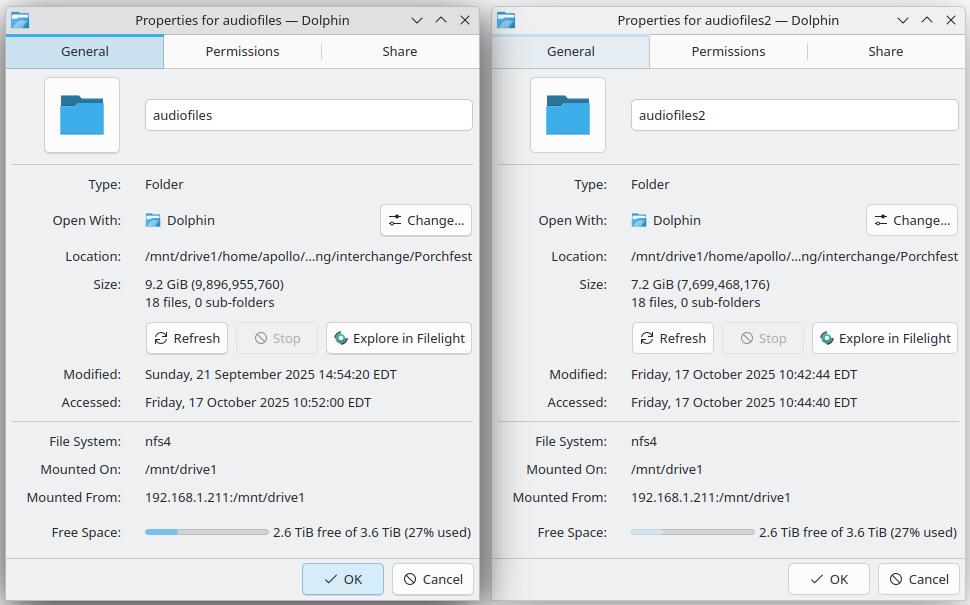
I noticed that my session had…shrunk? A lil while back. Like the file size went from like 10-ish GB to ~7 GB. I kinda shrugged it off as some weird file size computation difference between my computers, but it turns out that somehow (I think when I renamed the project directory using CyberDuck), the ends of some of the audio files got truncated or something. I was able to rescue the original audio files from the ZIP they originally came from and the project loads now!
So uhhh…I guess the lesson here is don’t use CyberDuck lol (or at least don’t use it without reading the docs first). And maybe also keep backups of things.