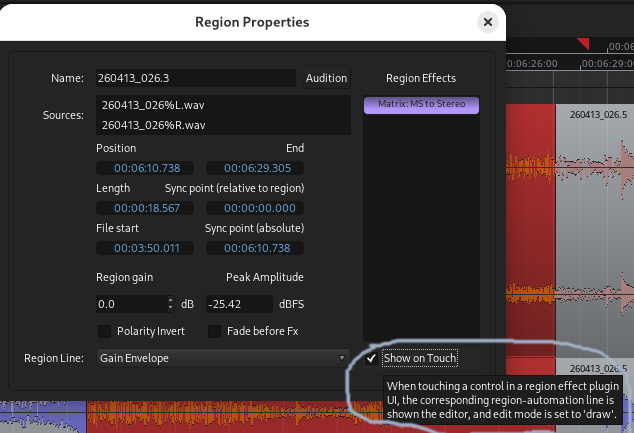
Region properties → Region Line allows one to display and draw automation for a specific plugin parameter, for that region. That’s cool (I saw the Reaper people use it and I’m happy that Ardour now has this too)!
How is “Show on Touch” supposed to work? It is not documented at The Ardour Manual - Applying effects to regions separately
The info tooltip says:
"When touching a control in a region effect plugin UI, the corresponding region automation line is shown [in ?] the editor, and edit mode is set to ‘draw’.
I was unable to trigger this behavior.
I want to automate Steve Harris’ (LADSPA) “Matrix MS to Stereo” plugin. It has only one control : width.
I can draw the “width” line, and the plugin responds to it when I play the region. But after I’ve done that, the “Width” cursor on the plugin’s interface is greyed out and doesn’t react any longer to mouse drags. It only obeys the drawed line.
And if I display the gain line instead, and try to tweak the “width” cursor, nothing happens (from the info tooltip, I would have expected the display to switch to the “width” line).
So how is “Show on Touch” meant to be used? And are there play/manual/touch/write modes for region automation, as there are for track automation?
This is the setting. I wonder about. It seems to make no difference whether I enable it or not. In both cases, the effect’s parameter is greyed out as soon as an automation line is drawn.
I’m on Ardour 9.7
If and only if the plugin GUI Controls send touch events, touching that control makes the editor switch to draw mode for you to add events for the give control on the timeline. It works just like region gain.
I guess I just missed the special meaning of “touch” in this context. The tooltip says:
"When touching a control in a region effect plugin UI, the corresponding region automation line is shown [in ?] the editor, and edit mode is set to ‘draw’.
I expected that moving a cursor with the mouse in the plugin’s UI would trigger the effect. Although it’s not a proper touch event, this seems to be how it works when track automation is set to “Touch” (or are mouse events more like “Latch” in track automation?).
Anyway it’s more clear to me with
Thanks for the explanation! The wording might be combersome wording for the tooltip, but could make it clear for people like me in the documentation. Incidentally, the missing “in” in the tooltip is probably a typo.