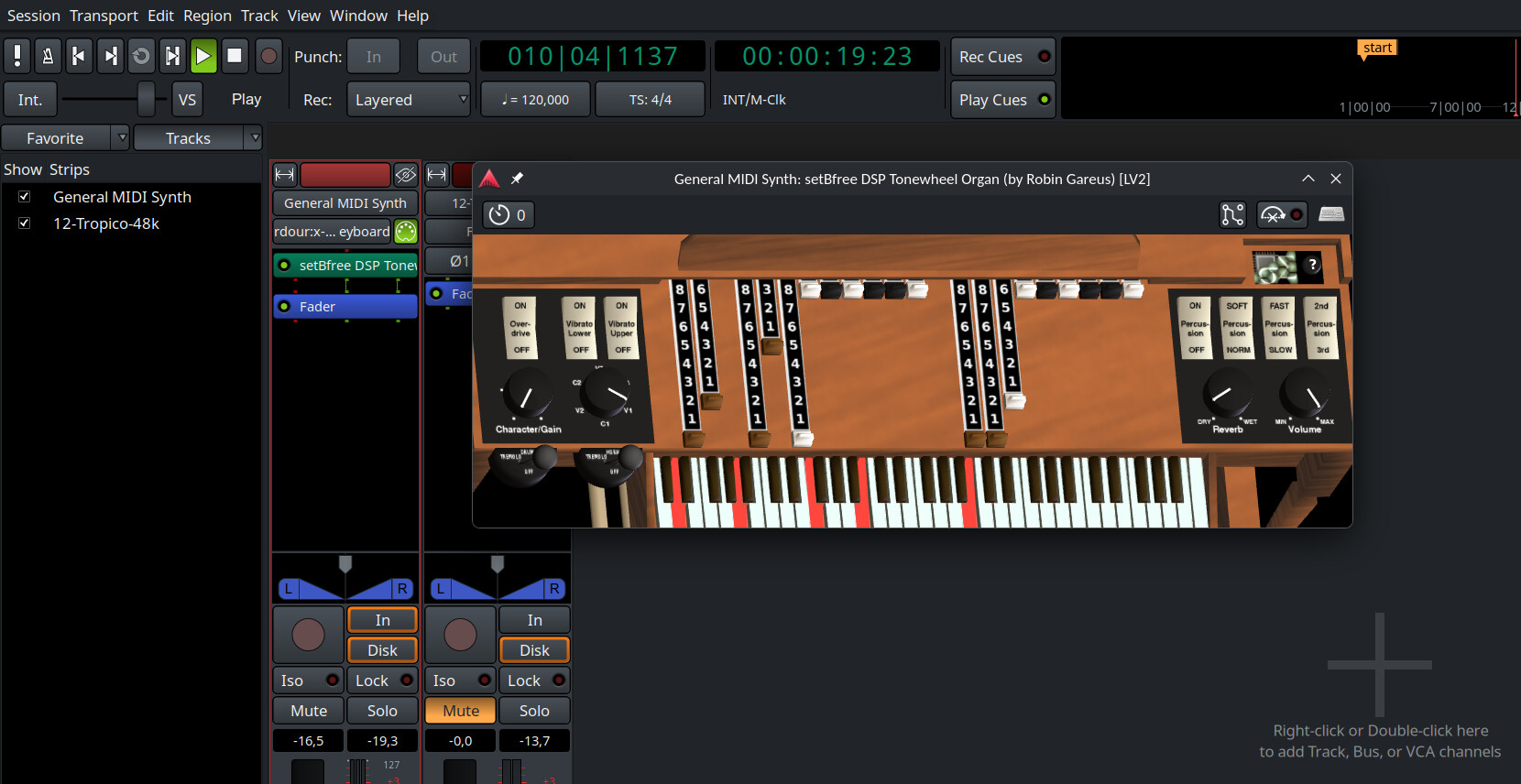
First I want to be clear that I really have no clue how to really use any “DAW”, and especially not how to actually use a “plugin”. I feel very accomplished that I can consistently record and export a single track from a single digital microphone in Audacity. I’m trying Ardour since it seems to be well thought of from what I can tell online, and it appears that many users have had success using the “setBfree” virtual instrument, which apparently is a sort that has to be run inside a “DAW”. Also, I seem to have been able to create a new track, which is something.
As far as how I’m running, I’m on Debian 12, and according to “apt install”, ardour is the current version (1:7.3.0+ds0-1). I downloaded setBfree about 40 minutes ago from x42 setBfree - ToneWheel Organ. I think I think I have successfully “installed” setBfree by following the README instructions and coping the b_synth.lv2 into a folder /.lv2 in my home directory, and if I create a new “MIDI track” inside Ardour I can find an option to have it use setBfree. This seems somewhat promising. Unfortunately, after doing the above there is no graphical representation of the instrument, and I don’t know of any way to control it. (I’m testing with no MIDI keyboard attached, in part since with standalone virtual instrument software like Yoshimi, VMPK, and GrandOrgue I’m accustomed to always being to control the instrument with mouse input as well.)
Am I going about this vaguely the right way? Please bear in mind that while I first studied music around 1983, and have used Linux on and off since 2003, I probably lack most knowledge that might be considered common in digital music circles, so it’s quite possible I’ll ask for clarification your 8 year old nephew could provide.
In the downloaded zip there’s also a bin/ folder with a standalone program you can run.
In Ardour’s Mixer view or when showing the Mixer strip in Editor (Shift-E), you should be able to find the plugin in the “processor” area and doubleclick (or right click->edit it to open a GUI window.
I’ve just quickly replaced General MIDI Synth by setBfree for this screenshot, the track still bears the GM Synth’s name, as that’s what it was created with… also the MIDI it plays here was autogenerated from a not very cleanly played audio track while testing the supplied Lua script for polyphonic Audio to MIDI, unedited and full of false notes, so the upmost b note in the screenshot is somewhat superfluous…
I tried but failed to post a reply asking about the “processor” area …
thankfully, the guy in the video started by opening the “editor mixer” and later clarified that it can be used to access plugins.
So I’ve successfully gotten, sort of, to the state of the screenshot above.
Next question: How do I connect my MIDI keyboards? I’m used to having things interacting with MIDI showing up in Qjackctl or aconnect (GrandOrgue lets you program a MIDI source right from the virtual instruments’ graphical representations with just a right-click), but Ardour seems to have no presence in either.
That’s what I expected, because again, that’s pretty much how I’m used to it working so far.
My practice console is two M-Audio KeyStudios and a Launchpad Mini connected via a nonpowered USB hub. The Launchpad I have to connect manually to Qmidirouter to sent the correct signals to GrandOrgue. Sound usually goes out to a Yamaha AG03, which is indeed putting out sound from setBfree on Ardour.
I’m not sure how to answer your question more precisely. These controllers all show up in both a “aconnect -l” and in Qjackctl, but it seems Ardour does not:
I did notice two things. When I dumped Ardour and restarted with a new session, and changed the top selection to “ALSA”, and clicked on the configuration button at right, I found Ardour could see my controllers.
I also noticed Under the “?” on setBfree, it says you san assign MIDI CC via Cntrl - “butn2”. What on earth is “butn2”?
Does it matter what sort of “track” setBfree is added to? Like, Audio Track vs. MIDI Track vs. … ?
Thanks for taking the time with what I guess is an unsual problem!
The default audio backend when I first launched Ardour was Pulse Audio. I remember accessing the pulldown menu and noticing “Jack” and “ALSA” as the other options, and there are only the three.
FWIW, wIth PulseAudio selected under the Audio System pulldown, the only option under MIDI in the “advanced” section is “none”.
Also FWIW I noticed something else interesting. I located and launched the standalone setBfree program, and initially it refused to launch because there was no JACK server active. I opened Qjackctl and pressed Start, and then standalone setBfree was willing to start, and shows up in the Qjackctl “Graph” view as a JACK object. This of course cannot be connected to my controllers or sound output that are configured under ALSA (sound output when playing the keyboards with the mouse is to the laptop speakers and not my AG03, which is connect and active at the moment - I was just practicing on GrandOrgue a minute ago), so I am looking at how to use an ALSA to JACK bridge.
I don;'t know what you mean by “an ALSA to JACK bridge”, but if you’re thinking about audio, please stop right there. This is a pathway you want to go down.
The pulseaudio backend was a convenience for people wanting to do editing and composition on laptops with no external equipment. It does not support recording, and there is no support for MIDI I/O because pulseaudio doesn’t do that.
As pipewire support spreads, and as pipewire improves, that’s what everyone on Linux will be using for audio & MIDI. At this time, pipewire support is spotty (some distros are still using old versions) and it has several issues, notably with support MIDI control surfaces correctly.
For most people (at least those who don’t need to watch videos while working with Ardour), the ALSA backend is the most functional and correct.
Okay, so I start Ardour with New Session, Empty Template, and ASLA is selected under Audio …
Hey, I have control of the upper manual. Only seems to allow for one MIDI input at the moment, though … I can use the pin view to connnect two keyboards to the one virtual, but that’s not terribly useful.
There’s no way for Ardour to know that a track should be connected to two distinct MIDI ports. It does the best it can automatically - beyond that, you need to create session and/or track templates with the wiring you need. You can connect as many MIDI ports as you want to a single track.
Be sure to disable “input follows selection” in the MIDI section of Edit > Preferences if you do this, however. Most people love that feature, but I am guessing that you will not.
Here you are talking about the limitations or characteristics of setBfree, which is nothing to do with Ardour itself.
Many MIDI virtual instruments support multiple MIDI channels, and setBfree is no exception. If you set your MIDI keyboard to channel 1 (which is, typically, the default) it will control the upper manual. If you set it to channel 2, it will control the lower manual. From the setBfree plugin website:
By default setBfree expects two manuals (midi channel 1,2) and pedals (midi channel 3)
So, by connecting two individual MIDI keyboard and setting one to MIDI channel 1 and the other to MIDI channel 2, you can control both at the same time. If you have a MIDI pedalboard, you can also use this on channel 3.
And, as Paul suggested, once you have it set up and working as you want, you can save that as a track template in Adrour and easily re-create it in the future.
Nice. I’ve actually never needed even to know how to set MIDI channels with these keyboards. Turns out for these Keystudio 49s the proceure is to press ‘Edit Mode’ followed by a music key, so I just tried a couple of settings until the lower physical keyboard controlled the lower manual. Using a second instance of setBfree on a new track worked fine too. I think I successfully looked at the “follows selection” checkboxes and found them to be unchecked. Thanks!
I am thinking of buying or building a MIDI pedalboard fairly soon. I was recently gifted some money toward my church organ project, and since that has to be somewhat portable anyway I’m anticipating getting a pedalboard I will be able to bring home for practice.
With my real Hammond I’ve been experimenting with a series of hardware effects, such as transparent overdrive, “screamer” overdrive, echo, stereo chorus, and a Leslie sim pedal. Is this something that’s pretty easy to emulate inside Ardour?
setbfree is in the Debian repos, so you can install it with sudo apt install setbfree Sorry if you already figured that out, but just wanted to point it out in case you didn’t know yet!