I’ve had a look around and I must be missing something, or its my terms of search that are wrong as this is an area I’m very new to; likewise music in general.
What I’m trying to do:
I’m trying to run multiple drumgizmo instances so that I can create a customised kit that extends beyond the standard 16 channels.
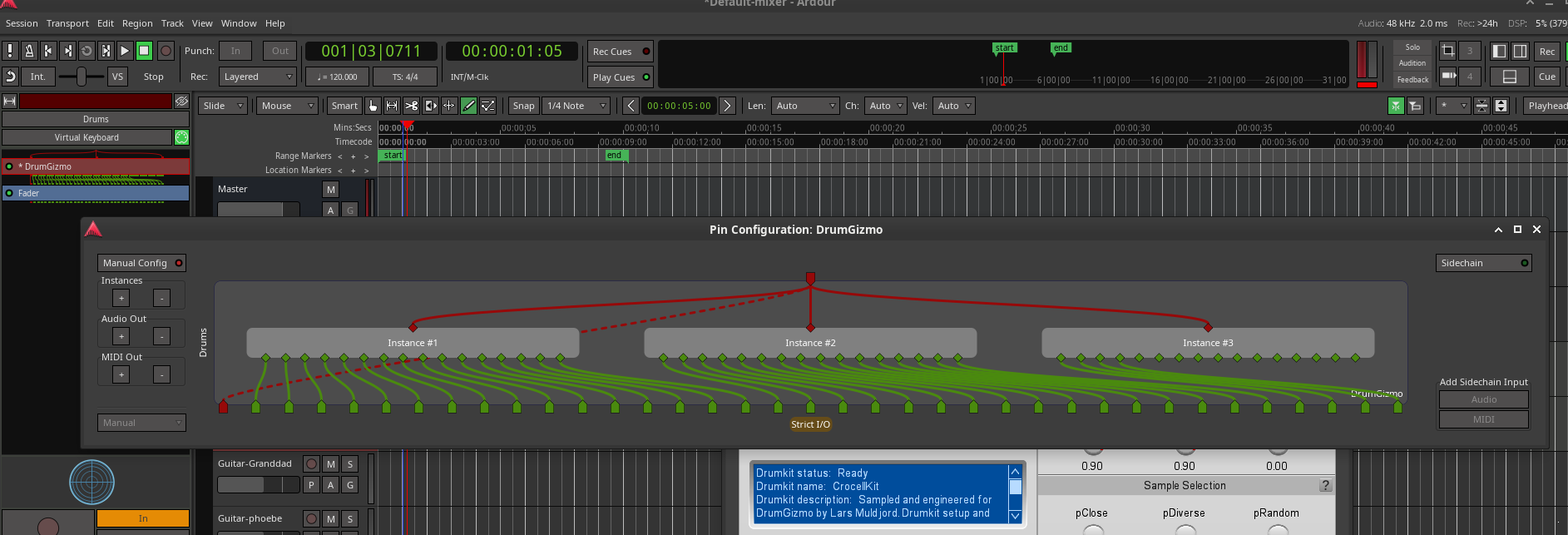
I’ve tried adding one instance and then editing the pin connections and choosing (manual) which allows multiple instances to be configured (Instance #1) (Instance #2) and then routing the midi to both instances and increasing the audio outs… this lets me have more channels which I can then route to individual tracks. However I can’t figure how to open (instance #1) and set the input (drumkit/midimap) files and then open (instance #2) to set different files. It may be that its not possible.
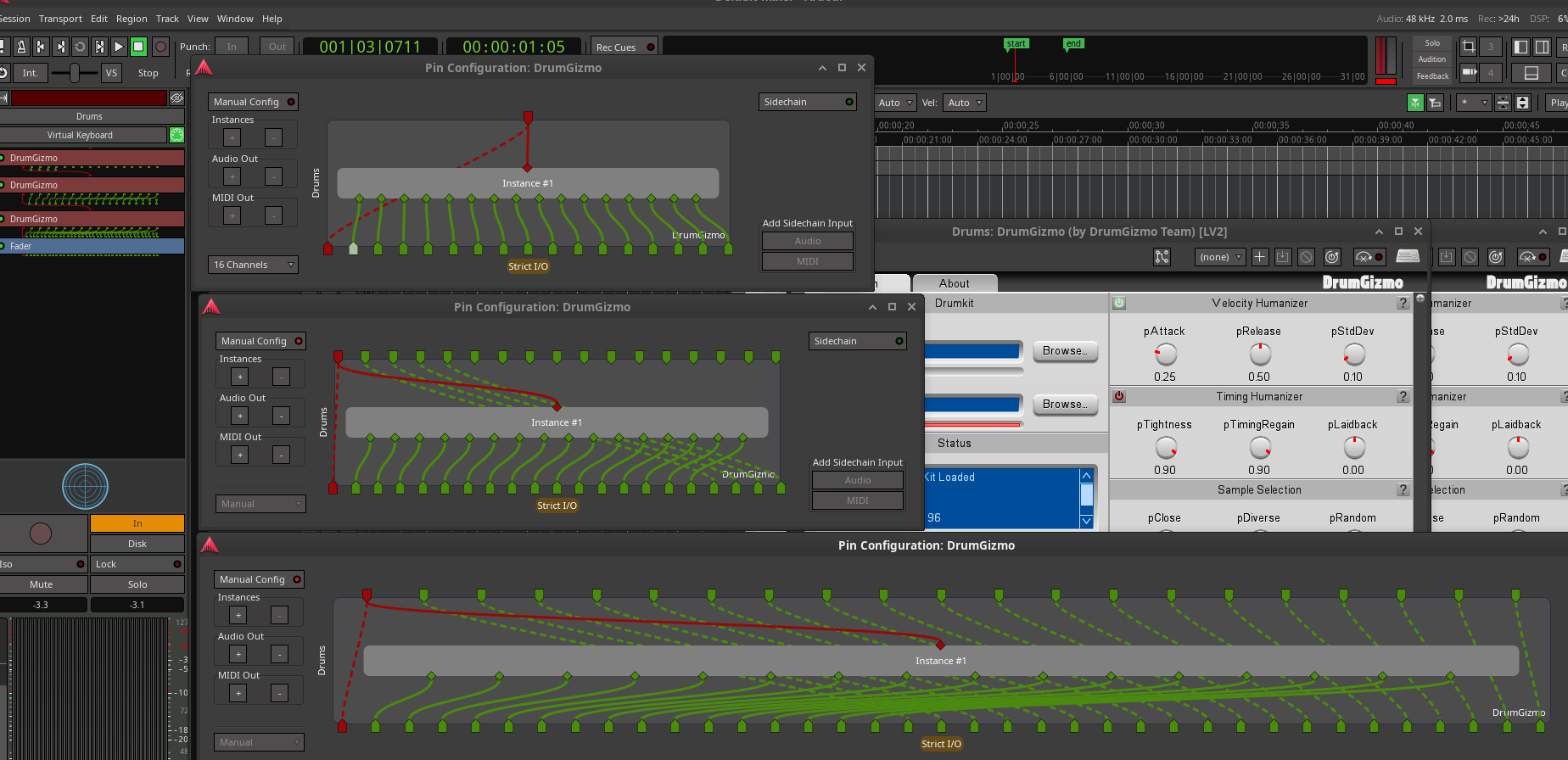
Second thing I’ve tried… adding two instances of drumgizmo by choosing add when the message about an instrument plugin already exists. This allows for two versions of drum gizmo to run. Then mapping the pins from the first plugin through the second plugin (dotted lines) using manual config and then upping the number of channels. This allows me to route the channels as required.
My third way would be to simply create two tracks with each one having a drumgizmo plugin and then route each set of, up to 16, pins into individual tracks.
I like the second option as it works, but would prefer the first one to be able to open instances, but for the following reason it gets increasingly messy!
It is fine if there are only 2 instances… but if I have a set of files that breaks down multiple bits of kit into multiple sets of files (such as a snare set, a tom1 set, a tom2 set) and so on and I then add say 4 or 5 drumgizmo’s I need to route the pins of the first instance through the second instance then the first and seconds instances pins through the third and so on… each set requires the previous pins and the new pins to be routed (with the dotted lines which I assume means its a hop over not a link to for want of a better term).
The third way also works, and requires far less routing of pins, and as all the channels eventually end up as individual tracks that can be grouped and fed to a master it would work… but I can’t help but feel I’m missing a trick (or ardour is, or I’m missing something) by not allowing the multiple instances in option one to work by allowing the opening of the individual instances within. It would very much be the cleanest way. So any help would be much appreciated.
Some further clarification to make my less than clear thoughts a bit more logical and clear.
As you can see, this is the first option. Its nice and clean but I can’t work out how to open each instance… only the first one opens. This would very much be my preference to use; if it worked as I assume it should.
This is the second option. It works and I can open each instance, but its very messy because each instance must be routed though the next one, then both of those through the next one… and so on.
I should note that these are only examples, my actual use case involves multiple individual parts of a drum kit each with usually 4-5 channels. Mainly overheads, ambient, and if relevant close mic. Other mics on other bits of kit picking up sound incidentally are not included in each set.
I didn’t quite understand what your goal is. I’m picturing two drumgizmo instances, each with their own separate key “zone”, i.e., DG_A would respond to keys A1-G2, DG_B responds to A3-G4. You create a midi track, which would house all your midi info, no plugin. Route that (midi) output to 2 midi busses, each loaded with a DG kit. Each DG kit is fanned out to 16 audio channels. That will work, but not sure if that helps you.
What you suggest is the third option where parts of the drum will be played via one midi>drumgizmo>fanout and the other part(s) via one or more other midi>drumgizmo>fanouts with some form of common midi input (I didn’t know about midi buses, but that seems be the way to go instead of having a single physical midi input being fed to two midi tracks which ends up with two duplicate recordings).
The question was more about that there seems to be two other ways of doing the same thing that are possible, but the first one doesn’t seem to have any way to open a specific instance of the “instrument plugin” while the second option works but is much more complicated to wire up (so honestly I’d probably use the option you suggested, option 3).
But to my mind option one seems the most logical, a single midi input track that instances multiple “instrument plugins” that then fan out; but only if the individual instances can be opened and the options set for each one (which doesn’t seem possible at the moment).