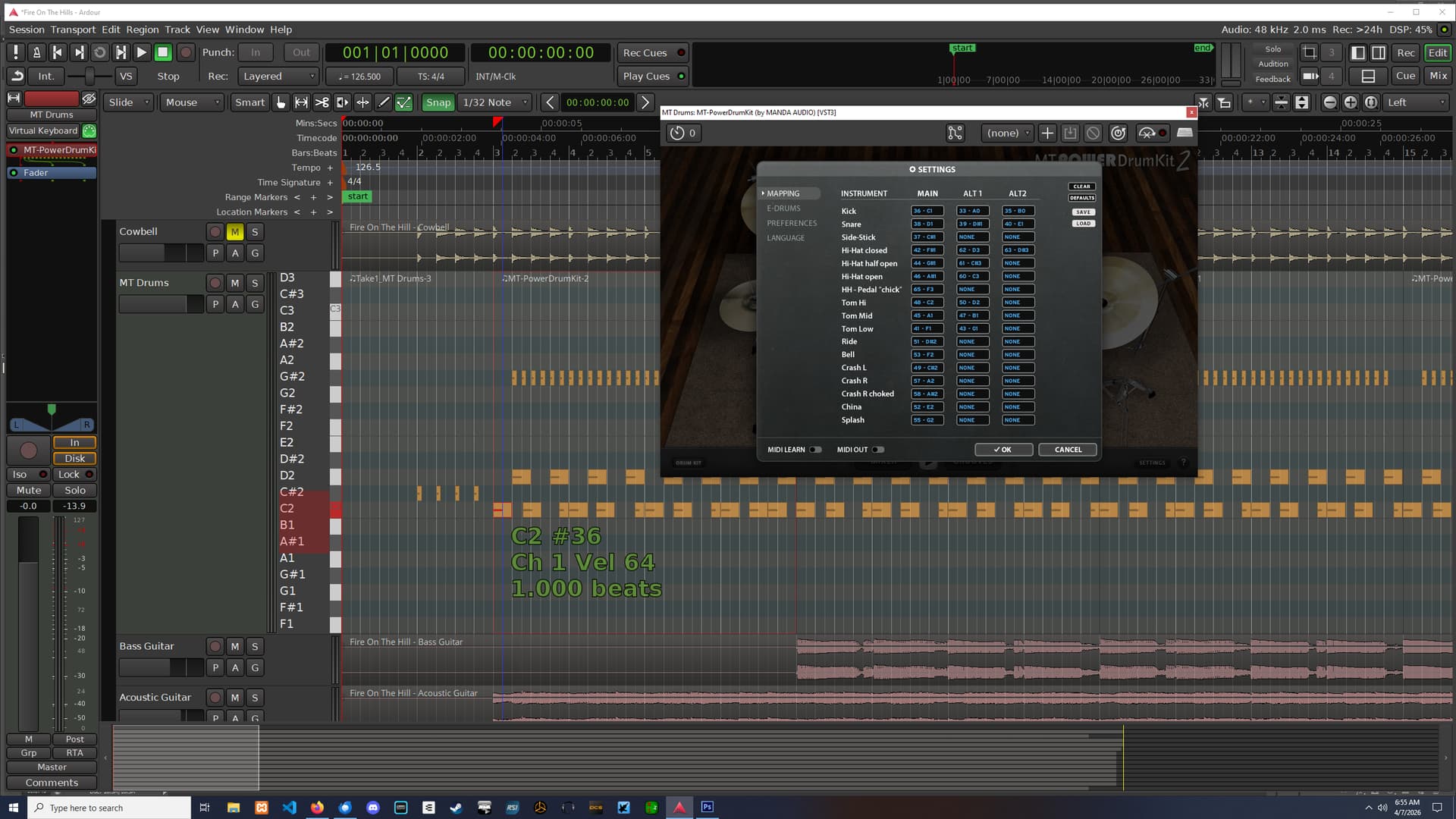
So I asked them over at MT Power Drums and have not received an answer. As you can see from the image, The kick drum is being triggered by C2 instead of C1. I’ve looked all over and with my novice experience, I can’t see any way to change this within Ardour. But there must be something that can be changed or adjusted to have it play the correct trigger notes.
Can someone please explain to me how to do that?
I have not changed any of the default Ardour settings for MIDI. And all I did was to install the MT Power drums plugin per their instructions. So when I create a new MIDI track using MT, it automatically adds the plugin and creates its own MIDI track.
Oh, and I’m not using any of the MT drum clips. I’m doing my own drum composing in Ardour because it’s a great MIDI editor and then I take my tracks over into my primary DAW on a different computer. But every time I make a finished track, I have to select the entire C2 line (and any other notes that are off) and drag it down to C1 on my music system.
The only issue here is a different in note naming conventions. Both Ardour and MT Power Drums agree that note #36 is the kick. As for what to call it … please read:
You can’t. As the article I linked to notes, there is no agreement on how to label octaves, and everybody thinks they have done it the right way. And there’s no disagreement about the note number (36) being used for the kick. It’s just called C2 in Ardour and C1 in MT Power Drums. We do not offer an option to change the naming convention, and neither does MT Power Drums, so if you really needed it changed, you’d have to modify the source code and rebuild Ardour yourself.
It is same note (number 36). It just has a different name in systems that use Scientific Pitch Notation and systems that don’t. MIDI files don’t contain names of notes, only the numbers.
Why on earth do you need a different editor? Ardour and MT Power Drums both agree that #36 is the kick drum. Anything you export from Ardour as MIDI will use note #36 as the kick drum. What is the issue here?
BTW: quite a few other DAWs use the scientific pitch system for octaves too …
I already stated this, but I use (different DAW) Cubase and Groove Agent for my primary recording studio and mastering setup. All of the drums in Groove Agent use C1 as the kick. So I edit the tracks on my office system so that I don’t have to boot up my recording studio setup and then turn on all the gear to just do drum work. I do all that drum work on my office system. Your DAW uses C2 for the kick. So when I export the MIDI file and bring it into Cubase and Groove Agent, all of the drum sounds are off the lanes. And I have to spend time dragging all of the notes down to their proper lanes. It’s a pain in the ass and I’m tired of it. I was asking you for a solution to fix that problem. You didn’t present me with one. So I’ll look for something else that uses C1 for the kick.
Your screenshot above shows MT Power Drums and Ardour agreeing that note number 36 is the kick. They disagree about the name of this note number (MT P D calls it “C2”, Ardour calls it “C1”). MIDI data has no names - these are up to software to choose. THe MIDI files you export from Ardour will use note number 36 for the kick, just as MT P D expects.
Now, if you you import that file into another DAW that uses scientific pitch, it will also say “C1” for note number 36, just like Ardour does. If it doesn’t, it may say “C2” like MT P D, or, as noted in the original article that I linked to, something totally different (i.e. there’s nothing to stop software naming note number 36 as “C3” either).
MIDI is a numbers-based system, and MT P D and Ardour agree about which note number to use for the kick. If you import MIDI that is exported from Ardour, and the note number is not 36, then there’s a much more serious bug, I but I have never seen that reported in Ardour’s entire life.
To try to summarize in one line: “C1” is not a well-defined MIDI note, the names used by different software for the same MIDI note number can be different, but this doesn’t change the number which is the only thing that matters.
The statement that you make that you’ve never seen this problem before should probably be revised. I’m experiencing this problem. And I’ve been using Cubase and Groove agent for years and their system is studio standard. Anyhow, I donated to your product and I’ve been using it and experiencing this problem. If you were interested in helping me troubleshoot the problem and come up with a solution, I would be happy to stick around. I’ll stop using Ardour now and find something else. And I don’t appreciate being communicated with by a condescending prick. Goodbye.
I am sorry if you feel I was being condescending - that was not my intent. Lots of people don’t realize that the mapping between names (like “C1”) and actual MIDI note numbers is not defined by any standard. Your screenshot showed two bits of software that agree about the note numbers, but not the names, which suggested that perhaps this was the root of your issue.
I’m totally interested in helping to fix the problem, but so far I haven’t seen a problem other than two bits of software that don’t agree on the naming convention. That’s a relatively common thing - for example, all Yamaha hardware products use the same convention as Ardour does. Cakewalk provides a user option for how to name the octaves.
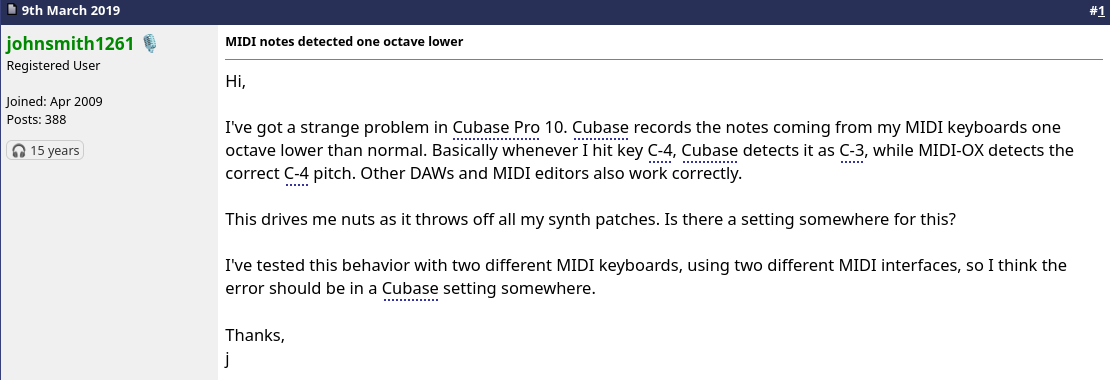
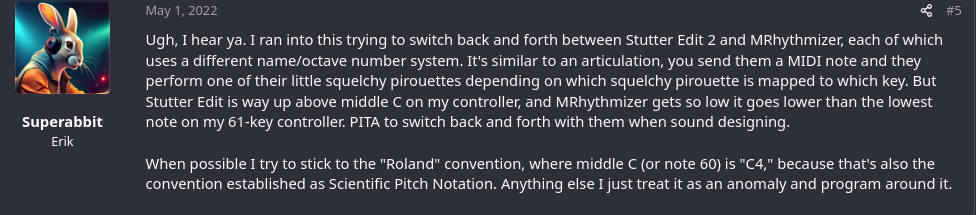
Here’s a screenshot of a KVR Audio discussion about a similar issue:
This user also apparently felt that it was important for Cubase to say “C4” since that was what his keyboard said it was sending. In reality, it makes no difference - it’s the same note number with two different names.
The fact that the names are different is something I’ve acknowledged, but I do not understand any way in which this can be an actual problem (I appreciate that it creates some cognitive work).
I will assume English is not your native language, as Paul exactly explained your situation in a very concise method that most English speaking folks would clearly understand. He was not condescending in anyway. He was simply explaining the difference between a MIDI note number and a simple cosmetic name for it. Hell, call note #36 C1 or C1000 for that matter. It has no bearing on anything.
Paul was very much trying to help you. It is YOU not understanding it. That’s entirely on you, not the Ardour project. The same note number NAME is (or can be) assigned differently depending on the app, keyboard, whatever. Build a soundfont in Polyphone and you can see this in action.
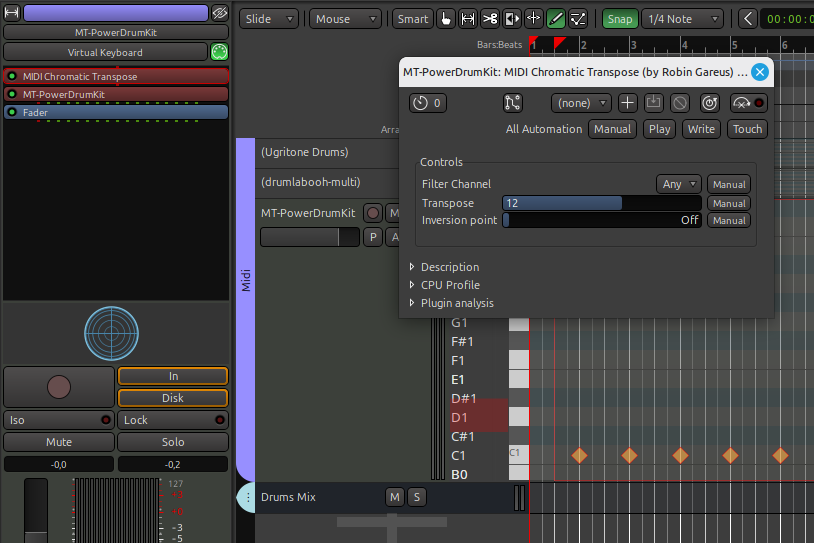
If you really need to map different midi valies for whatever reason there’s a plugin that can map any midi values to any other. Maybe this is what can help you. (I’m away from my machine so I can’t give you the ecact name)
plugin “midi chromatic transpose” from Robin Gareus set to 12 (1 octave)
now all midi events are transposed 12 steps up.
plugin must be first
I can hear MT powerdrum kick sound.
Note: there is also a plugin (available in the Ardour distribution - see documentation) to map a single midi note, if you just want the C1 mapped to C2. I think you get the idea
now you can export that midi track for usage wherever you want.
It still has the C1 for the kick.
Hth
(I once used that method for a MIDI bassline where I tried out a number of different sounds - coming in sound fonts - but which had different octave settings)
Yes, but it’s not clear if the OP actually needs MIDI mapping, or whether they are getting hung up on (irrelevant) note naming conventions.
Let’s take an example:
Edit a MIDI track in Ardour, create a load of notes labelled “C2”. With the MTPDK2 plugin, these will normally play as a kick drum.
Export the MIDI track from Ardour and import into Cubase. These notes will then show up as C1 (because this is how Cubase labels notes, assuming middle C is “C3”).
However, if MTPDK2 is then used as the plugin in Cubase, then it will still play the kick drum, because MTPDK2 uses MIDI note 36 for kick drum, irrespective of how the DAW labels it.
This is the confusing bit for me. If a MIDI track with C2 notes is exported from Ardour and imported into Cubase, they should automatically show up as C1. There should be no need to map them or drag them around.
And, as such, they should automatically play the bass drum if MTPDK2 is used as a plugin, or if a similar plugin with the same drum mapping is used.
The OP mentioned
From what I understand, Groove Agent is a drum plugin in it’s own right so, it seems, within Cubase the OP is NOT using MTPDK2. From what I have researched, the drum mapping in Groove Agent is entirely dependent on the kit you load, so it is possible that some mapping would be needed.
BUT…
The OP specifically stated that the kick drum was on “C1” in Cubase, which is MIDI note 36. And, again from some research, if the “Acoustic Agent” kit is used, then the drum mappings do seem to line up with MTPDK2:
Feature
Groove Agent SE
MT Power Drumkit 2
Mapping Standard
General MIDI (Acoustic Agent)
Strictly General MIDI
Note 36 (C1)
Kick Drum
Kick Drum
Note 38 (D1)
Snare (Center)
Snare
Hi-Hats
42 (Closed), 44 (Pedal), 46 (Open)
42 (Closed), 44 (Pedal), 46 (Open)
So, the OP should just be able to export the MIDI track from Ardour, import it to Cubase, and use it with no mapping or dragging of notes required.
I am beginning to suspect that they’ve not actually even tried doing this and that, if they had done, then they would quickly realise it “just works”.
If you read carefully what Paul was saying was that the problem of the note number changing when exporting a MIDI file and importing into another application has never been seen. Since note number is the parameter defined in the MIDI specification and the actual value that all software has to work with, if note number was not exported properly that would indeed be a serious bug.
That is completely independent of the cosmetic name that a particular software assigns to the note numbers.