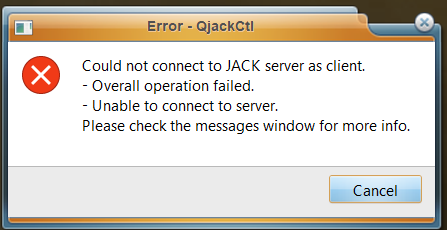
Does anyone know if there’s a good place to get help with jack on Windows (basically, I can’t make Qjackctl work here). It works if Jack is already running but no matter what I do, I can’t make Qjackctl start Jack (I’m running Jack2 ver1.9.21).
I’m happy to try a Windows list or forum if there’s one available but I’ve tried this web page:-
And all the links just produced Error 403 or Error 404. If I try to post to jackaudio@lists.linuxaudio.org I get a response telling me to use jack-devel@lists.jackaudio.org but if I try to post there it gives me an error saying there’s no such mailbox
Have you tried GitHub discussions yet? FalkTX is project lead now, and has a lot of commits on github, so presumably he sees issues and discussion topics there.
I installed JACK 1.9.22, including the JACK ASIO Router, in Win11 22H2 and QjackCtl starts JACK just fine.
I had to uncheck Realtime in Setup/Setting when running as an unprivileged user, though.
Thanks Peder - that was it. I start off by leaving all the settings at (default) and it gave me the attached error message. And even if I selected any interface (i.e. other than ASIO) I’d see the same error message. But selecting ASIO has made it work for some reason.
Great!
Yeah, you should definitely use ASIO for professional audio work in Windows.
Even though I installed that driver I don’t see any ASIO option in the Interface drop-down. Only some MME, DirectSound, WASAPI and WDM-KS ones.
But that could possibly be because I’m using a crappy PC with just a built-in Realtek chip.
Or something else; I don’t really care
Note that “3. Pick “Full installation (with JACK-Router)” during installation.” is slightly incorrect. I got an options window instead, where I had to check that alternative.