when I switched back to 9.8, no problems. I tried 9.10 with two macs (an M1 Max Macbook and a Mac Studio) and they both produced the same thing.
Please report on the “Quirks” settings you have for macOS (in Preferences).
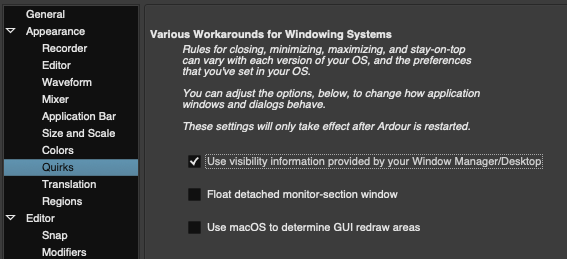
these are the quirks settings
Try turning on “Use macOS to determine GUI redraw area”.
I turned it on and the visual bugs disappeared but now it’s consistently laggy while before it was more like stuttering, is it normal for it to be laggy with it turned on?
It is very hard to say what it “normal”. We have wildly different reports from people on different versions of macOS and different hardware. It is, frankly, pretty dispiriting. The changes in 9.10 sped things up dramatically for many situations, but apparently you have one where this is not true, and we do not know why.
Do you use the Retina screen on the macBook, or an external Display?
In the past 9.8 and earlier, rendering was slowed down significantly by
- Apple’s display color correction
- excessive small redraws of many small areas (notably meters) instead of a single large
redraw. - Retina resolution of Editor
We worked around (1) by using openGL, sidestepping color correction of some widgets (notably editor canvas), and also used an image surface for that to not render it in retina resolution (speed up rendering by a factor of 3-4).
Those workaround have been replaced by doing off-screen rendering (Improved UI Thread Efficiency and Meter Redrawing on macOS). Except now the editor is also rendered at native resolution. That may cause issues on 4k or 8k displays with slow CPUs, but so far everyone else has reported significant speed-up of macOS systems that have previously been treacly …
I tried to look for the same zooming bug, but it doesn’t occur on Intel-based Macs. Everything else looks great. Tested on macOS 10.15, 12, and 15. 
2 Likes
I have a 13.6" macBook Air from 2002 with M2 processor, running current macOS 27.2.1.
I have an portable 4k display (via USB-C), that I can use for testing, but usually I only check with the Retina screen.
For some reason that system is blessed. I never experienced any significant slow rendering there; the only exception was showing the meter-bridge window on the external 4k display, but that is also smooth now in Ardour 9.10.
This makes it hard to work on fixing slow redraw performance that others experience. Having access to a system that renders slowly would likely help.
I use “more space” for the Retina display with color profile “Color LCD”.
Ardour Preferences > Appearance > Quirks > Use macOS to determine GUI redraw area is enabled, as is Prefs > Appearance > Update clocks at TC Frame rate (not sure if the latter is relevant).
1 Like
I’m using the retina screen on the macbook and a 2k display for the mac studio.
the visual bugs only happen during playback but the stutter remains there for me in 9.10 (this is with Use macOS to determine GUI redraw area turned off), If I turn on Use macOS to determine GUI redraw area in 9.10, visual bugs are gone but it’s consistently laggy. So I switched back to 9.8, turned on Use macOS to determine GUI redraw area (I never enabled this before) and it doesn’t lag, only happens in 9.10.
In 9.10, the stutters happen when using draw mode during zoom in selection
That option should have been removed with 9.10 (set to be enabled, which has also been the default).
so I just turned on Use intermediate image-surface to render canvas (requires restart) with Use macOS to determine GUI redraw area turned on aswell and now it’s all fine.
tested on both macs and now there’s no problems even though I never had to turn on Use intermediate image-surface to render canvas (requires restart) on 9.8.
1 Like
First of all, thank you guys for your latest work on solving this for macOS!
I really appreciate it. 
I can confirm that enabling "Use macOS to determine GUI redraw area” for 9.10 is now considerably laggy-er in general (-across plugin GUIs, anything moving, etc.). This was previously not the case, and in fact I had it enabled by default to help the Editor/Mixer GUIs not have un-updated areas (like meters, etc.). (FYI: I would only really disable it whenever using some Voxengo plugins (e.g. GlissEQ), as Ardour would throttle Voxengo’s insane re-draw attempts (as noted by @x42 some years back) and therefore yield a less laggy waveform display for those plugin GUIs.)
However, In much experimenting this afternoon, and testing on a medium-large project (with 98 total routes), everything seems to work pretty damn well with the combo below…
Actually, enabling the “Use intermediate image-surface to render canvas” option (–which I had no f*cking clue about–) made a huge difference in speed/flow/movement of the Editor (e.g.), even when loading and playing an insane project with something like 300+ total routes.  (-Although Voxengo plugins in that one run at ~1FPS, haha. Ah well…
 )
The absolute best combination for myself (using 9.10) seems to be:
- Enable “Use intermediate image-surface to render canvas”.
- Disable "Use macOS to determine GUI redraw area”.
-So, @CopperEddie, you might want to consider testing  that exact combo to see if it’s even less laggy for you.
My system, FYI:
- macOS Mojave (10.14.6)
- Intel-based 2013 Mac Pro (3.5 GHz 6-Core Intel Xeon E5)
- GPU = AMD FirePro D700 6 GB
- 32GB RAM
-J
Just tried that combo and it is definitely less laggy! (I do still get the visual bugs though)
1 Like
Hi,
i have 2 macbooks at disposal:
- M1 pro 2021
- M1 pro 2021
both behave like broken - UI is laggy (no matter the quirk settings toggle). I noticed when cursor is still on single track it’s manageable, once you hover over other regions it gets like frozen (like it’s doing something in the background)
Did you try enabling "Use intermediate image-surface to render canvas” under Preferences → Appearance (and then restarting Ardour)?
Can you post a screenshot of what your specific “visual bugs” you see are? I’d just be curious to know if I see the same thing on my end.
E.g., do you mean things like these line blobs, as in your video?:
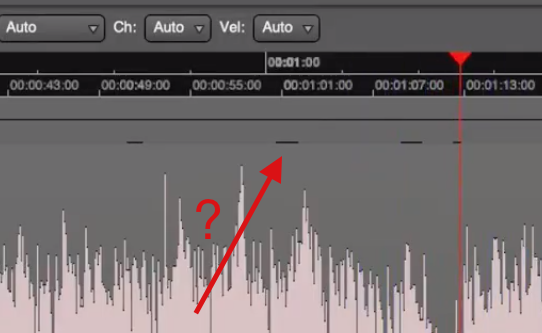
yes and there’s little white highlights in the timecode/min:secs appearing only during playback and moving the cursor around rapidly
1 Like
Okay. Actually, yes, those ‘line blobs’ are occurring for me, too. In this .gif, look near the top of all regions. Also, those lines correspond to the much more obvious automation lane disturbances, which appear mouse-movement related, yes:
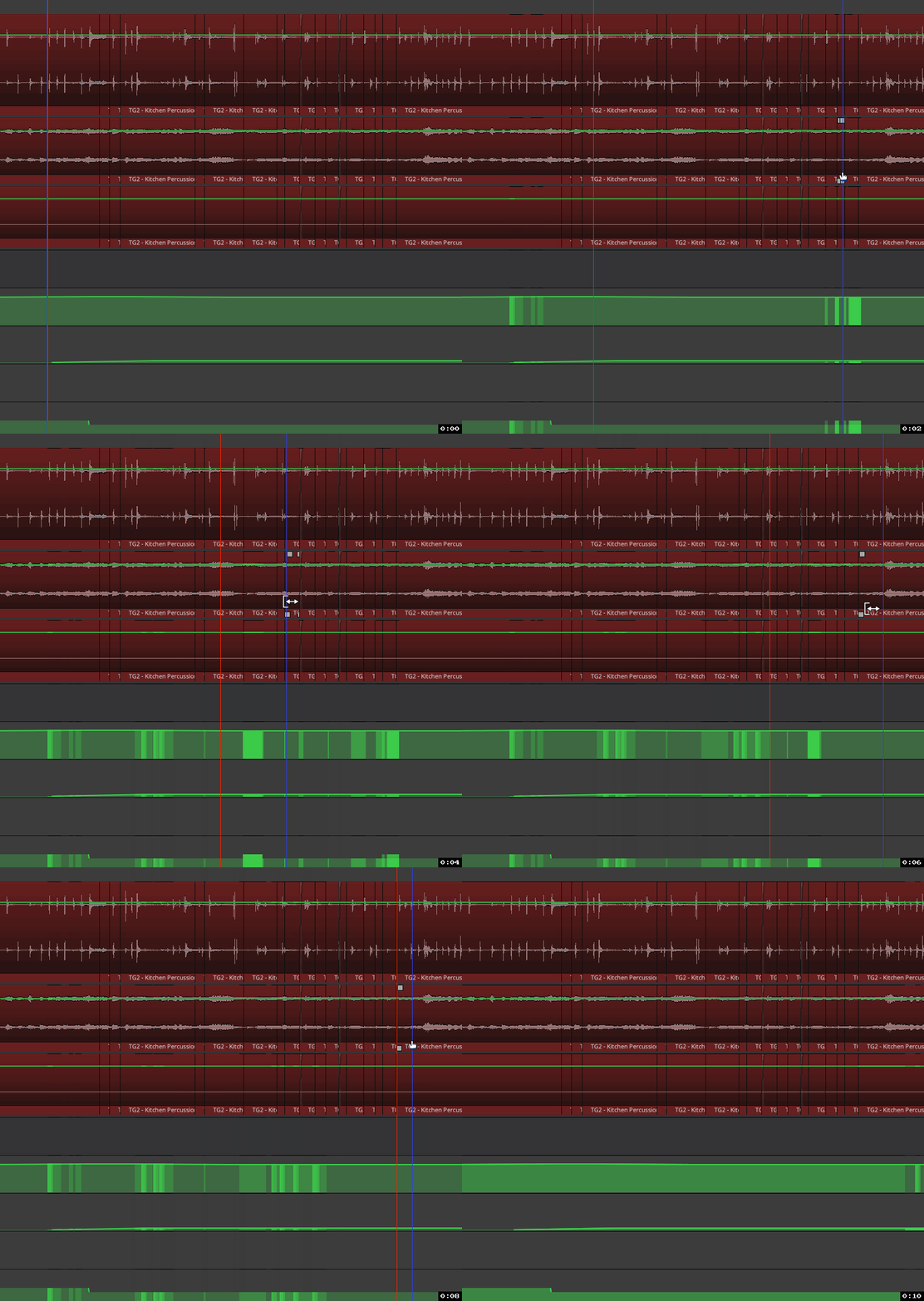
And again, enabling “Use macOS to determine GUI redraw area” removes these visual flaws, but at the expensive of (now) considerable lag, transport ‘stuttering’, etc… 
This will result in graphic glitches. Disabling it is should longer be an option.