Good morning
Is there any existing way to use the keyboard to go to markers in edit window?
I cant find any thing in the shortcuts window, hovering over the marker in edit window, or in the forums.
I think this is very basic important functionality and wonder what other people do to jump around in the session.
Many thanks
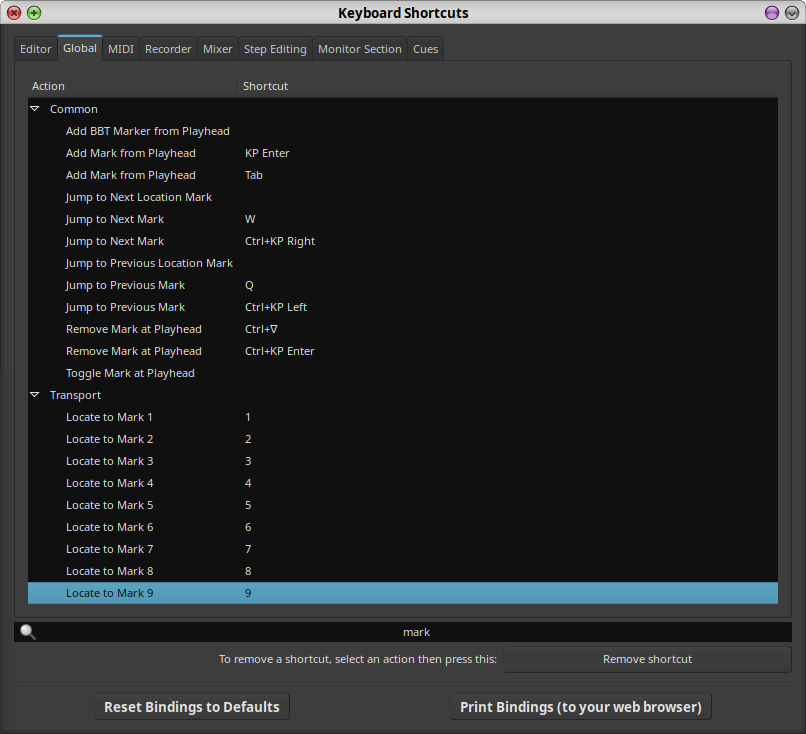
There are the default ‘q’ & ‘w’ shortcuts to jump to the previous/next marker respectively, if that helps. Also, there are actions for ‘Locate to Mark 1’ up to ‘Locate to Mark 9’ to locate to the first 9 markers in your session: these aren’t bound to any keyboard shortcuts by default, but you can assign them to whatever you like in the ‘Keyboard Shortcuts’ window. If your keyboard has a number pad, the ‘1’…‘9’ keys there might be a good choice.
Thanks Colin
I forgot about q and w. They’re very useful.
I cant find a locate to marker in the shortcuts window that matches markers in the transport menu though. Nothing about go to when i search marker or locate, just click behaviour.
So how would I set up go to marker x?
Many thanks
In Ardour 8.12 here, I have "Transport | Markers | Locate to Mark [1-9]'.
The actions for these 9 are in the ‘Global’ tab of the Keyboard Shortcuts window:
That is great. I did it and it works perfectly.
I wonder why it isnt a default
Many thanks for your kind help 
This topic was automatically closed 91 days after the last reply. New replies are no longer allowed.