I searched the web, but the results i find answer how to record louder or how to normalize and such.
So my system volume is usually set to 25-30 %.
For pretty much all programs (mainly firefox and moc, but all others too) that does fine.
Using ardour it is way too silent, so i have to go up to 70-80%. Even if master is at highest volume and so are the tracks.
Once i am done with ardour, i start to playback music again, and if i forgot to turn the volume back down, it is not a nice experience.
Is there anything i can do about it?
Thanks.
Ardour attempts to do bit-for-bit reproduction of everything you record or import. If you have not adjusted the faders, then what is played back is precisely what is recorded. Ardour does not adjust your hardware mixer settings in any way.
However, desktop audio application and/or pipewire/pulseaudio on their behalf, can and will adjust hardware mixer settings or apply additional gain to their audio streams. So you would need to address this at the pipewire/pulseaudio or even per-application level. It’s not something ardour can control.
If it is just the hardware mixer settings, you could write a short script that uses amixer(1) to adjust those settings, then starts ardour, then sets them back.
2 Likes
Yeah, i should have said it. It mainly is midi, recording not really. Else i play piano and sing via mic (but usually no recording).
Also my device is a simple M-Audio M-Track Solo, for the microphone volume is set quite high, output volume is set high too.
I will try to create such a script, it seems doable.
Thanks.
Edit: Yes, that works.
The approach I have taken is to (roughly) calibrate my monitor outputs based on Ardour, and then adjust everything else from there.
To do this, I inserted a pink noise generator on a track on Ardour and set the signal level to -20 dbFS, and made sure the Master bus output was set to 0 dB
Then I used a Sound Pressure Level (SPL) app on my phone to adjust until I hit 80 dB SPL, which is a comfortable listening/mixing level.
Note that adjusting the level here might include changing the volume control on your monitor speakers, configuring the output level on your audio interface, etc. But the idea is, when you’ve done that, you try to not touch it any more: it becomes a fixed reference level.
Then you adjust everything else around that. In my case, it meant adjusting the level of the desktop audio to around 45%.
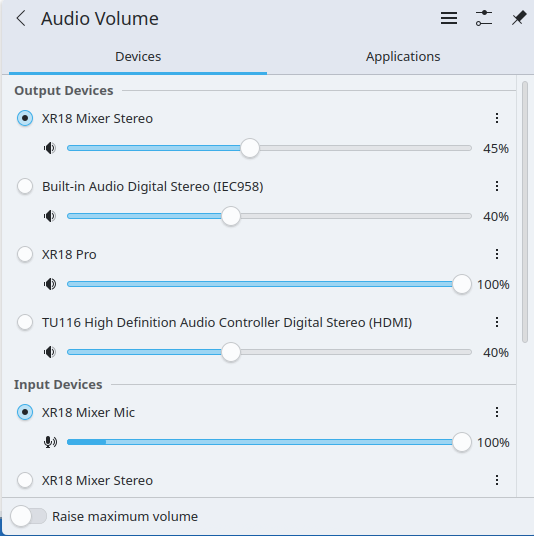
Note that this particular control does not impact Ardour output. I found this gives a decent range of audio output levels on things like YouTube without blasting my ears out. Although there’s a lot of variation on YT itself, so I find myself frequently adjusting the level on individual videos.
I do find it’s often a bit quiet on some video conferences and, in that case, I switch it up to around 60% and the put it back to 45% afterwwards.
With this setup, if anything, I find that Ardour can often sound a bit loud, but that’s the point really: this approach is meant to help you mix better, which often involves reducing track levels.
Cheers,
Keith
1 Like
My main issue with a single gain setting is Bandcamp … they have no volume control in their default player, and they are always much louder than anything else that I listen to via my browser. At some point I need to figure out how to create a Pipewire rule specific for that audiostream that will cut the volume instead of me having to either reach over with the backscratcher and change my console master out level, or switch workspaces and find pavucontrol, scroll down, and adjust it there.
Just for the record: I think i was wrong. It is not only ardour, but there is more programs where i have to adjust volume. It is simply that switching from firefox or moc to ardour, and back, is what i do most often, so i had the wrong impression. Those two are really “loud”.
A few of the “too loud programs” i could set in the mixer, default volume. A few i can’t. No biggie, i often use them with a virtual piano-keyboard, so i realize it quickly before the neighbours complain 
But, to make a too long story short now: changing volume in about:conf of firefox and setting system voume higher should take care of my most common problem (and as long i don’t forget to change volume, there was no real problem at all). Plus the wrapper script for ardour with amixer. If still needed.
Thanks again.
Which player is this? There isn’t an official Linux client, so I assume some third-party app or the web player?
Cheers,
Keith