Just trying Ardour again after many years, and experiencing extreme (250 ms???) latency between playing a note on my USB MIDI keyboard and hearing it (default piano patch).
The problem seems on the audio end, not MIDI, as there’s also delay when playing the virtual keyboard, and the audio meters show the sound before I hear it. I know light travels faster than sound, but I’m just not that far from my speakers…
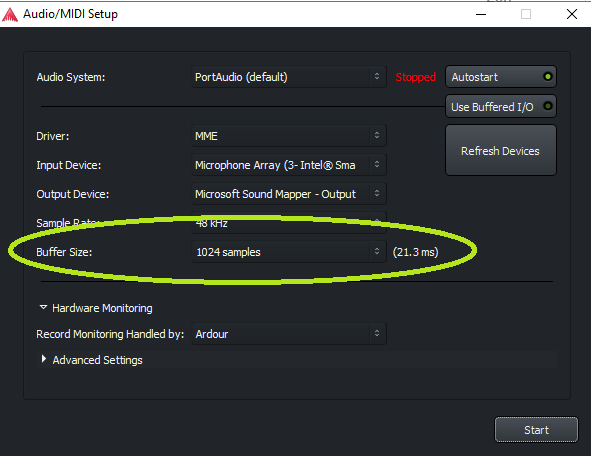
On windows for Low latency you have to use Driver: ASIO
MME (Microsoft Multimedia Extensions) is the default Windows desktop driver that is not not really usable for pro-audio (but handy if you’re traveling with a laptop and no real soundcard).
I have found that the WASAPI driver is not bad, much better than MME, and allows sharing with other applications (I have been using it recently to have Ardour audio presented in Zoom calls which as far as I understand is not possible with the ASIO driver).
But the original poster clearly stated Mac Mini with M1 processor, the response from pedcab was providing some general buffer setting advice, but not directly applicable to the OP system.
Need someone with more CoreAudio experience to give advice on reducing latency.
Sorry for that… Not at my audio computer at the time. I run Linux Mint with either a Scarlett or a Fender IO with no such latency issues on any of them… I was just trying to highlight the relevant setting on my work PC…
Just fired it up, and when I play a note, I get a double strike!!! The first is unnoticeable normal latency I think, the second, the ~250ms latency. Wha?!?
And, after a few minutes of this & that, I’m back to only the 250ms note.
OK, I bet I just set up Ardour wrong. It’s very confusing. Will try to reset to factory settings and start over…
OK, I deleted the Ardour Preferences folder from library/preferences. Started it up, went thru the opening dialogs, created one MIDI track, and, well, at least I got sound. But still the 1/4sec delay
So USB speaker acts as soundcard (aka audio interface). What speaker/interface is that? If this is a consumer device intended only for playback it may cause the delay.
Do you perhaps use a USB-hub? Those are known to cause issues when connecting audio/MIDI gear.
Do you also get a long delay when you use the mac’s internal speakers?
Like I said above,
Just fired it up, and when I play a note, I get a double strike!!! The first is unnoticeable normal latency I think, the second, the ~250ms latency. Wha?!?
So, there’s a low latency path hiding in there somewhere, but that’s the only time it appeared.
You previously wrote that it was a “USB speaker.” Is it an analog powered speaker connected to the Mac’s analog audio output, or is it a USB connected speaker?