I tracked a bunch of songs in one big project, then exported their multitracks to bring into separate, dedicated projects for mixing individually. The only editing I did within the tracking project was comping takes together and basic, short fades where needed, saving anything else for the individual sessions.
While mixing one of these songs, I noticed a weird pop in one of the guitar tracks that sounded like a dropout. Given Ardour’s system of showing a grey arrow/cutout on a region whenever this happens, I was surprised I missed it, but when I went back to the tracking project, it wasn’t there. Exact same take, exact same location, exact same settings, no plugins to speak of (plus I bypassed everything during the export) so I had no clue what went wrong. I thought it might have been a one-off glitch, so I tried it again, clicking the option to re-import the audio…

For context, here are the settings I’m using while bouncing the multitracks.
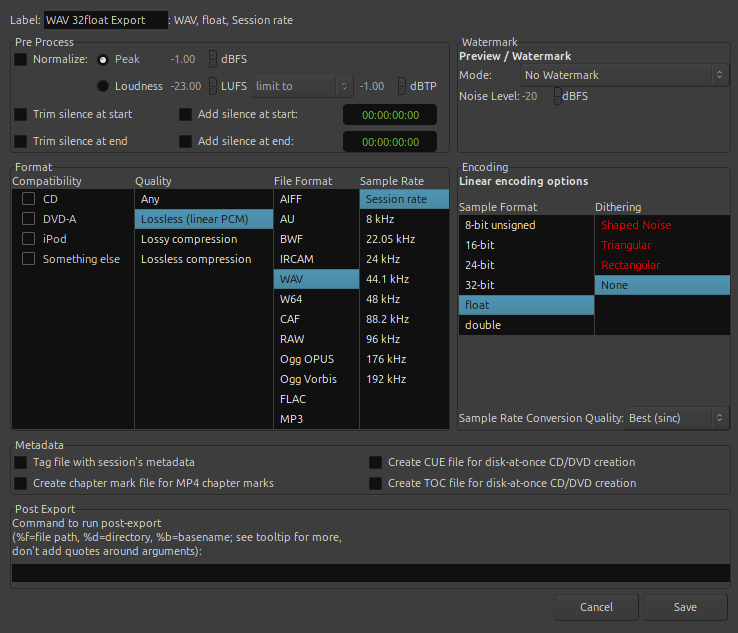
This is as raw as you can get, right? Everything matches up and the output files should be byte for byte identical, aside from the aforementioned comps and fades.
I positioned the two tracks on top of each other as shown in the first screenshot, made sure the fader and pan values were identical (again, no plugins to be found on either track), and inverted them against each other. I don’t know what’s causing the dropout or why it’s consistent, but I wanted to ensure it was the only difference between the original and the exported file. Well, no! While I couldn’t hear anything, the master fader still showed a ridiculously low volume as the inverted tracks played, so I exported whatever that was, threw it into Tenacity, and amplified the heck out of it. What I got was a very quiet, very noisy copy of the guitar track, even though the export was inverted against the original, which should have muted it completely (weird click notwithstanding).
I have no clue what’s going on. I could and have just fixed it in the song’s dedicated mixing session, making use of the stretch tool, but I shouldn’t have to, the original recording has no dropout. Regardless, I’m still scratching my head at the two tracks not canceling each other completely when inverted. What am I missing here, and what extra processing is Ardour doing as it exports these files?
I’m very confused.
EDIT: I made a test project to play with export settings and try to narrow down the issue here. I can only guess it has to do with sample rates and conversion between them, though that shouldn’t even be a factor in this project since everything in this session was recorded in 32bit/96khz and exported the same.
I managed to fix the click issue in that single track after messing around for a while, but I have no clue how I did so, and the export still does not cancel out the original track entirely when inverted against it so I can only assume there is still something going on… I don’t know. If anyone has any idea what could be causing this, please inform me!