I’m experiencing the same problem, and the red messages in the log were bothering me as well. Your post motivated me to look into it, and it seems I’ve managed to get rid of those messages.
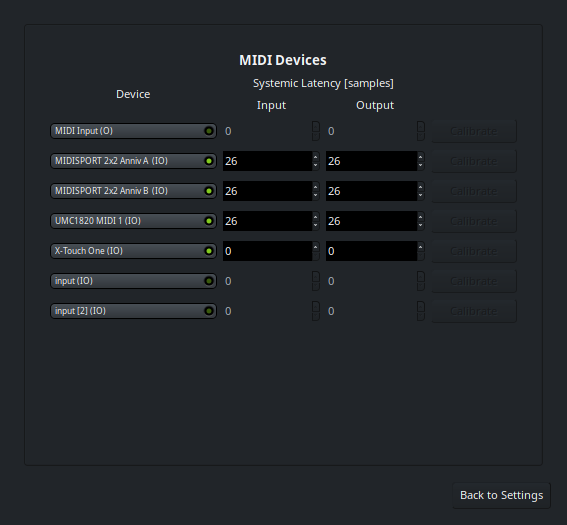
There is how the Setup & Calibration dialog under the Audio/MIDI setup dialog → Advanced Settings looks on my system:
As you can see, a couple of MIDI input devices with rather non-descriptive names. Suspected they were causing the errors, so simply disabled them, and the messages disappeared. Everything seems to be working fine now when testing with the ALSA backend.
I seem to have this error as well and I am unable to record from my mic. I’m extremely inexperienced with this software and digital audio in general.
It seems those bottom two Midi inputs which you have disabled are the only two in the list for me. Should things work after disabling them, or do I need to start up a jackctl server first? (I would like to avoid doing that as messing with pipewire is a massive headache for me).
I suppose my inability to record audio is a separate issue and may just be because I started an empty session. Idk.
Correct, audio handling is separate from MIDI.
I suggest starting a new topic and showing what you selected in the Audio/MIDI setup dialog for audio device selection.