When editing ( especially ) midi, I wish there was one “Hide All except selected” menu entry in the Editor-List > tracks panel.
That would speed up the workflow, to first ‘Hide All’ followed by selecting the 1 track, you would like to see in the arrangement view.
Ideally with the ‘fit selection ( vertical )’ command, so the selected track fills whole arrangement view.
Probably an easy question but a lot of work for the programmers to implement something like this…
1 Like
John Devlin made a couple of scripts that do just that.
1 Like
Good find! 

(~I just re-categorized that (@johndev’s) post to the Lua Scripting section because I guess I missed it before! O___o)
…
Then the question becomes how to quickly and conveniently return to the previous track/bus visibility state…  -or at least how to quickly return to all tracks/buses being visible again.
I actually don’t know how to do that in a single command. 
(I suppose one could make another Lua Script for this.  )
)
-J
Yes, that would be nice. Maybe someone with more Ardour/Lua knwledge can turn this into a toggle operation.
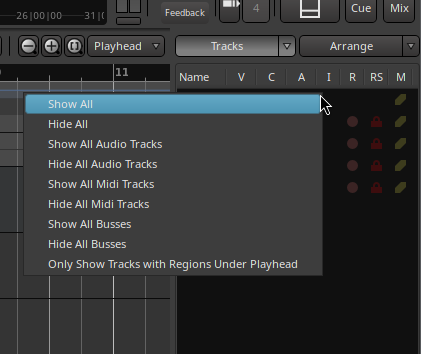
In the mean time, right click on the tracks list gives a ‘show all’.
1 Like
Yes, that works.
…
As for Lua scripting, seems like you could have two scripts:
1st script:
• Scans all currently visible routes, then…
• Saves a small, external, temporary file with a list of those routes, then…
• Hides all except the selected route.
(• Optionally expands that remaining route to full/larger size; don’t know if possible via Lua.)
2nd script (-a ‘revert view’ script):
• Reads appropriate temp. file and gathers list of previously visible routes.
• Re-shows the routes as required.
…
Seems plausible in theory.
I think this is why the devs gave us the playground of Lua in Ardour.
A lot of customization is possible via scripts, although I’m well aware that the vast majority of potential users of Ardour don’t know anything about coding/scripting (…I didn’t, like a year ago).
-J
It is unfortunate (surprising?) that editor views don’t do that…
https://tracker.ardour.org/view.php?id=6145
1 Like
Ha, reported by @x42 himself… O___o
…
I also just discovered “Editor Views”, which maybe could help in this regard:
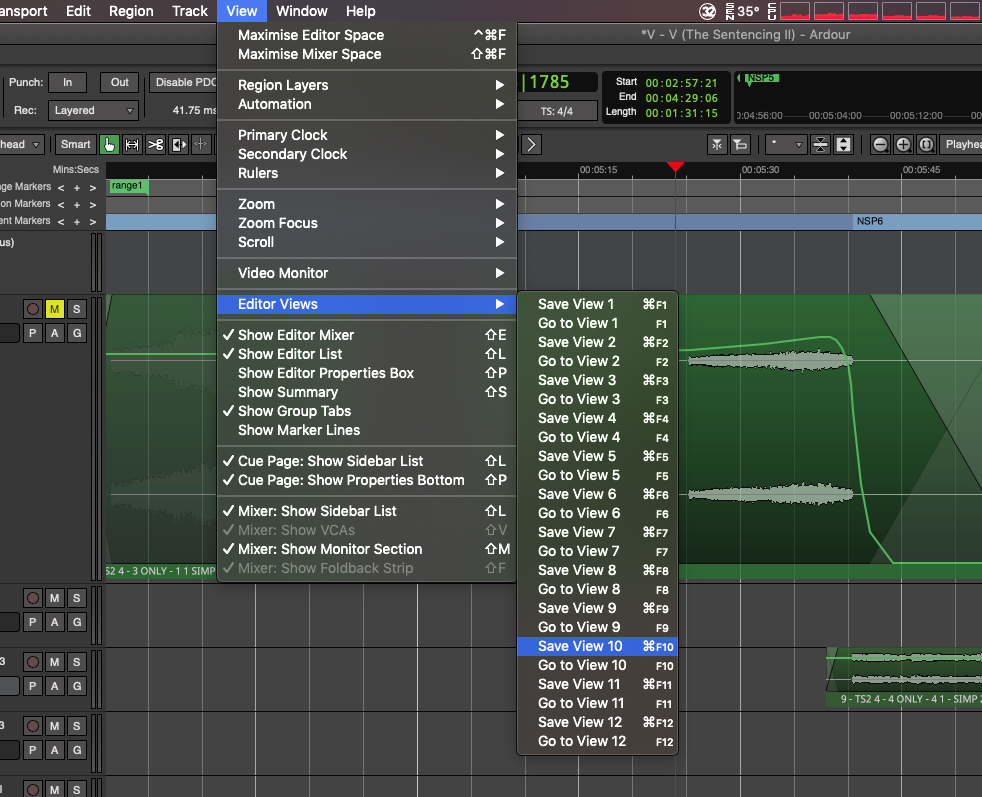
… ah wait, no. This just jumps to a certain “view”/place amongst the tracks, but does not seem to show/reveal currently hidden tracks/buses/groups. Ah well.
Thank you Sciurius and GhostsonAcid, for these tips !
With the lua-scipts I miss a toggle function to fast switch back after doing the midi edits.
Also I’m not that gifted to programm these scripts.
Yes the Editor-Views could be helpfull if some functions were added, but first issue is the aren’t saved at all with the project, making them almost useless.
Another possibility is to have all tracks visible and use the Z key to zoom in full to only that region, but then a toggle function for the Z key would be very helpfull.
Something new, like a temporary edit view in the arrangement window, with an assignable key to toggle into ‘region editing’ and thenback to the arrangement would be such a nice function…
But maybe new users prefer the new midi editing window we have since version 9 more.
Ardour’s inline-midi editing which I hated most when switching to Ardour has become one of my favorite workflow uses.
I just like the old school inline midi editor, like said would be nice to have this in the arrangement window as and kind of fullscreen region edit state / overlay.
But when seeing tracker.ardour.org I don’t dare to ask Paul or Robin, they probably already having terrible nightmares because of all user requests
1 Like
This topic was automatically closed 28 days after the last reply. New replies are no longer allowed.