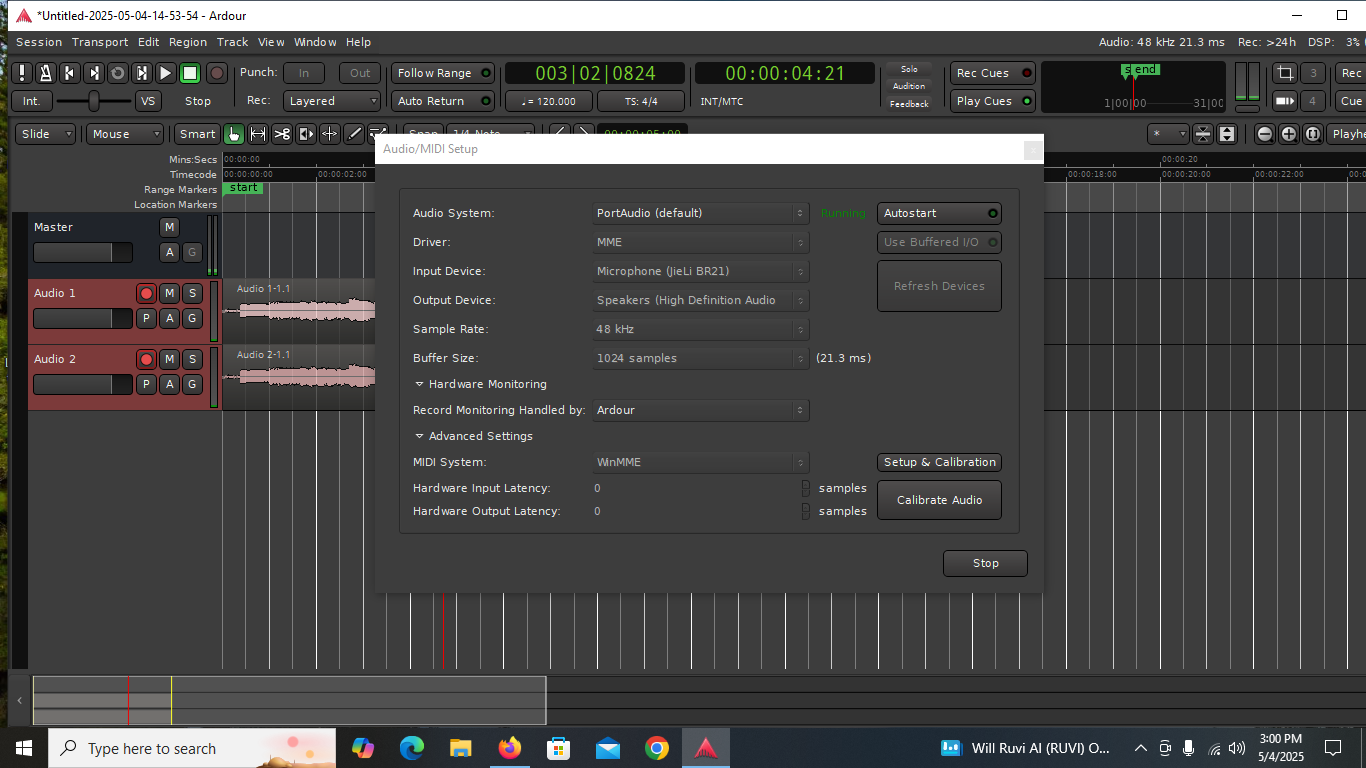
most recent screen shot sound coming out desktop not monitors (but instruments being played out of monitors)
thank you for your time
s
most recent screen shot sound coming out desktop not monitors (but instruments being played out of monitors)
thank you for your time
s
You mean physical instruments which are connected to the USB mixer, not software synthesizer instrumetns, correct?
That shows that the output (playback) device selected is speakers connected to the high definition audio device. The phrase “High Definition Audio” is specific to computer audio and refers to the built-in audio in the processor chipset.
You need to select as output device the USB mixer you have connected.
I do not believe you ever answered this question from post #10:
MacOS and Linux include a USB Audio class 2 driver which will work with most modern USB audio devices, but Windows does not, you must install the proper driver for USB audio devices.
What mixer are you using? Different models have different features, some only providing two channels of audio connection, some providing separate channels for each mixer channel.
Yes the instruments I hear from monitor are bass and guitar
the mixer is Depuseng ht4 I looked for downloads for driver and could not find any
thank you all who are putting time in helping me pin point the issues and hopefully a solution soon
You all rock I appreciate this help
I just researched for driver downloads, could not find any. Just emailed company asking if there are any driver downloads (very recent purchase, less than a month ago)
but it is hit or miss if the company will reply
The company email was not able to be delivered , not a good sign
This is a hardware mixer, and there will be no drivers for windows. It is ok. The USB looks to be only for playing MP3s. It does not provide audio interface to the computer.
The easiest solution may be to install ASIO4all drivers and use the built in computer audio. Maybe somebody else on the forum has a simpler solution.
My best guess is that you’re probably using the mixer as an output device whereas your friend had previously connected it as an input device. In other words, you plugged instruments into the mixer and the mixer’s output was probably plugged into your computer’s audio input. Your computer;s audio out would then have been connected to your monitors (possibly via the mixer - we don’t know).
Can’t you email your firend (or text him) and just ask how it used to be connected? You probably just need to rearrange the analog audio cables.
How exactly is your mixer connected to the computer? The pictures I found indicate only a USB host connector, but the description does say that it can operate as an audio interface as well.
The connector type would not be standard for that, but it is possible.
If the mixer has a USB audio class 1 device then you will not need additional Windows drivers, but it will be limited to two channels, 16 bit and 44.1kHz or 48kHz sample rate. The bit depth and sample rate are OK for what you are using, the channel limitation may or may not matter, depending on how you wanted to use multi-track recording.
What type of cables are you using, and between which connections on mixer and computer?
If using USB, what does the Device Manager app in Windows show under “Sound, video, and game controllers” and under the “Audio inputs and outputs” lists?
I also see that Depusheng have a later mixer model called M4 which explicitly states that the USB connection can be used as an audio interface, so it is possible that the HT4 model you have does not support that, as Schmitty2005 mentioned in a previous post.
In that case you will have to find a way to connect to your computer using the line input of your built-in audio interface (assuming your computer has a line in and not a microphone input only).
I would venture that the advertising for this is incorrect, perhaps due to a poor translation to English.
The description I saw did say “audio interface” but then suggested it was only for playback. Another I found which looked a bit better curated didn’t mention audio interface or a PC at all.
But I really don’t think this device works as an audio interface at all.
Cheers,
Keith
Good morning
I found this information regarding products using the JieLi usb driver.
It seems you have to do things in a particular order to make it work:
MOST important article:
Good luck, I know its depressing when you cant just get on and make music
update I got it to output sound
Its recording well the output is not as strong sound in monitor speakers as the imput but the wavelength of recording is strong
so…thank you all for helping
Im glad you got it to work 
This topic was automatically closed 91 days after the last reply. New replies are no longer allowed.