I am experimenting with the (very welcomed) cues (Ardour 9.7, linux x64). I consulted the manual, the forum and the tracker but there are few elements that I am still missing.
When selecting record length “until stopped”, is there a way to “quantize” the end of the recording? For example, that it will end next bar. Otherwise except if we are very precise, the newly created loop (looping I am) will get out of sync with the rest. Note than in Bitwig it appears that by default a clip records until next bar after hitting stop record. Such a feature was mentionned in Trying to understand the basics of Cues/Looping in Ardour 9 - #8 by border1
Using “follow length” might be a way to trim the recording to the bar or beat, but hardly to extend to the next bar or beat, because then there will be a sudden drop of audio (clip of 6 beats, follow length of 8 beats, 2 last beats of dead silence). (Can “follow length” be set programmatically with LUA?).
Side note : with “follow length” the playhead with audio clips looks wrong, it will go over the whole waveform but at different speed, instead of stopping earlier (beats < clip length) or later (beats > clip length), as if audio was stretching (which it is not). The behavior of the playhead is okay with MIDi clips. I can open an issue in mantis if this is not already on your radar.
There is no feedback about what is being recorded with audio, only with midi when a region is already present in the slot being recorded, correct ?
How to stop recording a clip with “until stopped” without stopping the transport? It seems that “Stop and forget capture” does the trick (transport still runs, clip is recorded), but I fathom that this is not the desired behavior. Note that hitting the “stop playback” icon does not result in a recording, but Transport → Play/Stop does, which does not looks consistent.
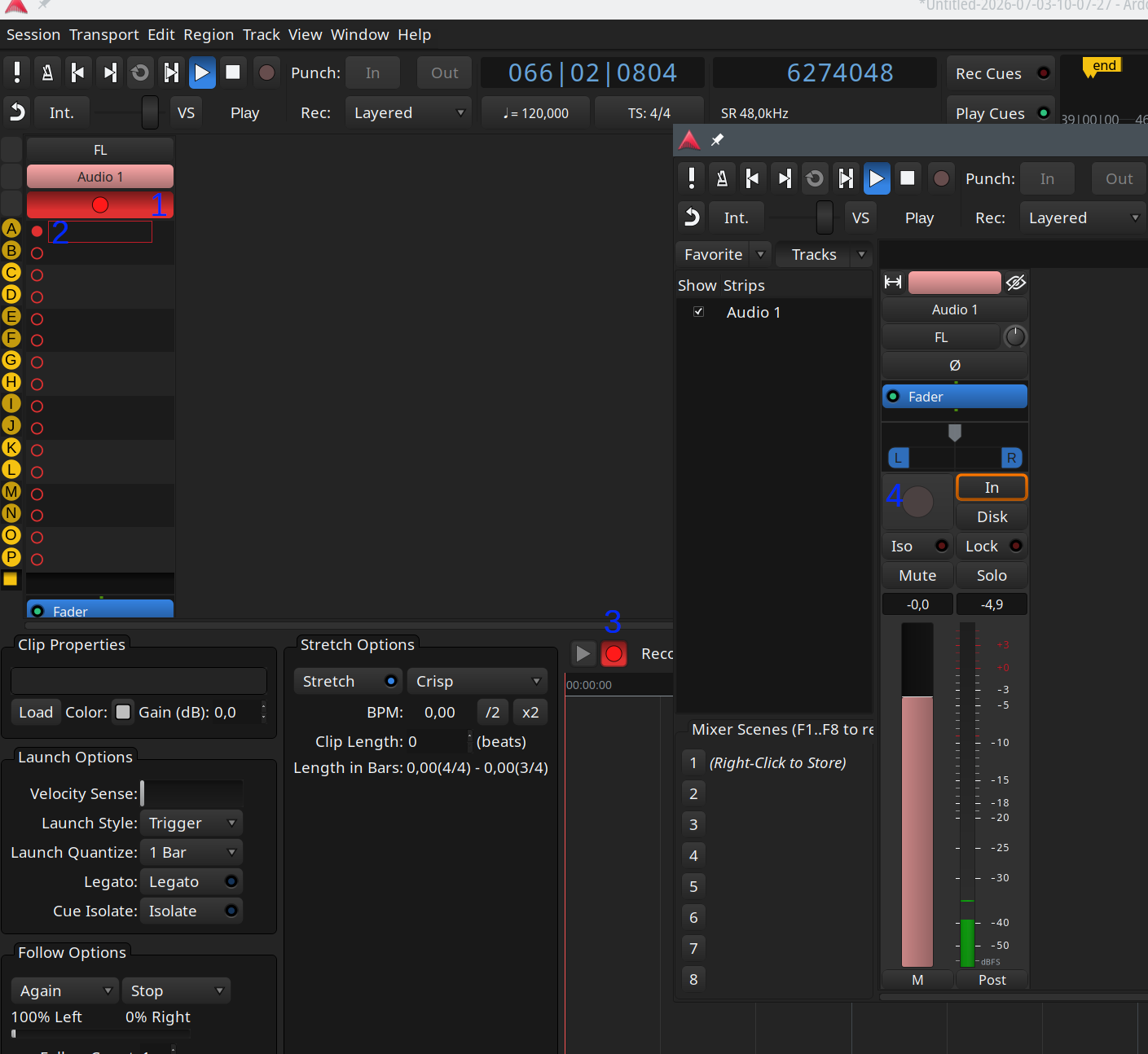
The rec buttons in the cue editor do not seem to produce the desired effect, no recording is done upon pressing them. The rec-arm in the mixer seems mutually exclusive with recording clips? Just to be sure, a quick screenshot with the buttons, “1” for the main rec arm, “2” for the slot, which is similar to “3”? “4” the button in the mixer window.
There are some weirdities, if I try to stop the record while the transport is running by pressing “2” or “3”, then “2” turns off but “3” stays lit, and I have to press the main rec arm “1” to turn “3” off. The exact sequence : start Ardour, add audio track, clip window, start transport, press “1” to arm, press “2” or “3” to start recording, after the count-down press again “2” or “3”, “3” stays lit, “2” and “3” are not responsive anymore no matter the selected clip in the track, not until “1” is pressed a second time to unarm everything. If the explanations make sense.
While paying with starting transport and the “rec” buttons, at some point I switched from “until stopped” to “one bar”, and stopping record before the one bar ended and made Ardour crash. I did not manage to reproduce yet, and without debug only got a “double free or corruption (out)”, I’ll try to find a recipe.
Definitely some bugs crept in here (though a little hard to tell precisely when). I am working on fixes, and things should be much improved in another day or two (i.e. nightly builds).