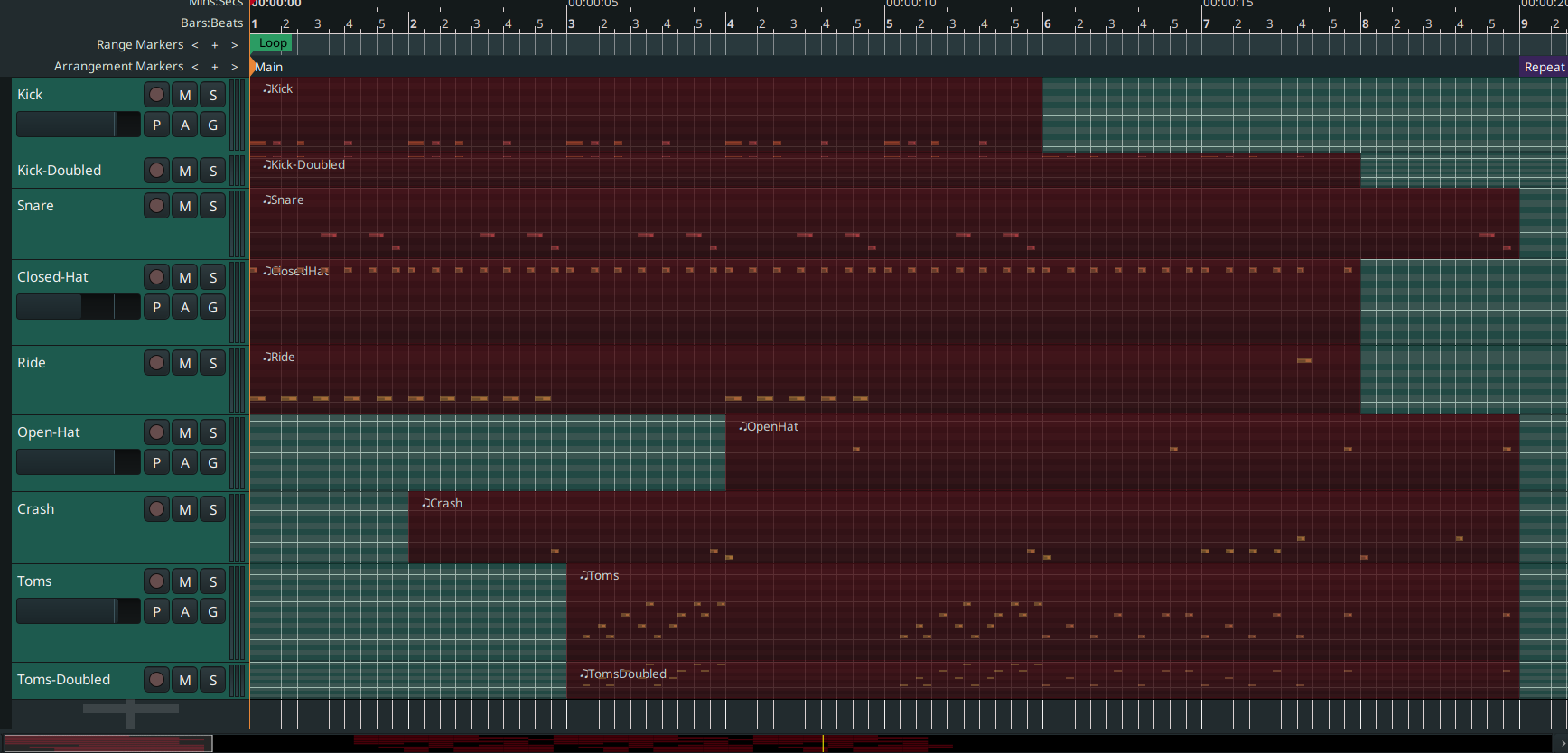
These days i experiment a lot with drum rhythms. I have one midi-track for each drum instrument, so it is quite an amount of tracks, and sometimes i like the result, and would like to store it, so i can later just import it to another ardour session and use it there.
As far i understand:
bouncing them to clip library i only get one midi-track per bounce (and then later have to drag them from editor-list one by one).
both setting as template and saving as mixer-strip will only save the tracks, but not include the midi-regions.
What i search for is a simple way to save all tracks including the midi-regions (i could combine them per track, so not several regions per track, but several for all tracks) and then reuse all at once. Doing one by one i’d just do by bouncing them to clip library.
I hope what i am looking for is at least somehow clear.
In short what is seen on the picture, tracks and regions, i want to save and then reuse in another session.
What would be a good, effective approach for that?
when you are satisfied with your rhythm, record all the single drum tracks together in a new MIDI track
bounce that new one to the clip library (all the instruments together)
To reuse it:
save a template where you have one MIDI track with the appropriate drum plugin, outputting to several Busses, one per instrument
import the MIDI from the clip library in the MIDI track.
Depending on the drum plugin you are using, you may have to do some manual routing, but I think mamy drum plugins can output to multiple channels (e.g. AVL drums, Drumgizmo).
This way you can still make adjustments to the one MIDI track, and at the same time mix/eq/pan/compress/etc. the single drum pieces individually. Also you spare a bit of computing power, using just one drum plugin instead of one per track.
Having all the drum pieces in one track can be a little confusing at the beginning, but again, usually the drum plugins show the names of the MIDI notes (kick, snare …) in the scroomer, in the track header.
Piergi:
I tested this back and forth a bit, and for my rather easy needs your proposed solution is perfect.
After a bit of thinking (during garden work ) i came up with an idea, and i just tested if it would work too:
I’ve set all drum-instruments per track to a different channel before i recorded them into the final midi-trick
During import i know selected “one track per channel”, and by that i am back to the original multi-track drum-groove, then just reset all of them back to channel 10 (if that is what i want in the long run, say so i can easily change the different volumes, apply automation, add effects, such, per instrument).
Perhaps you proposed it even, and i didn’t fully understand you
Yup, it seems like a “dirty hack”, but as far i see yet it seems to work.
Thanks again.
Seems garden work inspires me:
The most straight forward approach is to just use “Menu → Clean-Up → Cleanup unused Sources”
After that ~/Ardour/DrumGrooveSession/interchange/DrumGrooveSession/midifiles
only contains the needed, final midifiles, and i can just create a directory in ~/local/share/sounds/clips/; then drag and drop them in any other session, like i usually do from clips-library.
I got to make sure all regions in one track are combined before that, and give the regions meaningfull names.
I could still mix it with the aproach to first record all midi-track into one single midi-track, and then have both options available in the created directory in my clips library, depending what i want to use in the new session.
so:
(optional ) combine all regions in all tracks
give all regions a meaningfull name
(optinal ) record them all in one final midi-track
clean up unused sources
create a directory in the clips library with a meaningful name
For this step i suggested you use one MIDI track (with the whole drums) outputting to several busses, one per drum instrument.
As I said above, I don’t know what drum plugin you are using. If it is something like AVL Drums or Drumgizmo or sfizz (multichannel) you can have it just once in the MIDI track, and route the outputs to the busses, where you have automation, effects usw.
No need for all those extra steps (you need to name meaningfully and export just that one track).
I guess it depends on your preferred workflow. I find more practical to have all the drums in one track (no need to separate channel, the instruments are all bound to different notes).
Having said that right now it seems i would generally prefere all drum-instruments in seperated tracks (after i had them always all in one track for years):
I never really used busses, and right now i can’t even imagine how the general workflow would be to send the different drum-instruments from one track to several busses, if you could tell me the general workflow, that would be nice.
Also i typically use either AVL Drums or just GeneralMidiSynth “standard”.
(different channels per instruments only makes sense if i later want to seperate the one track to one-track-per-instrument again, i found no other way to get there).
Actually I use tracks myself instead of busses, because when I am finished tweaking the drums I record them to (separate) tracks and then disable the MIDI track with the drum plugin (until the next tweak ).
With AVL (the “multi” version) you right click on the mixer strip name (in mix window or in edit window in the left pane) and choose “fan to track” or “fan to busses”. The new tracks (or busses) will be in a group named after the MIDI track. You select the group and click on “IN” by the monitoring, so you can hear directly the sounds.
I think when you select a multi-channel instrument in the ‘new MIDI track dialog’ it asks you right away if you want to fan out to tracks.
Don’t forget to disable the round thing where usually the pan (left/right/stereo/mono) is (right click → bypass).
Yes, it worked. What took me a bit is to figure out that it seems i had to set monitoring to “disk” to hear the dragged region play when i looped (?) , when monitoring was set to “in” i didn’t hear anything during looping (though using the pianoroll/scroomer did gave sound, and also the volume meters for the according instruments gave feedback).
Right now for me this is difficult, but thanks to your explanation i think i understood enough of the concept to get my head into it with a bit of training. So really thanks a ton.

 ).
).