I have “MIDI region copies are independent” enabled by default. This almost always works fine for me. But sometimes I need linked copies. Is there a shortcut to force-create a linked copy on the fly without changing the Session Properties every time?
(For example, by assigning a hotkey to that specific checkbox…)
Thanks,
a.
In the right-click menu of a a region in grab mode you have:
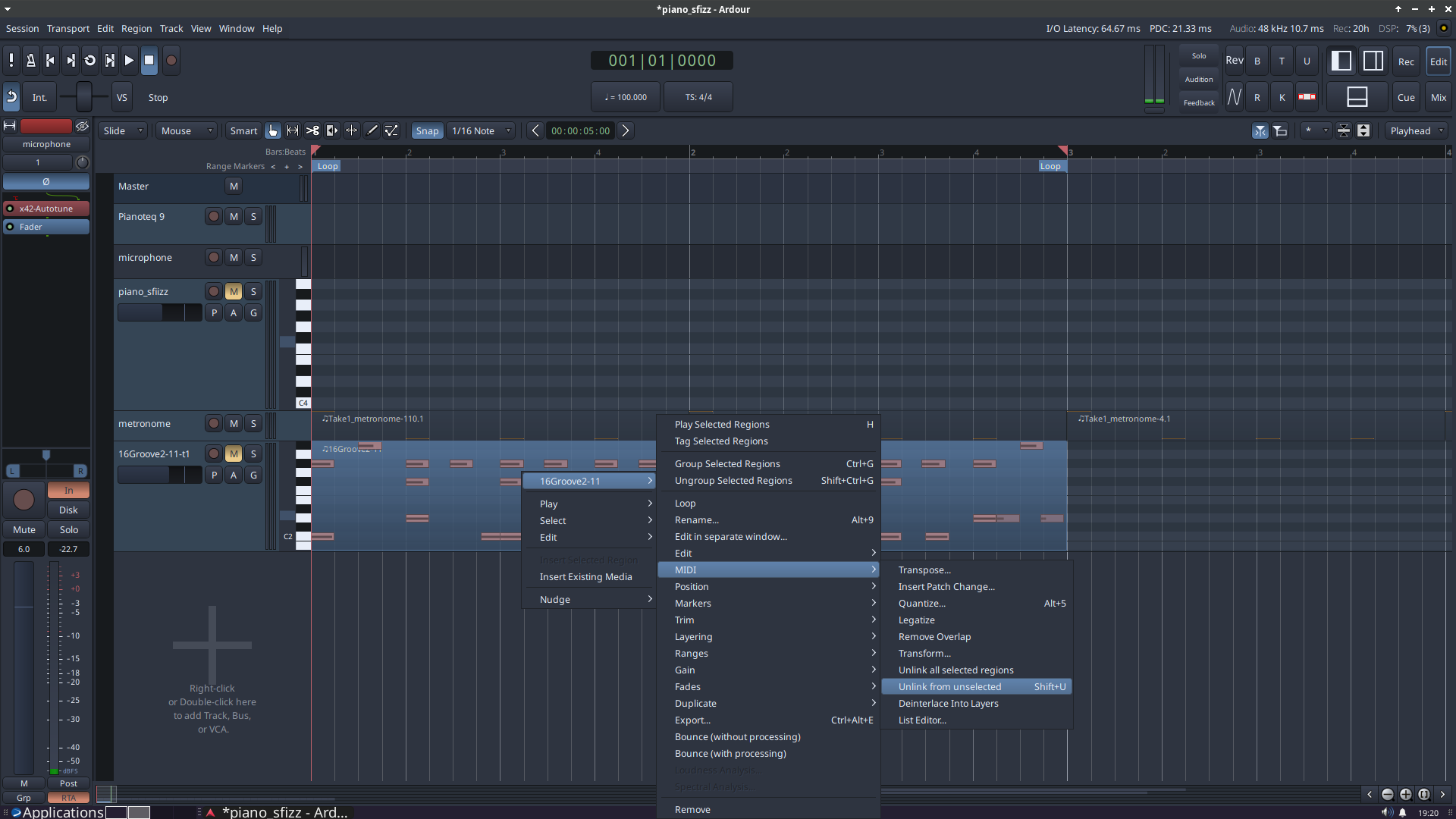
region-name(top of menu) → MIDI → then both: “unlink all selected regions” and “unlink from unselected”.
For the latter there is a shortcut “Shift+U”
If Session properties are set to unselect “Midi regions copies are independent” (which was the case in earlier ardour versions, iirc), it might be a little help, depending on your workflow, even if it is the other way around than what you ask for.
I gotta admit though: to me that workaround is also quite awkard, and i don’t really use it.
Most of the time i just copy the region after i am finished with editing it. And if i later edit it again, i just delete copies and copy them again (which only works for very basic situations, so is a quite awkard too).
On a chat note. as “long copied regions are linked” was the default, i screwed it all the time by forgeting it is a linked region i edited. So for me the new default sure is better .
I asked pretty much the same in the past, and right now there is another thread about a similar topic, so it seems there is not exactly the solution you ask for (at least not right now). But wait if someone else knows about it. It sure would be very nice.
PS/Edit: Like 10 minutes later i searched for something different, and learned you can group regions. I don’t know if that might help, doesn’t look like it to me right now, but you might want to investigate: The Ardour Manual - Corresponding Regions Selection
This is a valid question and I don’t think it is possible but it would be very handy if there would be an option to make a linked copy of a region (not depending on the setting in Session Properties).
Something like an additional option to Duplicate in the menu: “(Multi-) Duplicate linked”
It also would be handy if it’s more clear (visually) which regions are linked to each other. The only way (besides maybe the name of the region) is to open the Editor List and select the source.
Like n4dir I screwed up a lot of midi regions in the past (forgetting to unlink before editing) so nowadays I also default to independant region-copies.
With a clear mark that differences linked and unlinked regions and the possibility of duplicating them linked or unliked, I think Ardour would work better without danger of changing undesired regions. I hope for that functionality
 .
.
 Like n4dir I screwed up a lot of midi regions in the past (forgetting to unlink before editing) so nowadays I also default to independant region-copies.