I have a live recording in Ardour 8.12. Two of the tracks represent the stereo output of a keyboard. Now in post processing i would like to handle these tracks as one stereo track with stereo eq, stereo compressor and so on. How can i transform these tracks to a stereo track?
I dont want to use a group. These tracks are members of a bigger instrument group yet.
You could send them to a stereo bus and bounce them. If you save the “bussed” setup you can always change and export the stereo track and the single mono tracks independent from project progress. Usually a typical procedure for control-obsessed lead guitar neurotics.
Edit: Save the session as a snapshot I somehow forgot to mention the important bit of it.
It sounds like you should have used a stereo track to record that.
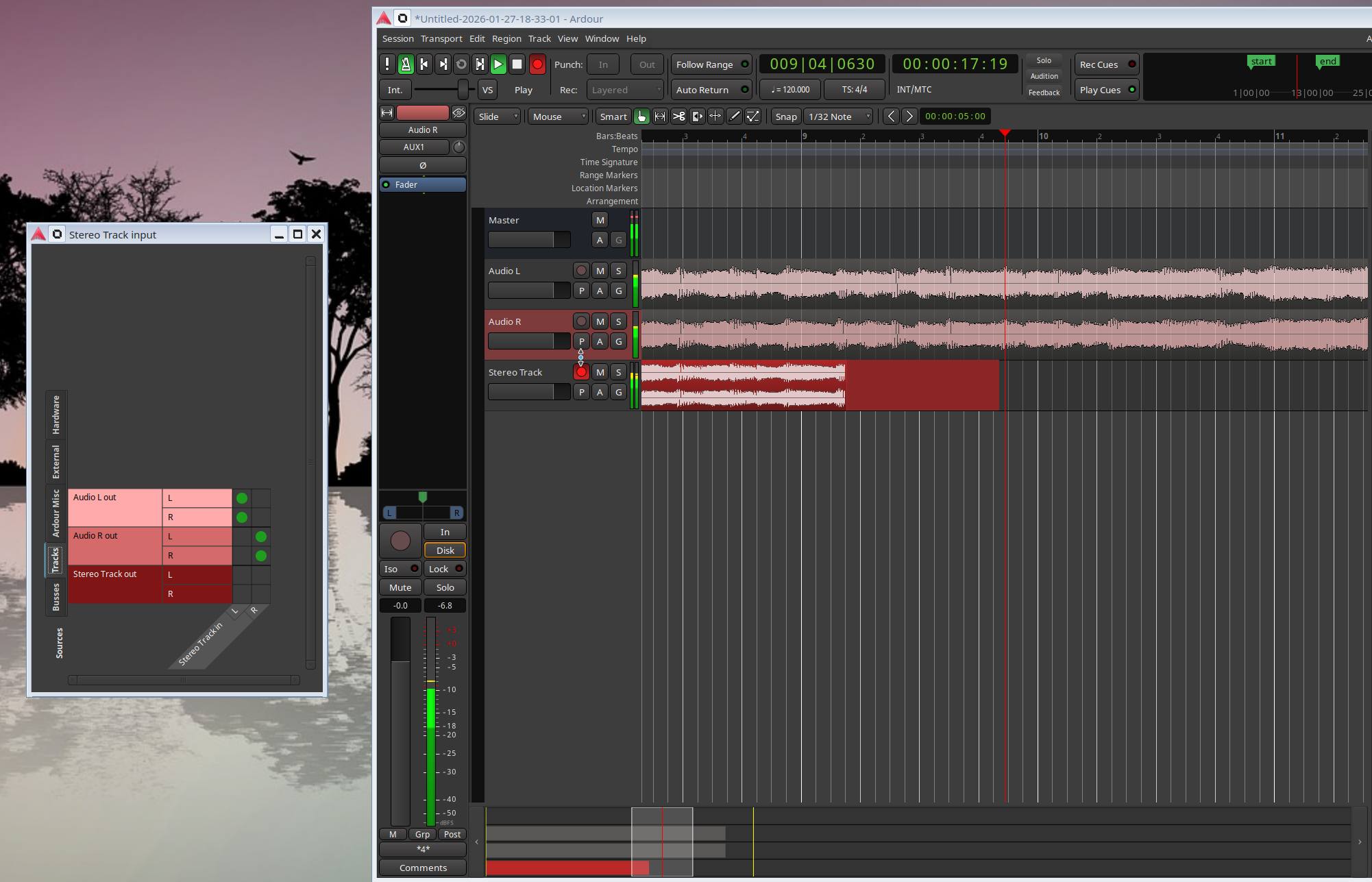
There’s a few ways to do that but, probably the easiest, is to create a new stereo track and connect the outputs of the mono tracks to the input of the stereo track:
Your answers let me try to add a stereo bus and route the unprocessed mono tracks lo left and right of this bus. All processing lives now in this stereo bus. It’s an easy solution for me.
I was just thinking about this topic the other day. I haven’t tested this in a while, but doesn’t bouncing tracks by connecting outputs directly to inputs results in a delay? I was thinking that stem export and re-import was the way to go.
(Note: I’m more accustomed to Mixbus than Ardour. Not sure if there’s a difference.)
Yes, and I think, even creating any new file for this simple goal (converting two mono tracks to a single stereo track in ardour for post processing) is no good idea. I would never change anything inside the audiofiles folder, because here lives the holy part of the project, the essence of an unrepeatable recording session. I would never touch any file or copy or bounce them here or there. And I don’t understand, why it is necessary.
Why does Ardour not offer a kind of stereo track you can associate two existing files (or region lists) as left and right to? I would say: Select two mono tracks → right click → “combine to stereo”. And instead of the two tracks a stereo track appears which shows both mono region lists as a group and routes them internally to left and right. All processing would be like in any stereo track, but ardour reads the data out of mono files.
Okay, but the simple routing of two mono tracks to a stereo bus for further work is alright, too. Simple and effective. I don’t know why I needed this post to have this idea
It does! But that happens when importing, not after you’ve captured audio data already. If you import two files A%L.wav and A%R.wav, then they will (generally) be combined into a stereo track called “A”.
We just don’t currently provide a smooth workflow for “oh, I made a mistake when I recorded this, I meant to do it in stereo, now I want to take what I recorded in mono and turn it into a stereo track”.
It could be done with a Lua script if someone cared enough to write it, I think.
Just FYI, unless you embed audio files (use them in a sesson without copying them “into the session”), all audio files that ardour uses are mono.
Could a new stereo track be created, and the existing mono files be imported?
I created a couple of test mono tracks, and tried importing track 1.wav and track 2.wav, but the import dialog has “Mapping: one file per track” and “Mapping: sequence files” but no option to “import multiple files as multi-channel track.”
I don’t see an obvious way to import two mono files into a stereo track.
This seems broken, at least in 9.0-rc4. What is supposed to happen: We follow the ProTools convention. If the files are named XXXX%L.YYY and XXXX%R.YYY, we offer “All files in one track” as an import disposition.
So even when the feature is working again, for that to be relevant to the originally described situation the tracks would have had to be named track 1%L and track 1%R or similar before the option was available.
If the tracks were named something like track 1 Left and Track 1 right then the corresponding wav files would not fit the naming pattern and so the option would not be offered.
Is that a correct understanding?
But you could relatively easily make a Lua script where you could select any two mono files (-but of the same length and sample-rate, of course (-I honestly don’t know what Ardour would do if you gave it otherwise, haha O_o )), located anywhere, and have the script execute commands to:
Automatically duplicate the files into the …/interchange/session_name/audiofiles/ directory.
Rename them with non-conflicting %L and %R endings accordingly.
Use do_embed and merge them, thus placing a single, new, stereo source in the Source List.
…
My copy-paste script already does most of this in a certain part of its Pre-Paste (importing/embedding) logic. I might make a handy import+merge script like this one day, sounds interesting…
I have encountered this a few times - files that should be LR stereo are supplied as 2 separate files, L and R. I just use SoX to merge them into a stereo file before importing: sox file_L.wav file_R.wav -c 2 file_Stereo.wav -M
They are still saved as 2 separate L and R files in the audiofiles folder but will appear as a stereo channel in Ardour.
Right. Additional to getting all religious about these truly holy files, I’d definitely recommend creating a ritual backup. You could still delete it after you’ve finished the project and until then rely on it - additionally to trusting the deities of storage and the ritual of not disturbing the Shrine of Recordings.
 But you know, it’s always no time on live events to bring all to an optimum.
