All right! Then how would you suggest I compile based on that? The way I did the compiling was using the Terminal and downloading it directly from git using git clone and the URL.
sudo apt-get install git
mkdir ardour
cd ardour
git clone git://git.ardour.org/ardour/ardour.git
cd ardour
./waf configure
./waf
sudo ./waf install
What would I need to modify to make it compile the 8.6 file I downloaded instead?
The directions you posted would get you the current git snapshot (More recent than the latest release and not always stable though ideally should be) and certainly not 6.9.
Because you posted the waf install step, I am guessing you are running a different version of Ardour installed on your computer, can be confirmed by running which ardour. To run the version you compiled by in the directory you ran ./waf and instead run ./gtk2_ardour/ardev which should run your compiled version.
Seablade
EDIT: Fixed ardev command per @x42 's post (Thanks for the reminder)
As seablade mentioned running waf install is highly discouraged, unless use a DESTDIR and package ardour.
The reason for this is that there is no clean way to uninstall Ardour. Your system may end up with a mix of different versions of Ardour, which can cause issues.
When compiling from source, ideally run Ardour from the source-tree:
./gtk2_ardour/ardev
(this will also allow to get properly annotated backtaces in case you encounter issues.)
Thanks for the help! Question, where do I find the executable in the folder to be able to make a desktop shortcut? Running it through the terminal every time seems a bit annoying to me.
At least when I used .waf I got an automatic shortcut and everything.
Never mind, I figured it out! What I basically needed to do was make a .txt-file and type in this code:
cd ardour/ardour
ardour8
Then I saved it as .sh and put it in the ardour folder where I saved it in Home/ardour. Once done I R clicked Ardour8.sh and went Properties → Permissions to activate “Allow executing file as program”.
After that I installed Alacarte with:
sudo apt install alacarte
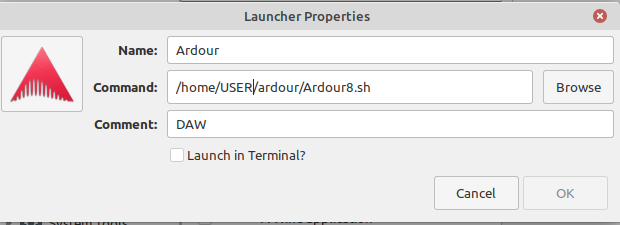
Then I made a New Item and added the Ardour8.sh file executable and an icon I found inside …/ardour/ardour/gtk2_ardour/icons to make it look like a proper software:
After pressing OK I now have an executable shortcut of Ardour 8.
To modify this shortcut script for future releases I will just open the .sh-file in a text editor and replace “ardour8” with another number like “ardour9”, etc. The advantage of this is that I don’t need to install anything, just update the source files and reuse my shortcut script.
And as someone pointed out in an earlier post the script recommended in the build instructions to run from the build tree is ardev, not ardour8:
cd gtk2_ardour
./ardev
What does the output of “which ardour8” show when run from ardour/ardour directory? Is it possible you have a distribution version of ardour8 installed and it is actually launching that? Or have you moved the ardour8 script up two levels in the directory tree?
Given that waf install was run earlier in the thread, it may be the installed/compiled version that is being run, which as Robin mentioned above may cause issues down the line with future versions as there is no clean uninstall option like that.
Well, the code works fine and it’s installed in my Home folder, which is good enough for me. I don’t need to access gtk2_ardour nor ardev to run the software.
Just running ardour8 or some other number in the code launches the correct version from the source code. You can even open older versions by typing using ardour6. Once you’ve accessed the ardour folder with the source code you can just run it with no issues.
I completely cleaned out the folder where I installed it and just downloaded the source code without compiling, so unless there are other folders out there where files are located there is nothing else left from my waf install. I don’t need to do anything else except update the source code from what I’ve seen.
The reason why it is not a good general solution is that it will only remove the files that this particular version of the source code would have installed. Which may be too much, not enough or just right.