Clear edit points on a track

Is it possible to clear edit points on a track, like you can for the Fader?

I thought it was a good idea to use the edit the gain on the track itself, just to save space in the view. Then, I wanted to combine different part on that track, using Consolidate - Combine, which “saves” the gain edits to the track itself, instead of being able to continue editing the existing points.

So, I wanted to clear the edits and use the Fader instead, but I had to delete each single edit point.

Right click on the track header and choose “Clear”

Alternatively, while the pointer is in the automation track, press Ctrl-a (Cmd-a on macOS) then press delete.

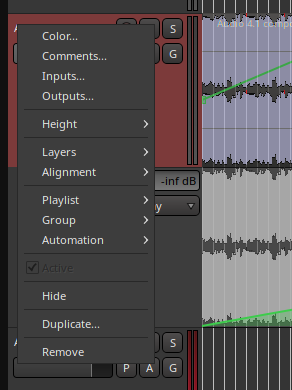
I don’t see a “Clear” in the menu when i right click the header of the track:
bilde

I’m not sure if I understand the second suggestion. I mean, I’m not trying to clear an automation track (like the Fader). And even if I do press Ctrl-a with the pointer in the Fader track, nothing happens for none of the tracks.

The header of the automation lane you want to delete points from …

It looks as if you’re using region gain, and want to clear that ?

Yes, I guess region gain is the right term. Sorry.

Use the second method then.

In grab mode (G), right click, gain, reset envelope

That resets the single “fixed” region gain, not the gain curve.

Yep, that works too. It’s a bit weird that you have to go back to object mode (“g”), but …

I have tried just now: press D, make some change, press G, reset envelope and the region gain is back to unmodified.

Or maybe we are talking about different things? (I have edited the message above with the correct terminology)

Grab mode and reset envelope worked! Thanks!

I’m not sure about the method with Ctrl-a. It didn’t do anything, and my printout of all the key bindings tells me it’s used for variations of “select all”.

Ctrl-a will work when in draw or internal edit mode and the mouse is inside the region. It does mean “select all” and in that context/mode, “all” means “all points in the region gain line”.
That makes sense, and I tried that, both in draw mode and internal edit mode, but it didn’t select anything. So I’m not sure what I’m doing wrong.

Actually this selects all control points everywhere in the session, looks like a bug !

I’m pretty sure that All means All, regardless of context.

Since there is no region selection in Draw mode, it cannot be region specific to begin with,