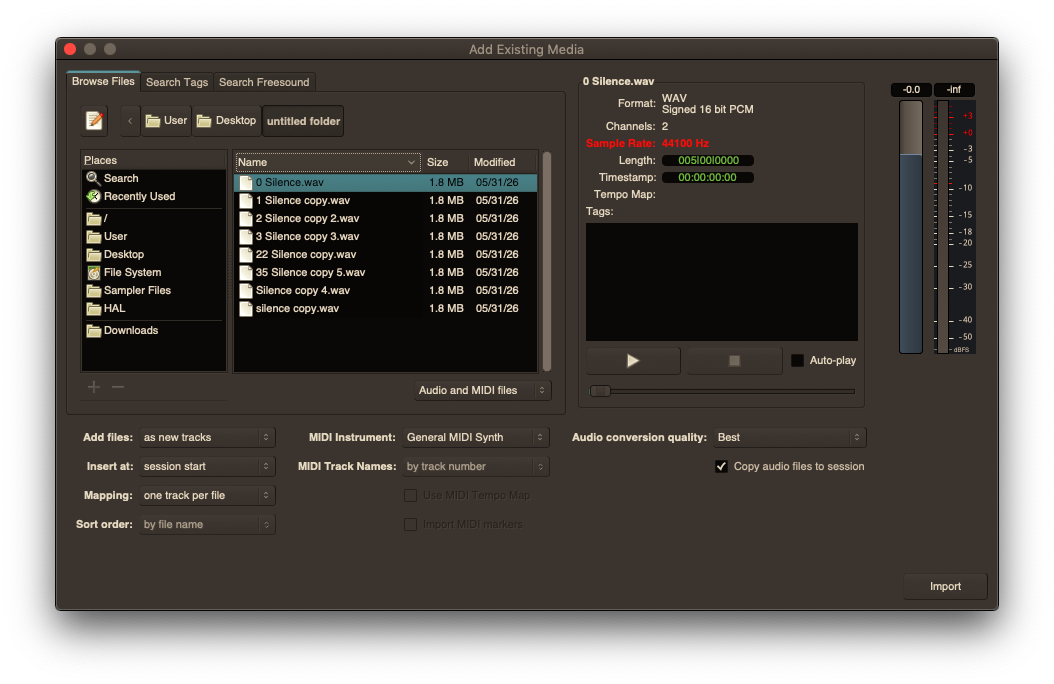
Ardour offers two main items that deal with folders / filenames
-Import window (Add existing media)
-Sidebar-Clips section
I made some suggestions about updating sorting to support sequential numbering (which developer gfontanilla was very kind enough to update all the sections I mentioned this issue occurring in, which I am very thankful for, makes sorting so much easier to understand now)
In seeing that modifications can be done to sorting, I was wondering if it was also possible to make other sorting changes?
Would any developers be interested in making other updates to how items sort within these two sections mentioned within Ardour?
It does not seem to bother other users but to me sorting is a very important thing that seems to be overlooked in Linux.
Maybe different sorting settings can be made available to users?
This way user can have some kind of control for how their folders/filenames are displayed in Ardour, overriding locale collating settings as much as possible.
I will share more information in a slight sorting rant below if anyone is interested
SORTING RANT
To me regardless of standard locale settings used/offered, Linux sorts items oddly.
Has always seemed (at least to me) like something that is a very important part of using a computer and yet is handled very poorly throughout Linux.
Each desktop environment handles sorting differently and on top of that each file manager, open file window, terminal command, etc. within a desktop environment and other applications all sort differently even on the same system.
At one time I tried to use storage drive for both Windows and Linux (as I imagine many users do) and it is almost impossible to setup a sorting method that is compatible with both systems.
In Linux, sometimes items that start with uppercase and lowercase letters are separated into different A-Z instances.
Sometimes symbols (underscores, dashes, brackets, etc.) are ignored, sometimes they show at top or bottom and sometimes above or below items that start with numbers.
etc.
Over the years I have been able to narrow down DEs / file managers / etc. that at least come close to using similar sorting methods but then as mentioned each application seems to use their own sorting decisions as well.
Again with folders/files being the basis for all computing, it seems strange that their has never been any kind of solution within Linux that would allow applications to just load a specific sorting file that a user can setup to their sorting preferences.
Anyways, I was just hoping Ardour could maybe provide some kind of setting for this. This way existing media folder/files could be more easily navigated/understood without so much confusion.
Thank you to anyone who reads this and for any info provided
You really have to make a very strong case for this and how this can improve a user’s workflow without them getting sidetracked into configuring their preferences.
Also I expect most users don’t scroll to find some source, but instead search for it, that is significantly faster.
As a person coming from Mac OS X / macOS, I agree with you here. Every GNU/Linux file organizer I’ve ever interacted with has failed to be as good as Finder…
However, is that not simply my conditioning? Probably yes, as Apple got to me early, as it’s all I ever had in my house growing-up. (Related: This is why Google corp. wants to get their Chromebooks into every school on Earth. -___- “Smart”, but fucking evil.)
So, question for you: Have you always exclusively used GNU/Linux machines, or did you at some point migrate to GNU/Linux from either Windows or Mac?
…
Also, what’s wrong (in your opinion) with this sorting anyway, at least in the main import/embed window here?:
You know it would not hurt for you guys to agree with me every once in while
Thank you guys for the responses.
@42
I am still interested in this topic, I personally think this is rather important. I have a lot to say on the topic but have been debating how much to post about this, sounds like this is another topic that is not going to be viewed with the same level of importance as I am viewing it as.
To prevent this post from closing, I have some info to share / questions that will hopefully give me some context on how you and maybe Paul would view the importance of sorting / file management overall.
DIFFERENT SORTING METHODS USED
There are obviously other file browser based windows in Ardour, but I will focus on the following two Import window (IW) Clips sidebar (CS)
-These two browsers are mainly going to allow a user to interact with their sample collection.
-Sample collections can easily consist of hundreds of folders and thousands of files.
-Keep in mind that most users are downloading sample packs online.
-Those sample creators may be using a different OS/file manager with a different sorting method.
-On top of that many sample creators can use strange naming in general for their samples.
Very hard to present this without going into detail to explain but will just mention this topic as simply as I can for now.
-Users will organize samples in a 3rd party file manager.
-That 3rd party file manager will have its own sorting method that user will have to follow.
-Then user uses Ardour and opens up IW and CS to navigate through their sample collection only to realize that Ardour uses a different sorting approach.
-Not sure if anyone is aware of this, but IW and CS both use completely different sorting methods then one another!
-IW uses a sorting method that can be altered by Linux locale collate setting, but still does not match 3rd party file managers sort.
-CS uses a static sorting method (does not change based on locale collate setting).
-So 3rd party file manager does not sort the same as the IW, which does not sort the same as CS.
-This means that user has to deal with 3 different sorting methods which is very confusing.
-Would be almost impossible for the user to become familiar with navigating through their sample collection.
RESPONSES TO COMMENTS MENTIONED
Your comments about “time” and users getting “sidetracked” by having to use a setting to correct an issue confuses me.
It sounds like you are referring to the time it takes for user to have to adjust a setting as being the thing that would get the user sidetracked.
I also think this issue is more then just a “time” based issue.
Time / Sidetracked
Pictures are nice and all, but this isn’t like debating the time it takes to create a script vs doing the action manually.
To me folders and files are one of the foundations of using a computer. If a user takes time to follow a naming structure, the idea is that that user becomes very familiar with that structure.
And because MOST applications deal with user interaction with folders and files, having a consistent structure, I would say is important for workflow.
Have you ever used a program and noticed something that is strange based on your desired workflow? You then immediately look into the many settings and hope to find an alternative to that behavior. If that setting exists and corrects the problem, have you ever viewed it as, man there were so many settings I had to go through to correct that behavior, or were you just happy that the setting existed?
The developer put time into providing a solution for an issue, and that time then carries over in helping out multiple users to avoid that issue. Rather then having to deal with the issue over and over and over with each use of that application, those multiple users now no longer have to waste their time.
So I view the undesired behavior as being the thing that could get the user “sidetracked”/disrupting workflow, not the process of user having to go through settings to change the behavior.
Search
-I view this a little differently as well.
-Yes, a search can be quicker, but it is based on the assumption that user will always know exactly what they are looking for.
-Even if search is used, results may still end up in a strange sorting order.
-Also, as I mentioned above, most users are getting sample packs from online. Sample pack creators do not always choose to use normal naming conventions, so searches may not find
-Users may want to navigate through their collections manually to preview samples
Do you guys view having 3 different sorting methods (2 internally) as being an issue?
Do you guys feel that IW and CS sorting should match each other?
After all that I mentioned above, if you still do not agree with my suggestion for a sorting setting / still feel that having to change a setting will sidetrack the user. Then this would mean that some kind of default sorting would need to be established.
Then because IW does not follow system/file manager sorting anyways, would it be possible to be able to override the sorting used in IW?
Meaning lets say the sorting used in CS (which needs some updates) is considered the desired sorting used by Ardour.
On a coding level could the CS sorting method be applied to the IW? So they match?
I am not expecting you guys to have to do any testing of this.
If I am willing to put the time into presenting the differences and my suggestions for updates, would anyone be interested in working on this with me?
I already have a good amount of this ready.
Again I have lot more to say but will wait for answers.
Seems to me there’s a lot of conditioning done to us . I’m also struggling with it sometimes…but i’m aware of what it actualy is - decades of Windows&MacOS. Luckily, i also remeber the times before.
Lots of menus&windows found in Linux apps look&function like they come from Commodore Amiga space adventure games. When you find " .\ " (or was it " \ … " ?)that represents “back” you immediately know - this window is designed by a programmer with no user on the horizon.
Now, that being said, there’s things to complain about in Ardour, of course, real problems, but oftenly it’s very hard to draw a distinction line beetween what’s a real problem and what’s just a preference baked-in by years of conditioning.
Probably not worth mentioning but will share a couple things noticed if anyone is interested.
LETTERING
The following items (and probably others that I have not mentioned) use a sort method that splits uppercase letters and lowercase letters. Sidebar - Clips Sidebar - Sources Sidebar - Regions Session Window (If user has to use collate=C which I have to) Import Window (If user has to use collate=C which I have to)
Current Sorting Used:
A
B
Z
a
b
z
Not sure about anyone else but I view letters as letters regardless of their casing.
Suggesting to change sorting to sort all letters together.
Suggested Sorting Used:
A
a
B
b
Z
z
Would this be viewed as a “very strong case” for something that would be willing to change?
Less likely to be considered but I think these are worth mentioning/updating.
SYMBOLS
Symbols are often used to make items sort at the top of lists.
The sorting used in Sidebar - Clips implements this approach which is great.
(note: there are some symbols that do not appear at the top of list but probably not worth mentioning them)
Import Window/Session Window
(If user has to use collate=C which I have to)
These windows use a very different sorting approach of symbols which can be confusing
1kick
5kick ---kick (now all symbols are below numbers) --kick -kick
Akick _kick (underscore symbols at the bottom and now in reverse order?) __kick ___kick
Ideally these windows would be programmed to match the symbol sorting approach used in the Sidebar-Clips section.