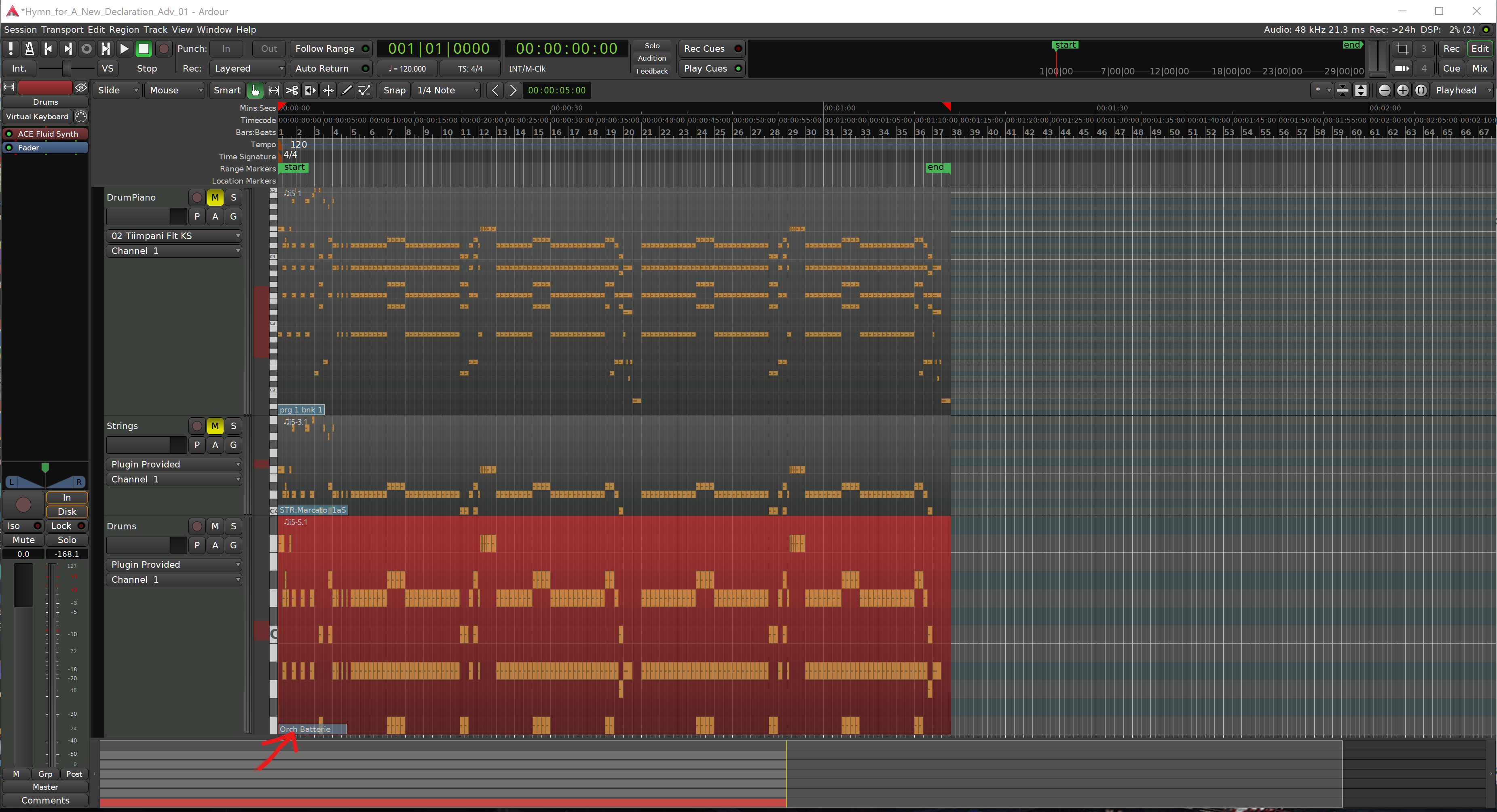
I’m hoping someone can help me. I think this question is linked to this thread.
I double click on the ACE Fluid Synth and it brings me up to a Midi program window… I select my SF2 file, but when I choose all the instruments to be the one I want to play on that track: whenever I click play it turns C4 (Channel 4, I’m guessing) back to the original one it had selected.
I don’t know how to stop the behavior, and because of that I can’t make progress.
Oh wow, I may have just fixed it: in the Track Area, under “Plugin Provided,” there’s a pull down that was set to Channel 1. But if I set that to Channel 4, then the instrument doesn’t change back in the Midi control window. I don’t know why that should fix it… there must be some hidden place where the midi file is targeting Channel 4 and I have to match that. Ugh.
If there is a MIDI patch change, it will show on the MIDI track as a box with the patch name when viewed on the EDIT page. You can press ‘e’ (shortcut for edit’, select the patch name with a mouse, and hit delete. You can also add patch changes with right click on midi region, select MIDI , patch change. You may have to select the region before you hit ‘ e’ though.
I think that nudged me somehow to get it fixed… I’d been trying to interact with that little box down there (and missed how to upload this picture until just now) and somehow after your post, I was able to do it.
It looks like hitting “E” was the key: “Internal Edit Mode.” Interacting with the patch code wasn’t possible until then. (It also brings up the notes, and so most tutorials and even the video snips in the manual I now realize are in “Internal Edit Mode.”
Once I was able to right mouse click that little blueish box, I could select the right instrument.
I was beginning to read through the manual starting at midi, then I skipped down to MIDI list editor (skipping over the section you just sent me).
So you really, really helped me out. It’s fantastic that this community is this fast off the mark helping us out. Wow.