Hello - is there any way I can create a key command to place a new CD marker at the playhead location? I am not seeing a place for this to be entered in the key command preferences.
Any help with this is appreciated, as I’ve adopted Ardour as the main DAW app for my professional mastering studio - https://totalsonic.net
There is no pre-defined action for adding a CD marker (an omission, but caused partly by the demise of CD as a format However, there is a lua script for adding a CD marker, and that can be bound to one of the lua shortcut buttons and driven from the kbd.
Paul - thank you for the reply. Is there a link available to this lua script? Is there a tutorial available for using them with Ardour as well? I’ve never used lua so don’t know what is involved in implementing this for my setup, but any pointing to documentation is appreciated.
Regarding “demise of the CD” - I can imagine for most people using Ardour they don’t need CD markers, but I am still mastering about once a week for the format, and it’s been making a mild resurgence in demand recently as well. Ardour’s output to cue+wav allows me to import quickly into Sonoris DDP Creator Pro, where I can create DDP files for direct upload of masters to CD manufacturers.
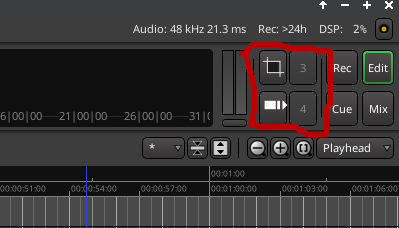
Top right of ardour in editor-view there is a symbol for the lua-script shortcuts. See picture.
You click on one not assigned yet (in picture 3 or 4) , in the popup-window you then click on the field which says “shortcut” per default, and in the opening drop-down list you pick “add CD Marker”, which is the third in the list (assuming that is the correct one).
How to use a keyboard-shortcut to it i don’t know (i just click on those symbols i don’t know the correct term for. In preferences they called “Action buttons”).
Don’t take my word for it, i might have misunderstood.
 However, there is a lua script for adding a CD marker, and that can be bound to one of the lua shortcut buttons and driven from the kbd.