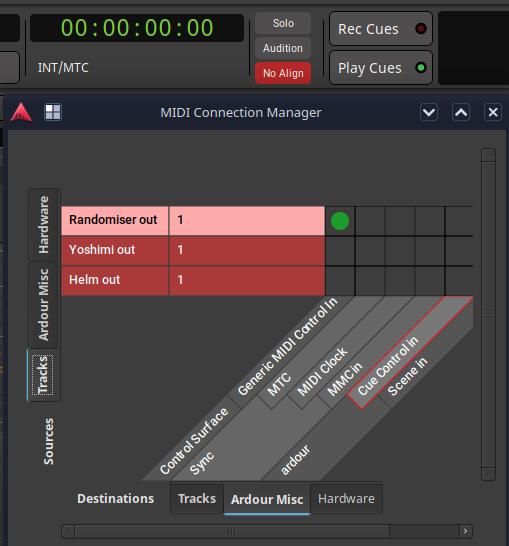
In this topic I tried to send CC from one track to another. Just setting the MIDI output to another track’s MIDI input doesn’t work*. I tried to connect a track’s output to the MIDI control in channel via the midi connections manager but this doesn’t work with MIDI Learn* and it pops up the No Align light. I don’t know whether that is supposed to work or maybe the ability to make that selection shouldn’t be there?
*Edit: I should clarify that this is for Ardour’s controls and for the purposes of recording automation. Plugins with their own midi learn can receive the CC
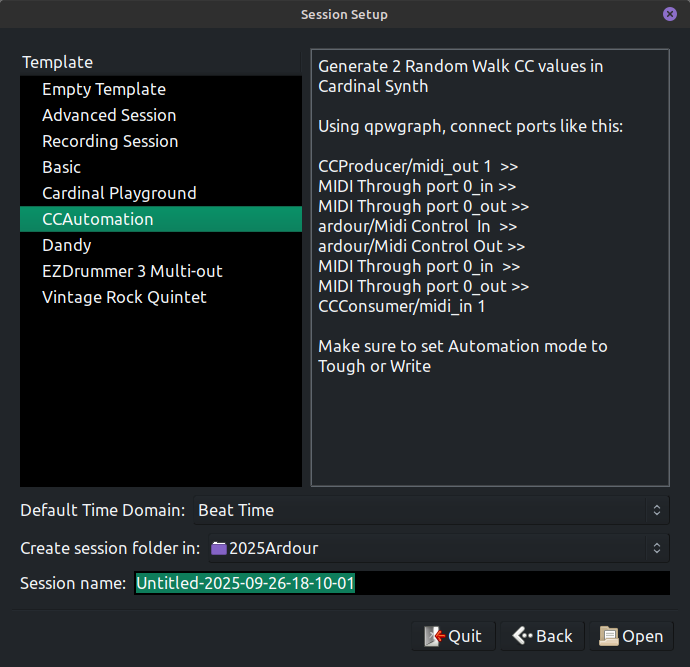
Sorry for the delay. I’ve put together an Ardour template called CCAutomation. Try unpacking the gzip in your local templates folder. It will hopefully set up all the routing, otherwise they are shown in the screenshot below. Pre-requisites are Cardinal Synth and ACE Reverb, but if you can get it to work, you can use whatever you want.
Right now, it is set up to use the 2D Walk module in Cardinal. One variable is mapped to CC 1 which controls the track fader, the other is mapped to CC 11 and controls the Reverb Blend parameter.
That is unlikely to work correctly, and as you mentioned “the ability to make that selection shouldn’t be there”.
Control surface data is processed at the start of each process cycle, and may perform operations on tracks or plugins. This happens before the MIDI track runs and produces output.
Besides, In theory you could MIDI learn a Fader to itself, which produces a feedback loop, and an ambiguity regarding port latencies (1 cycle offset).
In any case, we cannot prevent JACK users who use a 3rd party patchbay application from making nonsensical connections, and hence Ardour also needs to show them in the connection matrix.
Yes, I’d like to say I didn’t open the wrong CC lane instead of pressing show existing automation but I can’t
It would be nice to be able to automate parameters with plugins and not have to resort to nonsensical connections though. Also, if you have a midi file with CC in and want to link it to a plugin parameter via Ardour, this seems to be the way to do it as well. Unless I am missing something (likely).
I generally don’t know what the hell I’m doing. I tend to just make things up as I go along. Sometimes it even works, and occasionally it’s repeatable.
Not a way to link but there is a lua script called Midi CC to plugin automation which converts the CC of a midi file to processor automation. However if the plugin has plugin automation parameters in sub menus then they don’t appear as a choice in the script. This is an issue in another script (add LFO to plugin parameter) so it might be a bug.