Hello, I don’t know if this is a question about theming, ghosting, a bug, or a different point of view.
When I record multiple MIDI takes with my EWI, CC2 for the Breath Controller gets recorded to the “automation” lane (in the picture below I was testing different Breath Sensor gains for my AKAI EWI-USB). I record my MIDI as Opaque and Layered, but the CC lines show up for all the takes, not just the top (if overllaid) or selected (if stacked).
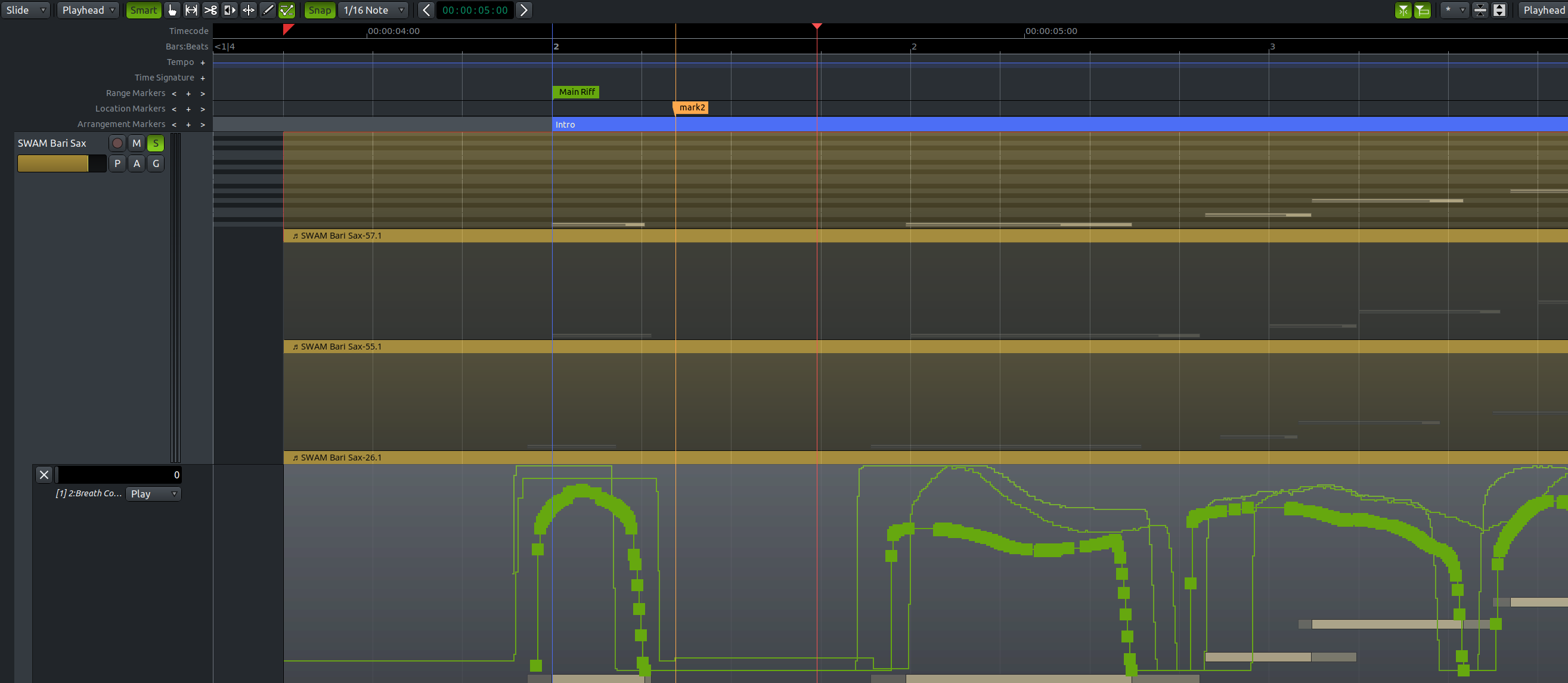
Here the takes are shown stacked and while the CC point boxes show up according to which take is selected, when you select points to edit, it also highlights point boxes on lanes from the unselected takes (though they do not appear to be affected by any drag editing).
I noticed a difference in appearances between G-mode and E-mode, across different themes and, for example, the Arc theme only shows CCs for the selected take when in G-mode, but shows all when in D- or E-mode. Not sure how this works. Transparency?
So I guess my questions are,
1.) Can CCs from unselected takes be hidden or dimmed/ghosted in Edit mode using themes?
2.) Is showing CCs for multiple takes a bug or intended behavior?
3.) Should I quit whining, remove the unused takes, and move on with my life?
Thanks.
Sidenote: interesting discussion of the merits (or not) of moving CC with notes here. +1 for mouse modifier
 )
)