I need to upload my tracks to a shared drive, so that collaborators can download them and import them into their own DAWs. So I basically want click tracks that are in sync with the measures in my Ardour projects. I tried assigning the master bus as the input for the track I wanted to record it on, but apparently the metronome doesn’t go through the master bus. Is there a way to do this?
Hi, that one is easy
if you open the Audio connection Manager (menu Windows → Audio Connections or Alt+P), the metronome (Click) appears as one of the sources in the “Ardour Misc” category.
Simply route this to the input of the track you want to record to 
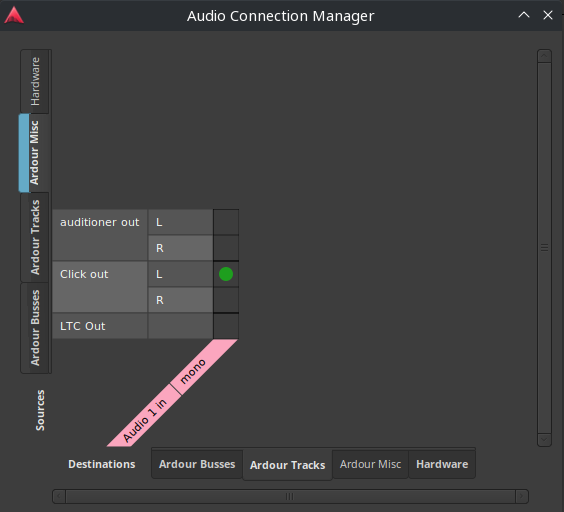
And there you go !

2 Likes
While an additional click track does not hurt, I always share my tracks without and do not have any issues - back and forth - as long as I do not use tempo changes - and my counterpart uses the same bpm. Proven across DAWs …
Thank you. I looked in the connection manager, and I might have figured it out if I had not named my own click track “Click”. I thought “Click” referred to my track - I didn’t realize it was the metronome.
This topic was automatically closed 28 days after the last reply. New replies are no longer allowed.