If only i had a MONO button somewhere in (some (Master)) Channel(s) to check for Phase issues while Miking Amps. 
And oh, yes Thanks for Ardour!
If only i had a MONO button somewhere in (some (Master)) Channel(s) to check for Phase issues while Miking Amps.
And oh, yes Thanks for Ardour!
Ardour Menu > Session > Monitor Section > Use monitor section.
This adds The Ardour Manual - Monitor Section to the mixer and also a mono button to the main application bar.
The nice part about this is that it only affects monitoring, not the master-bus itself during export (you can also add FX there that are only used while monitoring, e.g. room correction EQ).
Damn, you managed to write it before me!
Dankeschön! you`re a Rockstar! 
And its been on my Mind for years.
Hehe, yes, sometimes, things are closer than one believes!
Definitely in my top-150 buttons in ardour.
For double checking mono compatibility I tend to use a stereo correlation meter, in my case the one from https://x42-plugins.com/x42/x42-meters:
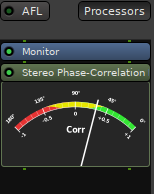
Ardour also includes the DSP, but so far only a half baked GUI for it, so it is not shipped with binaries but when running from source there is “ACE Inline Correlation Meter”. A Lua script: ardour/share/scripts/_correlation_meter.lua at master · Ardour/ardour · GitHub
Oh, yes that’s awesome, but i should not let to much distraction in in my, - what was that? - or i might loose Fokus again… and never finish my Music… And always trust your Ears they said…  Thank you.