Building with MSVC, PowerShell. Errors

I believed it’s a good idea for me to make a separate thread on building with MSVC, so here it is. I ran the following commands on PowerShell without admin, but you can do otherwise.

I’ve skipped over the installation of MSVC and having to restart.

mkdir C:\dev 
cd C:\dev 
git clone https://github.com/Microsoft/vcpkg.git
cd vcpkg
.\bootstrap-vcpkg.bat -disableMetrics
.\vcpkg install boost-headers pkgconf glib glibmm libsndfile[core] curl libarchive[core] liblo taglib vamp-sdk rubberband fftw3 aubio libpng pango libsigcpp cairomm pangomm libxml2 serd sord sratom lilv libusb jack2 lv2 libwebsockets boost-ptr-container boost-uuid

Notes:

  1. The above command took 2.4 hours to finish, for me. The vcpkg folder ended taking 12.9 GB.
  2. libusb isn’t mandatory in configuring, but when I built using msys2, there was an error which was fixed by installing libusb and then reconfiguring and building, but that reset the build progress.
  3. jack2, and libwebsockets aren’t mandatory either. you can drop their names from the above command.
  4. If you want jack2, do the following: (gc C:\dev\vcpkg\installed\x64-windows\lib\pkgconfig\jack.pc) -replace 'Version: 1.9$','Version: 1.9.22' | sc C:\dev\vcpkg\installed\x64-windows\lib\pkgconfig\jack.pc
  5. If you want libwebsockets, do the following, else the configure won’t find it:
@'
prefix=${pcfiledir}/../..
libdir=${prefix}/lib
includedir=${prefix}/include

Name: libwebsockets
Description: Provides fast throughput in both directions as client or server.
Version: 4.4.1
Libs: "-L${libdir}" -lwebsockets
Cflags: "-I${includedir}"
'@ | Set-Content -NoNewline -Encoding UTF8 "$env:PKG_CONFIG_PATH\libwebsockets.pc"
  1. I’m uncertain about boost-ptr-container and boost-uuid, but I’m not removing it (yet)

A few more commands to run, before dealing with Ardour’s files:

sc C:\dev\vcpkg\installed\x64-windows\tools\pkgconf\pkg-config.bat '@"%~dp0pkgconf.exe" %*' 
@'
prefix=${pcfiledir}/../..
libdir=${prefix}/lib
includedir=${prefix}/include

Name: aubio
Description: aubio library
Version: 0.4.9
Libs: "-L${libdir}" -laubio
Cflags: "-I${includedir}"
'@ | Set-Content -NoNewline -Encoding UTF8 "$env:PKG_CONFIG_PATH\aubio.pc"

Now, to download Ardour.

cd C:\dev 
git clone https://github.com/Ardour/ardour.git
$env:PATH = "C:\dev\vcpkg\installed\x64-windows\tools\pkgconf;$env:PATH"
$env:PKG_CONFIG_PATH = "C:\dev\vcpkg\installed\x64-windows\lib\pkgconfig" 
$env:AS = "C:\Program Files\Microsoft Visual Studio\2022\Community\VC\Tools\MSVC\14.44.35207\bin\Hostx64\x64\ml64.exe"
(gc wscript)-replace"MSVC_VERSIONS.*","MSVC_VERSIONS'] = ['msvc 17.14']" -replace"glibmm-2\.4","glibmm-2.68" -replace"giomm-2\.4","giomm-2.68"|sc wscript
(gc libs/tk/ztkmm/wscript) -replace"sigc\+\+-2\.0","sigc++-3.0" |sc libs/tk/ztkmm/wscript 
(gc libs/tk/ydkmm/wscript) -replace 'cairomm-1\.0','cairomm-1.16'  -replace 'pangomm-1\.4','pangomm-2.48'| sc libs/tk/ydkmm/wscript

The purpose of $env:AS... is to get past the check for gas/gcc. The path will likely be different for you.

This will be enough to pass the configuration. But as you’ll see later, some files will need editing, and usually when a wscript changes, I have to run configure again. Also if you close and reopen powershell, and have to run configure, you’ll need to run those 3 $env:... commands again.

python waf configure --prefix=C:/Ardour2 --configdir=share --optimize --ptformat --dist-target=msvc --also-include=C:\dev\vcpkg\installed\x64-windows\include --also-libdir=C:\dev\vcpkg\installed\x64-windows\lib --cxx17

Now getting to the build, with errors… Well, they’re there. I feel like logging every error is hard, so instead I’mma share git diffs that I’m confident about.

Git diffs as of 30th October: 2681 lines libs.diff as of 30 Oct 2025 - Pastebin.com
For my latest set of errors: WARNING: MSVC does not allow symbols to be visible/exported by default while building clearlooks-... (might be outdated, sorry)

Ideally this check is only done once, during config stage and it’ll be a ifdef HAVE_GLIBMM (for glibmm-2.4) vs glibmm-3 which you are using.

But I expect that libs/tk/ytkmm/ will no compile with glibmm 3 to begin with, so you need to roll this back once you use glibmm-2.4

:sweat:
I’ve only gone up to [ 14/1838] Compiling libs\pbd\system_exec.cc

I still don’t know how to deal with

system_exec.cc
C:\dev\ardour\libs\pbd\system_exec.cc(25): fatal error C1083: Cannot open include file: ‘unistd.h’: No such file or directory

Also don’t know how to deal with the ones with ‘ardourext’:

C:\dev\ardour\libs\pbd\pbd\undo.h(35): fatal error C1083: Cannot open include file: ‘ardourext/misc.h’: No such file or directory
C:\dev\ardour\libs\pbd\pbd\debug.h(34): fatal error C1083: Cannot open include file: ‘ardourext/pthread.h’: No such file or directory

(The error link is currently up to date)

@John_E since you have a working MSVC build could you shed some light how you handle this? and how you use msvc_extra_headers/unistd.h.input ?

I checked that file on github, it’s something of a placeholder. Based on online searches, it’s apparently got to do with POSIX. I’m leaning towards the idea of some conditional for that, though I’m unsure which to use. An alternative might be updating the libs/pbd/wscript file, but that feels like a reach.

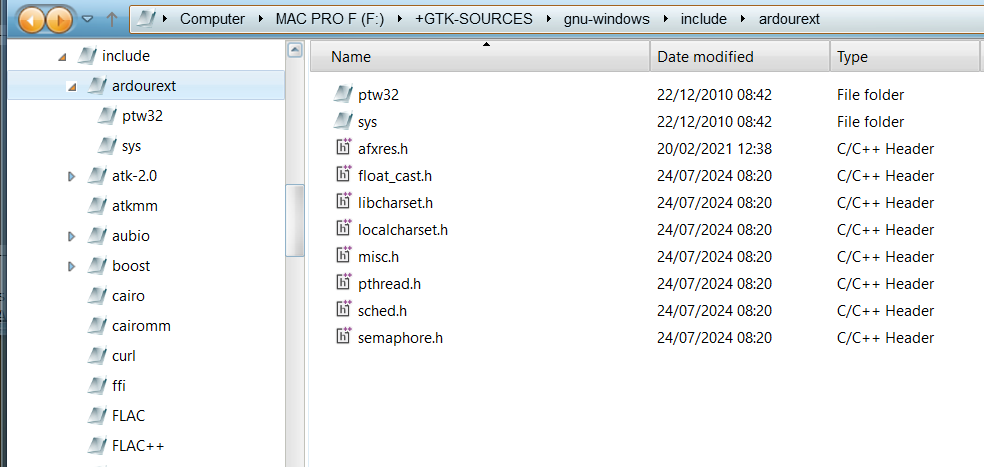
Hi Robin, I’ve attached a screenshot showing the contents of my ardourext folder here. Its contents are mostly those “.input” files but simply copied as normal headers.

The subfolder called ptw3 only contains pthread.h (i.e. the proper one) and the subfolder called sys contains time.h plus a copy of targetsxs.h.input (I might have edited some files though - I’ll need to check tomorrow)

Regarding any other .input files (e.g unistd.h.input) it looks like I’ve copied/renamed them into the overall include parent folder

Hope that helps…

Can we rename them in arodur’s source-tree, so that can be directly used as include folder?

Not too sure… in the early days, an MSVC build needed a slightly different version of libpthread called ptw32. It was the version used by a couple of support libs and crucially, by jack - which meant that Ardour needed it too. So simply renaming things would leave pthread.h part of Ardour, which probably isn’t desirable…

Okay, I’ve just checked here…

targetsxs.h has changed here - though mostly because of various experiments I needed to try at various times. If Stephen can’t make the current version work, I’ll try and figure out which changes are still needed.

[Edit…] I just pushed a new version of targetsxs.h.input with all my experimental stuff removed (except for the most recent experiment, which I’m still testing)

None of the other .input files have changed here and immintrin.h.input isn’t needed now AFAICT. unitstd.h.input is still needed but it’s just an empty file to prevent compilations from complaining that unistd.h couldn’t be found.

Hope that all helps…

I’m not convinced this was the best way to pass the checks for configure. I’ll redownload ardour and change these.

Edit: Simplified it (along with the msvc version line) to the following:

(gc wscript)-replace"MSVC_VERSIONS.*","MSVC_VERSIONS'] = ['msvc 17.14']" -replace"glibmm-2\.4","glibmm-2.68" -replace"giomm-2\.4","giomm-2.68"|sc wscript
(gc libs/tk/ztkmm/wscript) -replace"sigc\+\+-2\.0","sigc++-3.0" |sc libs/tk/ztkmm/wscript 
(gc libs/tk/ydkmm/wscript) -replace 'cairomm-1\.0','cairomm-1.16'  -replace 'pangomm-1\.4','pangomm-2.48'| sc libs/tk/ydkmm/wscript

Is it a good idea to delete the .vcproj files and the existing MSVC folders (MSVCvst_scan, MSVCMixbus3, MSVCardour3, msvc_extra_headers) and all .vcproj files? Or is it not recommended?

I ran the following :

'MSVCvst_scan','MSVCMixbus3','MSVCardour3','msvc_extra_headers' | ri -r -fo 
gci -rec -file -filter *.vcproj | ri -fo

After running the above commands, I searched for the remaining mentions of ardourext with gci -rec -file | sls 'ardourext' -ca , to get an idea of which files to change. The output was as follows (filtered A to Z):

libs\ardour\ardour\msvc_libardour.h:53:#include <ardourext/sys/time.h>
libs\ardour\port_manager.cc:25:#include <ardourext/misc.h>
libs\pbd\cpus.cc:39:#include <ardourext/pthread.h> // Gets us ‘PTW32_VERSION’
libs\pbd\file_utils.cc:57:#include <ardourext/misc.h>
libs\pbd\msvc\msvc_pbd.cc:37:#include <ardourext/misc.h>
libs\pbd\msvc\msvc_pbd.cc:38:#include <ardourext/pthread.h> // Should ensure that we include the right
libs\pbd\pbd\abstract_ui.inc.cc:36:#include <ardourext/misc.h> // Needed for ‘DECLARE_DEFAULT_COMPARISONS’. Objects in an STL container can be
libs\pbd\pbd\debug.h:34:#include <ardourext/pthread.h>
libs\pbd\pbd\msvc_pbd.h:31:#include <ardourext/misc.h>
libs\pbd\pbd\msvc_pbd.h:32:#include <ardourext/sys/time.h>
libs\pbd\pbd\pthread_utils.h:40:#include <ardourext/pthread.h>
libs\pbd\pbd\undo.h:35:#include <ardourext/misc.h>
libs\surfaces\generic_midi\generic_midi_control_protocol.cc:31:#include <ardourext/misc.h>
libs\vamp-plugins\Onset.cpp:18:#include <ardourext/float_cast.h>
libs\vamp-plugins\OnsetDetect.cpp:16:#include <ardourext/float_cast.h>
libs\vamp-plugins\PercussionOnsetDetector.cpp:38:#include <ardourext/float_cast.h>
tools\update_qm-vamp.sh:57:+#include <ardourext/float_cast.h>

An alternative is (gci -rec -file|sls 'ardourext' -ca).Path|Resolve-Path -Relative|Select -Unique , which only gives the relative paths without repeats.

.\libs\ardour\port_manager.cc
.\libs\ardour\ardour\msvc_libardour.h
.\libs\pbd\cpus.cc
.\libs\pbd\file_utils.cc
.\libs\pbd\msvc\msvc_pbd.cc
.\libs\pbd\pbd\abstract_ui.inc.cc
.\libs\pbd\pbd\debug.h
.\libs\pbd\pbd\msvc_pbd.h
.\libs\pbd\pbd\pthread_utils.h
.\libs\pbd\pbd\undo.h
.\libs\surfaces\generic_midi\generic_midi_control_protocol.cc
.\libs\vamp-plugins\Onset.cpp
.\libs\vamp-plugins\OnsetDetect.cpp
.\libs\vamp-plugins\PercussionOnsetDetector.cpp
.\tools\update_qm-vamp.sh

Usual mantra…if it ain’t broke, don’t fix it. :smile:

I assume anything involving ardourext is broken (though I’m aware it’s not true in your case).

I ran the following to replace all the mentions in my previous reply:

gci -r libs,tools -i *.cc,*.cpp,*.h,*.sh|%{$c=gc $_;if($c-match'ardourext'){$c-replace'ardourext/misc\.h','pbd/compat.h'-replace'ardourext/pthread\.h','pthread.h'-replace'ardourext/sys/time\.h','sys/time.h'-replace'ardourext/float_cast(\.h)?','cmath'|sc $_}}

(The error link isn’t updated)


Edit: I ran the following to look for all mentions of #include <glibmm/threads.h> :
(gci -rec -file|sls '#include <glibmm/threads\.h>' -ca).Path|Resolve-Path -Relative|Select -Unique
I got 86 files’ paths listed. Would be neat if someone (or some people) came up with working patches to all 86, to make it work with glibmm-2.68, but I know I’m asking for a lot, and I’ll likely end up working on them one by one till I can edit them all quickly with much fewer commands (like how the above command ‘fixed’ 15 files).
[Initially 87 since I made patches for signals.h, which is mentioned in the original post]

Stephen - I’m not sure if you’re already doing this but each time you successfully build a library in the Support Stack, you need to copy its header files (the public ones, at least) giving each of them an entry in a common #include folder.

See my screenshot in post #5

I think I’m doing that, but don’t know if I’m doing it right.

Am I getting ahead of myself by trying to deal with all mentions #include <glibmm/threads.h>?

Even in my pursuit of removing them to deal with the
fatal error C1083: Cannot open include file: 'glibmm/threads.h': No such file or directory
I’m uncertain on how to go about it. Whether to go file by file, or groups of files at a time? Or some other approach? Could I create a file a new file in libs/glibmm/threads.h (creating a new folder in the process as well) and make it have everything needed to work?

threads.h will be located in glibmm/glib/glibmm (along with the other glibmm header files you’ll need). What I’m saying is that you should copy the header files from that (last) glibmm folder to a dedicated include folder, along with with similar ones for your other projects.

To give another example, the header files for pangomm will be in pangomm/pango/pangomm. The location varies between different projects - and some projects require you to copy header files from multiple folders - but ultimately, you need a similar layout to my screenshot in post #5

Alternatively (I guess?) there was maybe some different mechanism in use when you built with MinGW and whatever that mechanism is, it’ll need to get copied so that it still works when building with MSVC

Maybe Robin could help with this? Does MinGW have some way of assuming or figuring out where header files are, but without the user needing to specify their #include location? MSVC has it’s own set of default folders which get searched automatically - but it doesn’t make any assumptions about where the user’s headers or 3rd party headers might be located…

I’ve made progress to ~20/1838.
Files I edited after the configure step, to make progress in the build:
signals.h
event_loop.h
stack_allocator.h
windows_special_dirs.cc
windows_special_dirs.h
undo.h
id.h
stateful.h
undo.cc
timer.h
timer.cc
controllable.h
stateful.cc

Yet to run git diff on everything but the first 5, and save the outputs. Or share them. The first 5’s are in the main post, at the end.

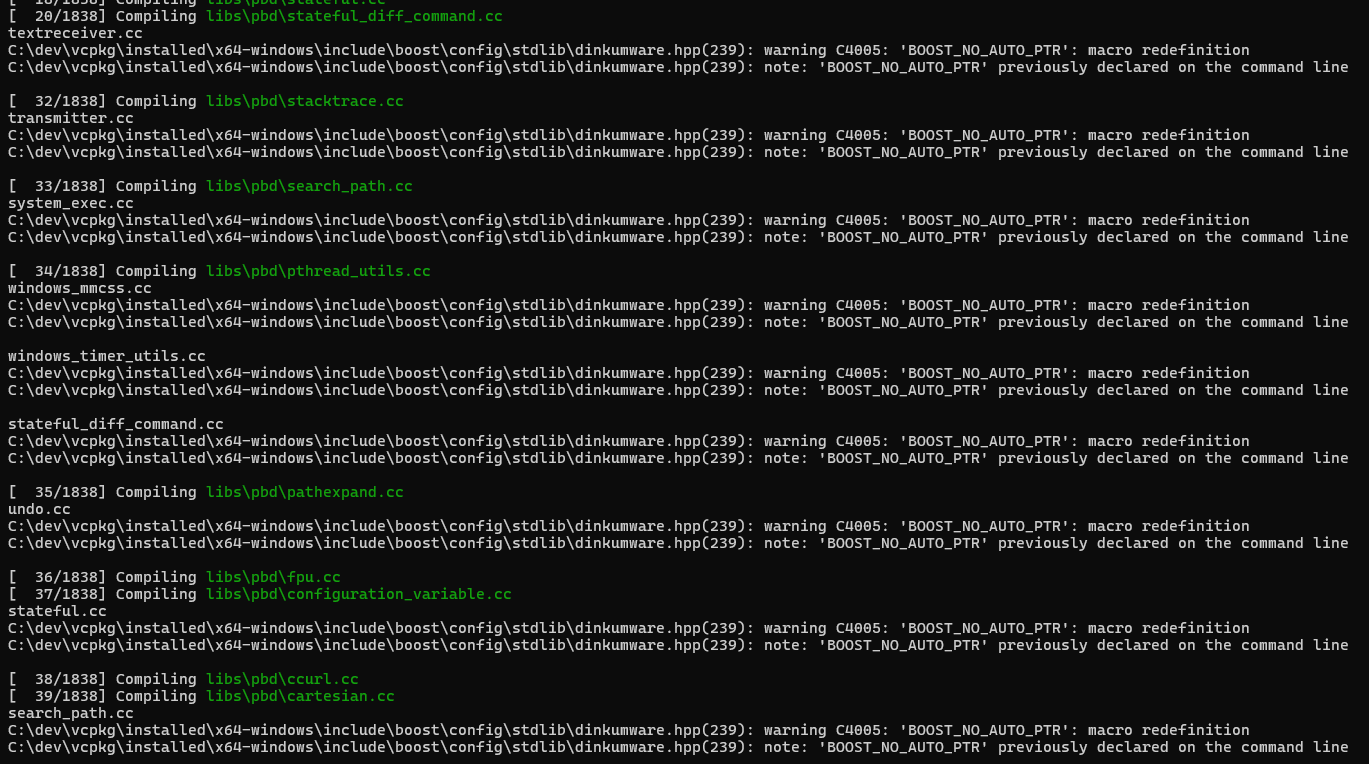
(Also, the Boost_No_Auto_PTR warning is a little annoying now)

1 Like

Okay, something’s wrong here… I needed to edit ‘pbd/pbd/string_convert.h’ here (to comment out the lines saying typename T::TO_STRING_TEMPLATE_NOT_DEFINED_FOR_THIS_TYPE invalid_type; because MSVC doesn’t understand it) but I don’t need to edit those others. However, I’ve a lot of extra #defines here (in addition to libpbd’s already defined ones…)

These extra ones are definitely needed:-
UINTSDEFINED=1
_SECURE_SCL=0
PLATFORM_WINDOWS
COMPILER_MSVC
BUILDING_PBD
BUILDING_GETOPT
LIBPBD_DLL_EXPORTS
INCLUDE_ARDOUR_MISCELLANEOUS=1;
WIN32
_WIN32
_WIN64
NDEBUG

These ones might not be needed any more:-
NOMINMAX
NO_POSIX_MEMALIGN
ARCH_X86
USE_XMMINTRIN
LIBC_DISABLE_DEPRECATED
HAVE_STRUCT_TIMESPEC=1
WINDOWS_KEY=“Mod4><Super”;=1
HAVE_JACK_SESSION=1
HAVE_JACK_VIDEO_SUPPORT=1
HAVE_X11=0

And I’ve a lot of #defines relating to libboost but I suspect these are the only ones actually needed;-
BOOST_SYSTEM_NO_DEPRECATED
HAVE_BOOST_SCOPED_PTR_HPP=1
HAVE_BOOST_PTR_CONTAINER_PTR_LIST_HPP=1
HAVE_BOOST_WEAK_PTR_HPP=1

Try adding some at your end and see if you then have more success building libpbd (just start off with the ones that are definitely needed).

[Edit…] BTW you might be able to lose those BOOST warnings by specifying this on your command line:-

/wd"4005"

2 Likes

Thanks for all your effort so far. Kudos!

1 Like