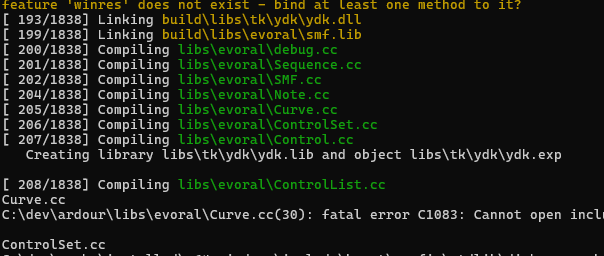
Building with MSVC, PowerShell. Errors

If you’re familiar with a Windows Command Prompt, open one and navigate to the folder containing pbd.dll - then run this command:-

dumpbin /EXPORTS pbd.dll

It should than list about 1,000 symbols but my guess is that your dll(s) will probably be empty.

‘dumpbin’ is not recognized as an internal or external command,
operable program or batch file.


Back to the following error currently:

Build failed
→ missing file: ‘C:\dev\ardour\build\libs\tk\ydk-pixbuf\ydk-pixbuf.lib’

I figure the solution probably involves the ydk-pixbuf wscript and/or the yddk wscript.

Yes apologies, it doesn’t work from a normal Windows Command Prompt. I installed VS2022 here but for some strange reason, I need to type VS2019 Command Prompt into my Windows search bar. But after searching online, it seem you might need to type x64 Native into your search bar and that’ll then allow you to launch whichever one’s installed.

I might’ve gotten a lead:

Finished searching libraries

gdk-pixbuf-scale.c.1.o : error LNK2019: unresolved external symbol _pixops_composite referenced in function gdk_pixbuf_composite
gdk-pixbuf-scale.c.1.o : error LNK2019: unresolved external symbol _pixops_composite_color referenced in function gdk_pixbuf_composite_color
gdk-pixbuf-scale.c.1.o : error LNK2019: unresolved external symbol _pixops_scale referenced in function gdk_pixbuf_scale

Unused libraries:
  C:\Program Files (x86)\Windows Kits\10\\lib\10.0.26100.0\\um\x64\uuid.lib

libs\tk\ydk-pixbuf\ydk-pixbuf.dll : fatal error LNK1120: 3 unresolved externals
PS C:\dev\ardour> Get-ChildItem -Recurse -File libs/tk -Filter *.c |
>>     Select-String -Pattern '(?<!\w)(pixops_composite|pixops_composite_color|pixops_scale)\s*\('
PS C:\dev\ardour> Get-ChildItem -Recurse -File libs/tk -Filter *.h |
>>     Select-String -Pattern 'pixops_composite|pixops_composite_color|pixops_scale'

libs\tk\ydk-pixbuf\pixops\pixops-internal.h:18:guchar *_pixops_scale_line_22_33_mmx (guint32 weights[16][8], guchar *p, guchar *q1, guchar *q2, int x_step, guchar *p_stop, int x_init);
libs\tk\ydk-pixbuf\pixops\pixops-internal.h:19:guchar *_pixops_composite_line_22_4a4_mmx (guint32 weights[16][8], guchar *p, guchar *q1, guchar *q2, int x_step, guchar *p_stop, int x_init);
libs\tk\ydk-pixbuf\pixops\pixops-internal.h:20:guchar *_pixops_composite_line_color_22_4a4_mmx (guint32 weights[16][8], guchar *p, guchar *q1, guchar *q2, int x_step, guchar *p_stop, int x_init, int dest_x, int check_shift, int *colors);
libs\tk\ydk-pixbuf\pixops\pixops.h:35:void _pixops_composite (guchar          *dest_buf,
libs\tk\ydk-pixbuf\pixops\pixops.h:64:void _pixops_composite_color (guchar          *dest_buf,
libs\tk\ydk-pixbuf\pixops\pixops.h:97:void _pixops_scale    (guchar          *dest_buf,

How about “dumpbin”? Did you find it eventually?

Yes, in the “x64 Native Tools…” app.
1015 3F6 00036E10 ?write_to_stdin@SystemExec@PBD@@QEAA_KAEBV?$basic_string@DU?$char_traits@D@std@@V?$allocator@D@2@@std@@_K@Z
1016 3F7 00036E30 ?write_to_stdin@SystemExec@PBD@@QEAA_KPEBD_K@Z
1017 3F8 00036E70 ?write_to_stdin@SystemExec@PBD@@QEAA_KPEBX_K@Z
1018 3F9 00071090 ?xml_node_name@Controllable@PBD@@2V?$basic_string@DU?$char_traits@D@std@@V?$allocator@D@2@@std@@B
1019 3FA 00039090 pbd_c_error

Summary

    5000 .data
    5000 .pdata
   2C000 .rdata
    1000 .reloc
    1000 .rsrc
   44000 .text

Yes, it looks like you’re building empty DLLs.

[Edit…] My apologies… I just realised that the first bit from your post #46 is the end bit of that long list?

BTW - with regard to gdk-pixbuf, Robin seems to be using version 2.31.1 (from just before it became buildable with MSVC). What version do you get if you build with vcpkg?

I build gdk-pixbuf here from version 2.40 0

I recognize some things in post 19, but don’t quote understand what to do from that…

What should I do then?

Interesting question, actually. Hadn’t thought about getting it from vcpkg since it wasn’t in the check in the config step.
Accoring to gdk-pixbuf | vcpkg.link: Vcpkg Ports and Packages Explorer , v2.42.12#4, with a LGPL-2.1-or-later license.

Ooh, that’s strange… does that mean you didn’t add stuff like COMPILER_MSVC / BUILDING_PBD / LIBPBD_DLL_EXPORTS etc?? In tthat case, I don’t understand how pbd.dll got populated (or why it’s ended up with the wrong name :thinking: )

Is it definitely dated from the date when you built libpbd?

For the time being I’ll ignore any potential problems relating to pbd.dll and focus on the

Waf: Leaving directory `C:\dev\ardour\build’
Build failed
→ missing file: ‘C:\dev\ardour\build\libs\tk\ydk-pixbuf\ydk-pixbuf.lib’

issue.

Current diff for ydk wscript (I got a fresh copy of the ydk-pixbuf wscript so no diff for that): ydk wscript diff - Pastebin.com

I doubt I can simply make an empty .lib file, 'cause I expect linking ydk will then fail due to 16 unresolved externals, which I believe come from ydk-pixbuf/ydk-pixbuf/gdk-pixbuf-core.h.

I don’t know if any issue exists with compiling ydk-pixbuf version 2.31.1 with MSVC.

Also: Should I make a diff file just of the libs folder, for now?


Edit: All changes to libs folder (excluding the deletion of .vcproj files): 2681 lines libs.diff as of 30 Oct 2025 - Pastebin.com

Version 2.40.0 included a file called gdk-pixbuf-features.h.in which introduced a mechanism for exporting functions from an MSVC DLL (similar to the way we do it in Ardour…)

Prior to that, functions would only have been exported if building with MinGW

I managed to deal with it (ydk-pixbuf lib missing, and the subsequent 16 unresolved externals for ydk. Perhaps I could’ve done it more cleanly, but I digress…
image

@John_E I made the following change to undo.h.

 #ifndef COMPILER_MSVC
 #include <sys/time.h>
 #else
-#include <ardourext/misc.h>
+#include <winsock2.h>
 #endif

I’m getting the following errors:
C:\dev\ardour\libs\pbd\undo.cc(38): error C3861: ‘gettimeofday’: identifier not found
C:\dev\ardour\libs\pbd\history_owner.cc(168): error C3861: ‘gettimeofday’: identifier not found

I’ve been informed it’s in pbd/msvc_pbd.h, line 179. Now, I’ve spotted it, but the file msvc_pbd.h has a lot of lines, and I’m concerned that if I include it in undo.h, there’ll be more errors.
Do you think I should copy that (line 179) directly into undo.h in an #ifdef COMPILER_MSVC conditional? or do #include “pbd/msvc_pbd.h”? Or something else? I assume everything that has gettimeofday will include undo.h.

Why did you remove #include <ardourext/misc.h> ?

That’s how ‘pbd/msvc_pbd.h’ gets #incuded

I don’t know how up-to-date it is or if it helps to build the latest version, or if it’s for something older, so I resort to alternatives.

Back in post #4 Robin asked about the msvc_extra_headers and those various .input files and I answered in posts #6 and #9. If my answers don’t make sense, maybe Robin could explain it a bit more clearly?

See also my post #19. Robin might need to explain how/where those #defines would need to get added. You can start by just adding the ones which are definitely needed.

I have started. 2 examples is adding

#ifdef COMPILER_MSVC
#define PATH_MAX _MAX_PATH
#endif

to windows_special_dirs.cc. and #undef max to stack_allocator.h.

One thing that has confused me though, is the existence of ardourext/pthread.h when pthread.h (and _ptw32.h) exists.

cpus.cc
C:\dev\ardour\libs\pbd\cpus.cc(39): fatal error C1083: Cannot open include file: ‘ardourext/pthread.h’: No such file or directory

Context in cpus.cc:

#if defined(COMPILER_MSVC) && !defined(PTW32_VERSION)
#include <ardourext/pthread.h> // Gets us ‘PTW32_VERSION’
#endif

File_archive.h (as an example) has #include <pthread.h> instead of that ardourext condition.

Obviously I haven’t explained things very well but if Robin can make sense of those 3 posts (#6, #9 and #19) maybe you can work together to decide how it needs to be on your system?

For example it’s very unlikely your main include folder will be in F:/+GTK-SOURCES/gnu-windows but by now, you should have created one somewhere.

I assume this was a serious comment, but I find the “it’s very unlikely” funny.
My main include folder is mentioned in my configure options: --also-include=C:\dev\vcpkg\installed\x64-windows\include

I might be misunderstanding but to me, that looks like something you’re passing to python (or waf?)

Or does it somehow then get passed to MSVC?

Is 'C:\dev\vcpkg\installed\x64-windows\include` the same folder where you eventually installed libboost?