In case it’s useful, I received another reply from Microsoft this morning. I’m not massively familiar with vcpkg but I don’t think switching to older libraries is quite as simple as I suggested above. Here’s what they said:-
vcpkg integrates with Git under the hood — each port in vcpkg is tied to a specific Git commit. If you want to use an older version of a library, you can check out an earlier commit of the vcpkg repository (for example, using git checkout ), and then run vcpkg install . That will build and install the version of the library corresponding to that commit.
This approach lets you reproduce older versions of packages, even if the current port has since been updated.
The obvious problem (I guess?) is that you’d need some way of knowing which of vcpkg’s earlier versions contained the release you’re looking for. So in practice, downloading earlier versions of a library might be a lot more difficult than it seems
You can always google the date a particular glibmm version (for instance) was released and then run git tag in the vcpkg git clone to see what tag is closest to that particular date and check out that tag (or one a reasonable amount of time after that).
Then have a look at the ports/glibmm/vcpkg.json (or ports/glibmm/portfile.cmake in older checkouts) file to see the exact version it corresponds to.
That said, glibmm appears to have been added to vcpkg in 2017, in commit 30f742160281, and that was version 2.52.1 :
Maybe it’s possible to just replace the URL with https://download.gnome.org/sources/glibmm/2.44/glibmm-2.44.0.tar.xz and the SHA512 with 1b0ac0425d24895507c0e0e8088a464c7ae2d289c47afa1c11f63278fc672ea8 and compile it but you may need to replace some of the dependency versions as well.
Replace the following in the root wscript:
if conf.options.cxx17 or platform == "darwin":
    conf.check_cxx(cxxflags=["-std=c++17"])
    cxx_flags.append('-std=c++17')

With:
    if conf.options.cxx17 or platform == "darwin":
        if compiler_name == 'msvc':
            cxx_flags.append('/std:c++17')
        else:
            conf.check_cxx(cxxflags=["-std=c++17"])
            cxx_flags.append('-std=c++17')


Also replace
        'full-optimization' : '/O2',
with
        'full-optimization' : ['/O2'],
Those were manual edits. I also dealt with the following error:
C:\dev\ardour\libs\pbd\pbd\signals.h(36): fatal error C1083: Cannot open include file: ‘glibmm/threads.h’: No such file or directory
Ah… regarding the errors Cannot open include file ‘ardourext/[whatever].h’ those files get generated by my .vcxproj file, when I’m building libpbd here. I could possibly upload a zip file containing those files but I remember that Ardour’s forum is quite limited as to what files are acceptable. Does anyone know if zip files are acceptable?
Probably a good idea… and as Peder explained, eariler versions can be found but I guess the downside is that earlier versions of all the libs needed for Ardour might be in multiple different versions of vcpkg, so it’ll quickly turn into a nightmare if we’re expecting newbies to find the support libs themselves.
For me, this has come full circle… if we want to attract new programmers for the non-linux builds, Paul and Robin need to think about providing pre-built support libraries (and corresponding header files). I guess the good bit is that those libraries only change very rarely nowadays - so it’s not like they’d need to be getting rebuilt all the time.
@EZ4Stephen - back around post#6 I mentioned that someone called Andre was the other guy who’d once built Ardour using MSVC. He just emailed me to say that for the support libs, he’d needed to create something called vcpkg overlays. I’m not quite sure what they are but it sounds like they’re some way of customizing vcpkg builds to add your own build requirements.
You’re probably already aware of overlays but in case you’re not, I’m just mentioning it, in case it’d be worth you reading up about them.
@EZ4Stephen I’ve pushed some code (mostly the sed stuff from your original guide) up to the Ardour repository that makes this all a bit more plug-and-play. I’ve also hooked up ccache and got ardev working for a smoother dev workflow. Tested and working on a fresh win11 VM. Here’s an updated guide:
MSYS
Install MSYS2
Open MSYS2 MINGW64
pacman -Syu
Open MSYS2 MINGW64 again
pacman -Syu again
Packages
pacman -S --noconfirm --needed git unzip make mingw-w64-x86_64-{toolchain,boost,glib2,glibmm,libsndfile,curl,libarchive,liblo,taglib,vamp-plugin-sdk,rubberband,aubio,cairomm,pangomm,jack2,serd,sord,sratom,lilv,libwebsockets,cmake,libusb}
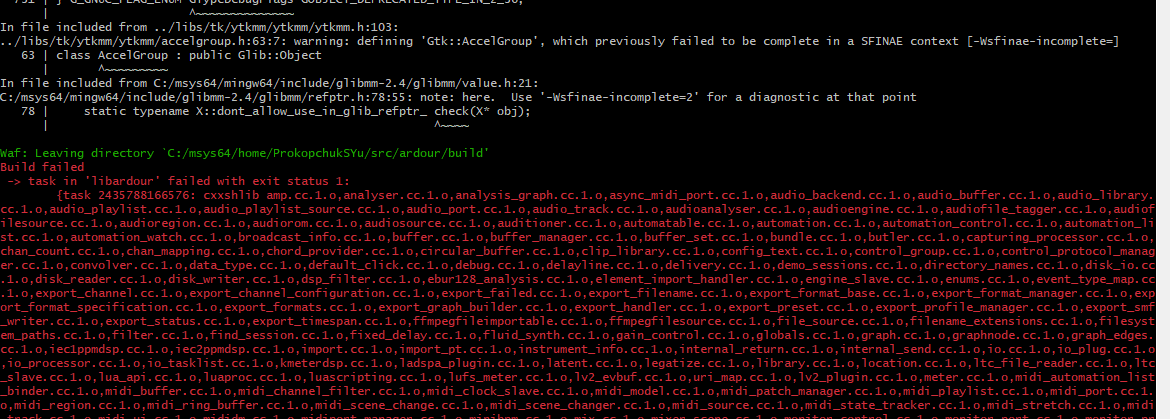
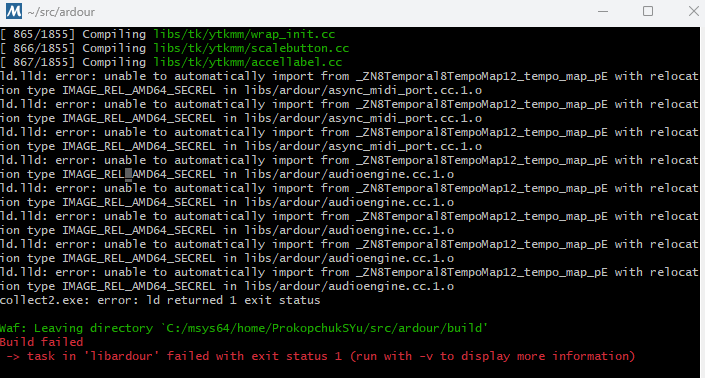
That is not the one I hit. Mine was a linker error.
ld.lld: error: unable to automatically import from _ZN8Temporal8TempoMap12_tempo_map_pE with relocation type IMAGE_REL_AMD64_SECREL in libs/ardour/async_midi_port.cc.1.o
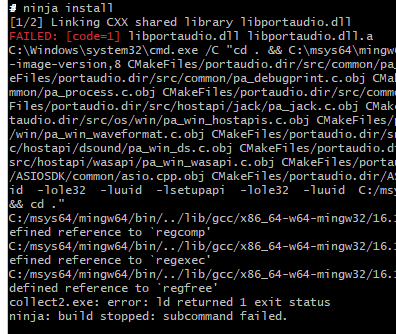
Regarding building portaudio: Do pacman -Syu then build portaudio using pacman. I’ve gotten a PR merged for asiosdk to get installed and used when building portaudio, and it has been signed and uploaded recently to the pacman repo.
Also note: MINGW64 has been deprecated as of 15th March in the msys2 news page. The prefix for downloading packages using UCRT64 is mingw-w64-ucrt-x86_64- (compared to mingw-w64-x86_64-).
Now you can get most dependencies by running the following (changing the mingw-w64-ucrt-x86_64- prefix for a different environment):
pacman -S --noconfirm --needed git unzip make mingw-w64-ucrt-x86_64-{toolchain,boost,glib2,glibmm,libsndfile,curl,libarchive,fftw,liblo,taglib,vamp-plugin-sdk,rubberband,aubio,portaudio,cairomm,pangomm,jack2,serd,sord,sratom,lilv,libwebsockets,cmake,libusb,libjpeg-turbo}
(Had to edit because the backslash in the first line wasn’t visible, which would make copying and pasting the above give an error at mingw-w64-ucrt-x86_64-toolchain.)
(UCRT64/CLANG64/CLANGARM64) lrdf is also now available, and I’ve tested building ardour with it: it works. (First time I got it added there was a problem in the .pc file, which has since been fixed).
pacman -S --noconfirm --needed git unzip make mingw-w64-ucrt-x86_64-{toolchain,boost,glib2,glibmm,libsndfile,curl,libarchive,fftw,liblo,taglib,vamp-plugin-sdk,rubberband,aubio,portaudio,cairomm,pangomm,jack2,serd,sord,sratom,lilv,libwebsockets,cmake,libusb,libjpeg-turbo,lrdf}