For some of my recent recording sessions, the general setup is like this:
one microphone + Ardour track for the singer
one microphone + Ardour track for me (aka control room)
all relevant tracks/busses routed to the respective outputs (two headphones)
What I like to achieve is an easy way to quickly unmute and mute my mic track.
Best would be that I could bind an arbitrary key (e.g. F12) to the Mute button of the track, but in a way that I can do a “push-to-talk”, where pressing the key would unmute the track, and releasing the key would mute it again.
Hi,
I don’t think key_down and key_up are available for shortcuts, but maybe you could define a lua script that toggles the state of recording (putting it “on” if “off” or “off” if “on”), so that pressing the shortcut key would allow you to speak, then pressing it again would re-mute.
Generic midi bindings will do this except I don’t know if you can momentarily toggle with them. Edit: poor phrasing on mobile device, but I meant you can bind it to turn on with a button press and off with a button press, but I don’t think you can have it stay on while held.
I even have a Faderport lying around here.
Tried it already, but wasn’t able to find out how to “lock” it to a particular track (so the mute button on the Faderport will mute always this track, and not other ones I may have selected with the mouse in the meantime…)
Anyway, after today’s session, I think I know now what I really want:
Just keep my mic track open, and only get it auto-muted during a recording.
If I recall correctly (And it has been some time) the fader port uses a version of the Mackie protocol by default. You need to use the generic midi protocol instead, which means manually binding specific controls etc. by ctrl+middle mouse button clicking to bind it.
The problem is that doing this will disable a lot of the other functionality associated with the Mackie protocol, and make the fader port less useful. So it may be better just to get a VERY basic small surface for this purpose if that is all you need. EDIT: Or use an OSC control ie. TouchOSC to send OSC to Ardour to do this is another option.
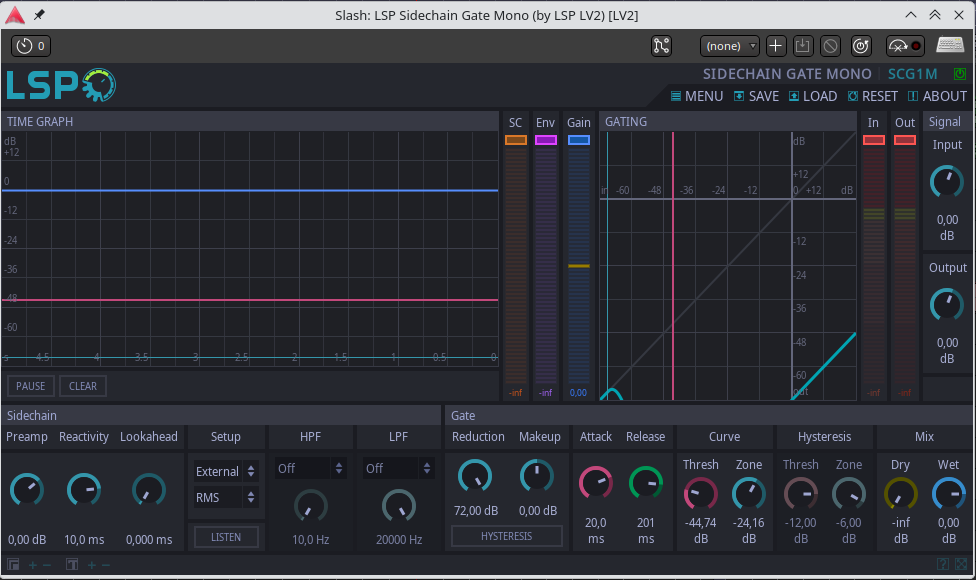
I’d like to share my current solution to the original question: (mis)using an LSB Sidechain Gate on my mic track.
The sidechain signal is coming from the playback bus, so as soon as the playback starts, my channel will be ducked down, until the playback stops. This way, I don’t have to press any buttons at all to mute/unmute myself during recording.