Okay, news  .
.
It’s weird. I think that problem is not the backend per se.
I managed to set the Pipewire buffer (quantum) in “Cable” to 8192 samples,
and then the audio choppynes in Ardour when using Pipewire/Jack went away.
Same behavior is with Pulseaudio when i set the buffer to 8192.
Alsa doesn’t allow buffer to be set that high anywhere i looked, so audio in Ardour remains choppy even with 4096 samples buffer(highes allowed option with alsa backend).
But raising audio buffer that high is weird.
Also, animated graphics in ardour becomes choppy with audio buffer that high, but i remember i read somewhere that it is it’s normal behaviour in that case.
Problem with LSP plugins GUI’s remains. Other plugins seem to work normal as far as i’ve tested.
New development.
I think i nailed the screwy audio playback thing.
Might be a false alarm.
Last night, at about three in the morning I realized i was testing the playback with the one particular instrument always present - Audio Assault’s Drum Locker 70’ Drums. So i turned off it’s internal effects and - voila. Suddenly I was able to lower the buffer to 2048 and add bunch of other stuff like Vitalium, Yoshimi etc and everything worked…
…until LSP GUI . Still no luck with that…
EDIT: Yes, i just tested audio/buffer/dsp for about 40 minutes, creating some loop using Dumlabooh, Obxd, Yoshimi and bunch of effects. Everything works just fine at 2048 samples buffer. Audio glitching and stuttering was definetely caused by internal Drum Locker effects.
Just need to find a solution for graphic adapter/openGL version/LSP plugins GUI problem - i think it’s connected. My suspition is that i need to find the right driver who will seamlesly support OpenGL with this GPU. While messing around and switching to Intel’s GPU driver, after reboot i got this message:
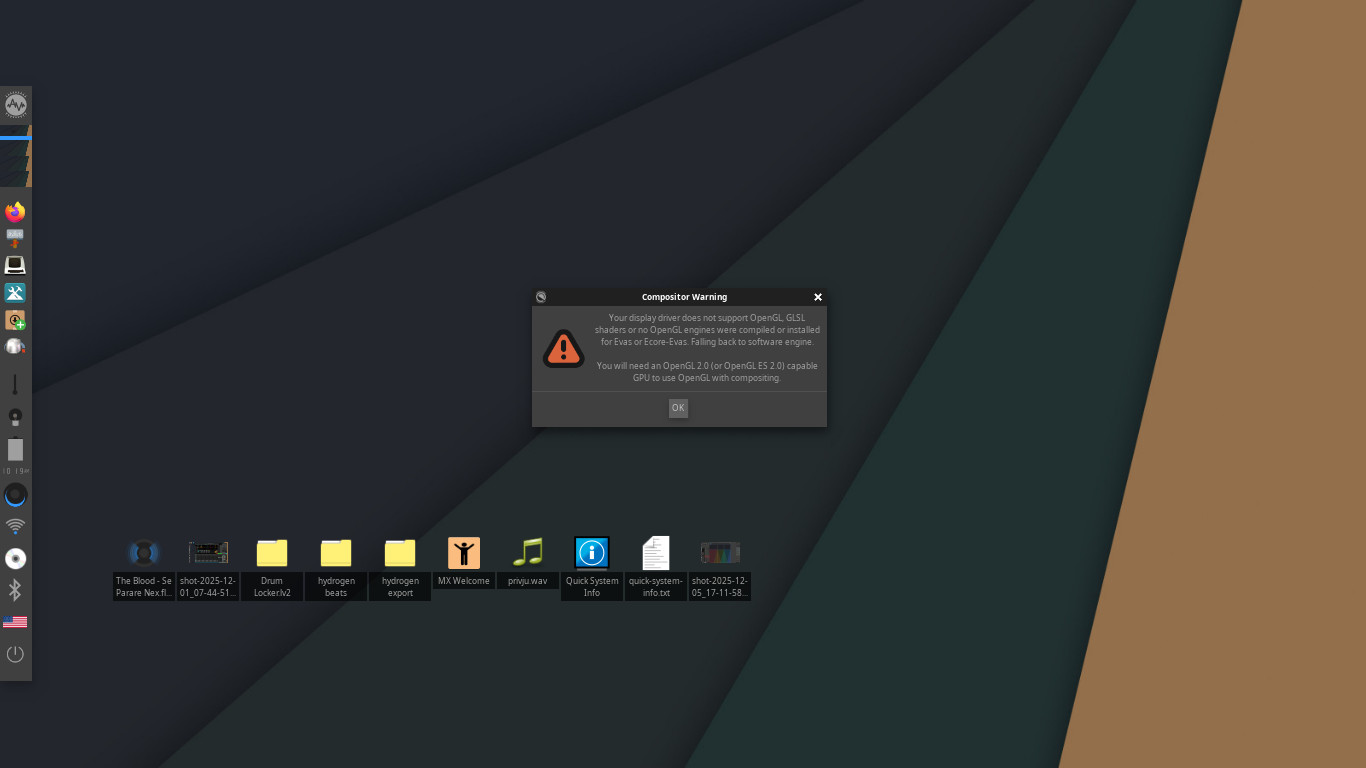
Might it be that this GPU doesn’t support required OpenGL version?
Hi,
Sorry, I got busy upgrading my build system to AVL-25 and didn’t get back to this. That warning does seem to indicate that there may be on OpenGL version issue, it appears Enlightenment has switched to it’s software compositing and as long as that works and if you’re getting better performance that way then the compositor was likely not the bottleneck. 2048 is still not great but 8192 should never be necessary… As far as LSP they also don’t work when switched from OpenGL to Cairo?
Even though your machine has decent enough specs the OpenGL thing is baffling me, I wonder the Kernel and Mesa Video drivers are too new for that particular Intel Graphics chip…?
Laggy audio was definitely caused by Audio Assault’s Drum Locker internal FX. That I realised while still using standard GPU driver provided with AV Linux with compositor set to OpenGl. I think it’s not related to gpu/open GPL problem. Yeah, 2048 buffer is kinda high, but not uncommon with these integrated sound chips in 20ish-something tracks projects with processing and heavy virtual instruments all around, so, once i saw it work with 2048 buffer as expected, I didn’t even test it with lower buffer. I will, as soon possible but I’m pretty sure it’s gonna be ok.
When I saw audio playback work, then I started tinkering with different GPU drivers to try to resolve LSP GUI issue. Installed a few different driver options using MX Package Installer. Also, somewhere in the system settings (don’t remember where right now out of my head ) i thicked on the “use intel driver” box.
Got that message i posted after one of the reboots while changing drivers.
LSP GUI problem, unlike audio playback problem, most likely is somehow connected to GPU driver/OpenGl version. Audio side of LSP plugins works normally, without seriously affecting CPU performance(tried it successfully a couple of times with generic Ardour plugins UI). As soon as i catch some free time, I will investigate it further, and I’ll get back what I found out here.
Thanks Glen, cheers!
Problems solved…kind of .
LSP GUI - After tinkering for hours with opengl vs software rendering, Mesa vs Intel drivers, and searching for right info about Intel HD 520 OpenGL version support, i just tought to myself: “Let’s see when did LSP introduce OpenGL support”…turns out, not that long ago. So i just downloaded LSP plugin pack version 1.2.1 (older) - and those just work without issues. Gui’s responsive, processor behaves normaly.
Glitchy audio - no real problems there. It was all caused by weird behaviour of internal FX in Drum Locker. I tested it for few hours and audio works good with 512 samples buffer, reducing latency to about 10ms. All good as far as i can see.
Once again, thanks Glen!
(…it rhymes, man : ) )
Have you tried to switch to Cairo when using LSP?
I would not recommend to use 1.2.1 version since there were already many changes, bugfixes and new plugins implemented in recent version.
To switch from OpenGL to Cairo, you need to set up the LSP_WS_LIB_GLXSURFACE=off environment variable and restart user session. In the About dialog you should see ‘Cairo’ instead of ‘OpenGL’.
I will try it tomorrow first available time, and i’ll let you know how it went.
Well…here’s what’s happening.
I’ve set the enviroment variable by editing the .bashrc file using export command.
Saved it, rebooted, checked if it’s off using terminal and printenv command and i got:
$ printenv
SHELL=/bin/bash
WINDOWID=18874403
QT_ACCESSIBILITY=1
XDG_CONFIG_DIRS=/usr/etc/xdg:/etc/xdg
E_CONF_PROFILE=standard
XDG_SESSION_PATH=/org/freedesktop/DisplayManager/Session0
XDG_MENU_PREFIX=e-
E_RESTART=1
TERM_PROGRAM_VERSION=1.14.0
E_TAINTED=NO
FREETYPE_PROPERTIES=truetype:interpreter-version=35
QT_LOGGING_RULES=qt.qpa.xcb.warning=false
SSH_AUTH_SOCK=/tmp/ssh-RT9aUlrClybe/agent.1941
E_LIB_DIR=/usr/lib/x86_64-linux-gnu
E_ICON_THEME=gnome
E_IPC_SOCKET=/run/user/1000/e-ljuba@0/2015
DESKTOP_SESSION=lightdm-xsession
SSH_AGENT_PID=2014
XDG_SEAT=seat0
PWD=/home/ljuba
XDG_SESSION_DESKTOP=lightdm-xsession
LOGNAME=ljuba
QT_QPA_PLATFORMTHEME=gtk2
E_START_MANAGER=1
XDG_SESSION_TYPE=x11
GPG_AGENT_INFO=/run/user/1000/gnupg/S.gpg-agent:0:1
XAUTHORITY=/home/ljuba/.Xauthority
DESKTOP_STARTUP_ID=E_START|481
E_DESKLOCK_LOCKED=
E_SCALE=1.000
XDG_GREETER_DATA_DIR=/var/lib/lightdm/data/ljuba
QT_STYLE_OVERRIDE=gtk2
GDM_LANG=en_GB.utf8
HOME=/home/ljuba
SSH_ASKPASS=/usr/bin/enlightenment_askpass
LANG=en_GB.UTF-8
LS_COLORS=rs=0:di=01;34:ln=01;36:mh=00:pi=40;33:so=01;35:do=01;35:bd=40;33;01:cd=40;33;01:or=40;31;01:mi=00:su=37;41:sg=30;43:ca=00:tw=30;42:ow=34;42:st=37;44:ex=01;32:.7z=01;31:.ace=01;31:.alz=01;31:.apk=01;31:.arc=01;31:.arj=01;31:.bz=01;31:.bz2=01;31:.cab=01;31:.cpio=01;31:.crate=01;31:.deb=01;31:.drpm=01;31:.dwm=01;31:.dz=01;31:.ear=01;31:.egg=01;31:.esd=01;31:.gz=01;31:.jar=01;31:.lha=01;31:.lrz=01;31:.lz=01;31:.lz4=01;31:.lzh=01;31:.lzma=01;31:.lzo=01;31:.pyz=01;31:.rar=01;31:.rpm=01;31:.rz=01;31:.sar=01;31:.swm=01;31:.t7z=01;31:.tar=01;31:.taz=01;31:.tbz=01;31:.tbz2=01;31:.tgz=01;31:.tlz=01;31:.txz=01;31:.tz=01;31:.tzo=01;31:.tzst=01;31:.udeb=01;31:.war=01;31:.whl=01;31:.wim=01;31:.xz=01;31:.z=01;31:.zip=01;31:.zoo=01;31:.zst=01;31:.avif=01;35:.jpg=01;35:.jpeg=01;35:.jxl=01;35:.mjpg=01;35:.mjpeg=01;35:.gif=01;35:.bmp=01;35:.pbm=01;35:.pgm=01;35:.ppm=01;35:.tga=01;35:.xbm=01;35:.xpm=01;35:.tif=01;35:.tiff=01;35:.png=01;35:.svg=01;35:.svgz=01;35:.mng=01;35:.pcx=01;35:.mov=01;35:.mpg=01;35:.mpeg=01;35:.m2v=01;35:.mkv=01;35:.webm=01;35:.webp=01;35:.ogm=01;35:.mp4=01;35:.m4v=01;35:.mp4v=01;35:.vob=01;35:.qt=01;35:.nuv=01;35:.wmv=01;35:.asf=01;35:.rm=01;35:.rmvb=01;35:.flc=01;35:.avi=01;35:.fli=01;35:.flv=01;35:.gl=01;35:.dl=01;35:.xcf=01;35:.xwd=01;35:.yuv=01;35:.cgm=01;35:.emf=01;35:.ogv=01;35:.ogx=01;35:.aac=00;36:.au=00;36:.flac=00;36:.m4a=00;36:.mid=00;36:.midi=00;36:.mka=00;36:.mp3=00;36:.mpc=00;36:.ogg=00;36:.ra=00;36:.wav=00;36:.oga=00;36:.opus=00;36:.spx=00;36:.xspf=00;36:~=00;90:#=00;90:.bak=00;90:.crdownload=00;90:.dpkg-dist=00;90:.dpkg-new=00;90:.dpkg-old=00;90:.dpkg-tmp=00;90:.old=00;90:.orig=00;90:.part=00;90:.rej=00;90:.rpmnew=00;90:.rpmorig=00;90:.rpmsave=00;90:.swp=00;90:.tmp=00;90:.ucf-dist=00;90:.ucf-new=00;90:*.ucf-old=00;90:
XDG_CURRENT_DESKTOP=Enlightenment
LSP_WS_LIB_GLXSURFACE=off
XDG_SEAT_PATH=/org/freedesktop/DisplayManager/Seat0
PANTS=ON
XTERM_256_COLORS=1
TERMINOLOGY=1
E_START=x-window-manager
E_PREFIX=/usr
XDG_SESSION_CLASS=user
TERM=xterm-256color
USER=ljuba
E_DATA_DIR=/usr/share/enlightenment
SUDO_ASKPASS=/usr/bin/enlightenment_askpass
DISPLAY=:0.0
SHLVL=1
XDG_VTNR=7
DESKTOP=Enlightenment
XDG_SESSION_ID=2
XDG_RUNTIME_DIR=/run/user/1000
E_HOME_DIR=/home/ljuba/.e/e
E_BIN_DIR=/usr/bin
XDG_DATA_DIRS=/usr/share/enlightenment:/home/ljuba/.local/share/flatpak/exports/share:/var/lib/flatpak/exports/share:/usr/local/share:/usr/share
EMIX_SINK_ICONS=/usr/lib/x86_64-linux-gnu/enlightenment/modules/mixer/sink-icons.txt
PATH=/home/ljuba/.local/bin:/home/ljuba/Applications/.bin:/usr/local/bin:/usr/bin:/bin:/usr/local/games:/usr/games:/sbin:/usr/sbin
GDMSESSION=lightdm-xsession
DBUS_SESSION_BUS_ADDRESS=unix:path=/run/user/1000/bus
EVAS_GL_RENDER_DISABLE_DITHER=1
E_LOCALE_DIR=/usr/share/locale
TERM_PROGRAM=terminology
_=/usr/bin/printenv
So, as you can see, in the about middle of terminal’s response , variable seems to be realy set to " off ".
But, still, when i’m in Ardour and i pull up an LSP plugin, and go to About page:
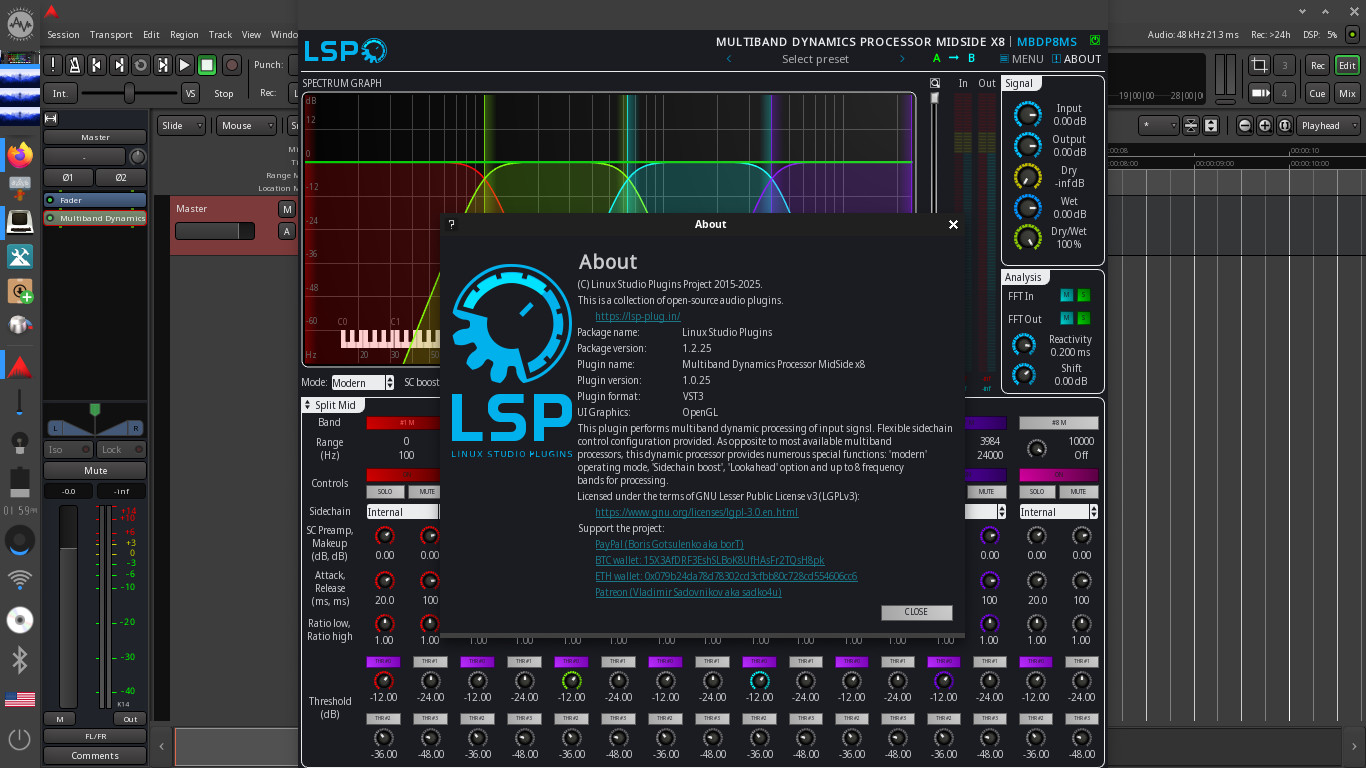
Any idea why?
@Ljuba that’s very strange. Just checked from console on some debug build of Ardour:
export LSP_WS_LIB_GLXSURFACE=off
/opt/Ardour-8.6.365/bin/ardour8
Then I open/create session, put LV2 plugin to the track/bus and launch the About dialog. It shows ‘Cairo’.
If I run then:
export LSP_WS_LIB_GLXSURFACE=on
/opt/Ardour-8.6.365/bin/ardour8
It switches back to OpenGL.
Aren’t you using SNAP or some other ‘modern’ package managers?
Is is possible for you to try my approach?
Hi,
It is not a snap (hell no!!). Ardour in AV Linux is the official bundle wrapped in a Debian Package, so the executable is here:
/opt/ARDOUR-8/bin/ardour8
I also tried changing the environment variable in the Desktop Environment itself but I also get OpenGL in LSP ‘About’ when I run Ardour. I will try further and post back later.
Same as Glen.
It works when executed from terminal,
but it doesn’t when added to lines in “bash.bashrc” file in “etc” folder.
I cannot make it permanent however i try .
What am i missing?
And still, i’m i dreaming or vst2 1.2.1 variants felt lighter on processor than LV2 1.2.25 with Cairo taking over the drawing aspect?
With Cairo these more larger/busy plugins have problems when a few gui’s are on the screen. Maybe simultaneous drawing of a few RTA-s is resource demanding? They seem to stop/make difficult the drawing of Ardours own graphics?
That’s what i noticed while testing 1.2.25 LV2 with Cairo for about an hour.
EDIT: Hahahah i managed to make so that it opens up Ardour(with LSP Cairo) automaticaly whenever i just click to open the Terminal
yea, i kinda fugured it out by falowing the path to ardour’s folder, looking at the version numbers, figuring out what’s the script for execution of Ardour, reading online where’s what in debian variants of linux etc etc…it took a while (about 2 hours) before i got those 2 lines correct…but hey
hell, i might be a dumb windows user, but i used to programm in fkn Basic as a kid, turned my good old c64 inside-out .
@Ljuba I admire your perseverance, most people would have given up long ago. It’s regrettable that your first AVL experience is with this particular unforeseen OpenGL problem, unfortunately I can’t reproduce the issue to give better advice because I’m down to 2 machines here and OpenGL is working on both…
Thank you for your patience!
No worries Glen.
Look, it’s not my first AVL experience . I used a couple of versions of AVL on and off, starting from maybe 7-8 years ago, maybe more, i don’t remember exactly when. Created bunch a of cue tracks / demos for the bands I was in at the time, using mostly Hydrogen+Big Mono Drum kit (I still think that’s a cool kit, and Hydrogen is sooo handy, or should i say cute ). It was as if you have a shitty guitar which you really like to play.
First time i installed Ardour, I did it on some ancient Ubuntu 8.04 or something, manually downloading a bunch of dependencies from their respositories using net at my college, burned it all on a CD, and transfered that on my PC. That was maybe 2008-2009.
So, this is nothing new.
The new thing with my linux experience is - LSP plugins have some awesome features, like mid-side processing, sidechaining etc. It’s getting really good for mixing. That’s what I see, not only hick-ups.
Here’s what i’ve found out, tinkering here and there:
1.) - USEFUL INFO FOR EVERYONE HAVING TROUBLE WITH OPENGL SUPPORT WHO WANTS TO USE LSP PLUGINS version 1.2.25 IN AVL 25:
There is a very simple way to make LSP permanently use Cairo, overriding OpenGL in AV Linux:
Log in as root.
Open the file called “enviroment”, path “/etc/”, using text editor.
(We could also describe that as - Open Thunar FIle Manager, click on File System under Devices, find and enter folder called “etc”, scroll down, find and open file called “enviroment”).
Copy-paste the forementioned line inside that file, literally just like LSP provider described:
LSP_WS_LIB_GLXSURFACE=off
Save that file. Log out.
Log in as user.
Now, whenever you open up Ardour and insert an LSP plugin, you’ll se in its GUI, in the tab “Menu” that it is automaticaly reverted back to Cairo, and not using OpenGL.
Tested that approach in practice, i’m using it right now on my own system.
2.) - INFO NOT REALY USEFUL(or maybe it is?), EXCEPT IF YOU’VE GOT THE SAME LAPTOP
(Fujitsu Lifebook E746, i5-6300U, Intel HD 520, 8GB ram)
For some reason, LSP version 1.2.25 VST2 variants with Cairo work best for me. LV2 and VST3 variants under Cairo choke Ardour’s own graphics. Even if i only pull up, say, 2 instances of LV2 GUI’s under Cairo - they block Ardour’s graphics. VST2 variants don’t behave like that. While testing, i pulled up 7-8 realy busy/demanding instances of LSP VST2 GUIs and everyhing in Ardour stayed normal. Only downside i see there is that if i pull many instances of LSP VST2’s under Cairo at the same time, RTA’s in LSP plugins become visibly slower, less responsive, little choppy, but the Ardour’s graphics, animations, interactivity (and sound playback) remain responsive, good, unaffected.
That’s it for now. I’m gonna stick to 1.2.25 VST2 variants with Cairo for now. Works for me.
Just wanted to cross post, that I have a similar symptom in my Ubuntu Studio system. So this might not be an AVL issue.
Today i’ve been digging around a bit. Turns out, i needed older kernel 5.10 and non-free software packages (firmware) for this particular laptop(Fujitsu Lifebook e746) to fully support OpenGL with this machine. So i tried Debian 11+KDE+Non-free unofficial iso, and it just works. Installed Ardour 8.12 + LSP 1.2.25 and OpenGL works, proc usage is normal, everything fine. So…No AVL for this particular machine . I’m also gonna try AVL on my Lenovo Ideapad Gaming 3 (AMD Ryzen 5600H, RTX 3050, 16GB ram) in near future, to see how that goes…
I use builtin AMD graphics and OpenGL works fine for me (Ryzen 4800H CPU). In most cases problems with graphics are related to bad OpenGL support.
OpenGL may work even faster if I get rid of the multisampling which may be too heavy.
I recently created the issue on GitHub to avoid multisampling and implement edge smoothing algorithm in the fragment shader.
I wastn’t having any peace and couldn’t keep steady , so i pulled out ssd from fujitsu laptop e746 with Debian 13 KDE set to x11 and stick it into Desktop Dell Workstation 8th gen i7 8700 with Nvidia Quadro RTX4000 and 24GB of ram…
And, as i suspected, it all works as a charm.
Cpu usage is minimal, LSP GUI’s work on OpenGL and are very fast. Audio works good, all seems ok and stable.
Something’s up with those integrated intel HD GPU chips. I cannot graps what it is, but something definitely is .
(What i didn’t try and i should cause it seem like a good test is to install and play some graphics intensive game under Linux with OpenGL rendering…Logic is - if it renders the game normaly, then it should also render LSP gui just fine, right?..)