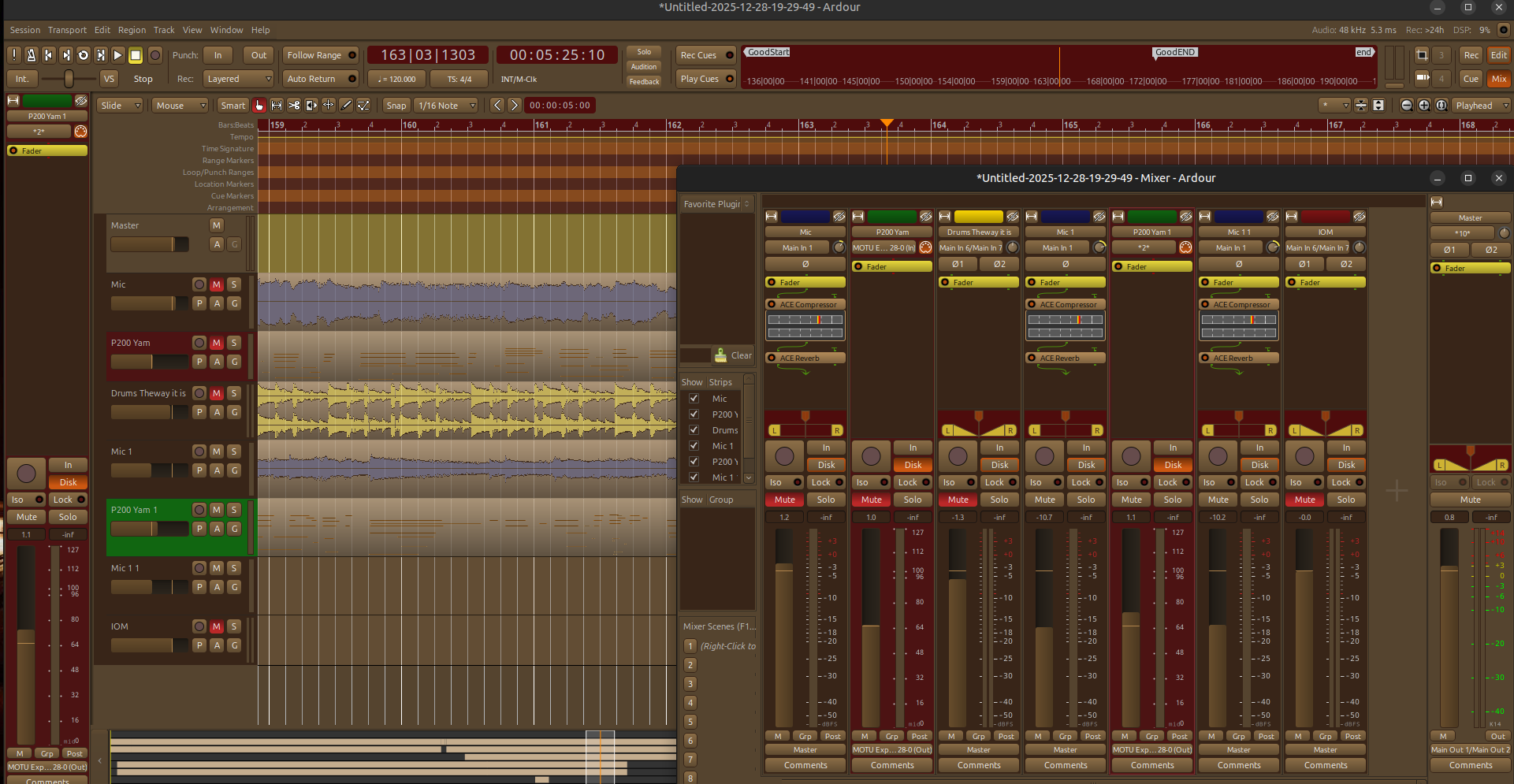
Hey guys…after about 5 months I finally get a little time to look into the reasons why my previous Autumn theme didn’t work anymore on Ardour 9. I have to say that I was really deflated when I finally finished the theme…and a couple of weeks later Ardour 9 was release and the theme was broken and didn’t work correctly. The thing is that I tested my previous Autumn theme all the way back to Ardour 5 and it worked so I just thought that it would work on version 9.
When the previous theme was loaded/install for Ardour 9 it was a mess. Some of it I knew was no color associated with new elements but there was also problem with some of the foundation colors that were WAY off from what I had set them to be. Most of which was brand new lines of code for new elements, 24 changes from what I recall.
I’ll be testing it to make sure everything is good…but so far it looks like it should. Once I make sure there aren’t any surprises I’ll package it up as a .deb file for Debian based Linux users and as a zip file with installation instructions inside and provide a link to both on my personal website.
I’ll check back soon to let you know when it’s available. For those of you that have no idea what I’m talking about - The Ardour color theme is called Autumn and it’s based off of the warm colors of New England USA in the fall/autumn season. I’ve attached a sample image of what it looks like.
The Autumn theme for Ardour 9 is complete but I’m having a bit of trouble.
The devel guys mentioned to me that if Ardour is installed using the distros package manager then it will be installed to /usr/share/Ardour9 but if it’s installed from the Ardour website it will be installed in /opt as “Ardour-9.#.#” Getting the deb file to install in /usr/share/ardour9 is no trouble but in /opt Ardour has the version number and build numbers as well.
I’m not that well versed with the postinst file in the debian package but I’m sure it’s possible to make sure that the installed theme file is being installed in either ALL of the Ardour-9.#.# folders or the most recent one. But so far no luck in doing this.
I also tried to have the postinst file install a “themes” directory in the ~/.config/Ardour9 but the dpkg system that installs the debain file doesn’t like this…but it doesn’t mention what the problem is just that it aborted with an error code of 1.
As a user who doesn’t think much about it, I would expect a custom theme (one not shipped with the system software) to install somewhere in my home directory, e.g. ~/.config/ardour9/themes/ or ~/.local/share/ardour9/themes… I think the latter is a better fit. I don’t know where Ardour9 itself looks for such themes, so take my reply with a big block of salt.
Hey. That’s exactly what I’ve done. Local install.
Ardour 9 looks for it’s theme in one of three places to my understanding.
IF it’s installed by the distro package manager it will reside in /usr/share/ardour9/themes
IF it’s installed from the Ardour website it will be in /opt/Ardour9.#.#/share/themes
OR locally at ~/.config/ardour9/themes…although by default the “themes” folder isn’t there but my script checks to see if it’s there. If it is, it will dump the theme file in there. If it isn’t there it will create it and then dump the theme/color file in there.
There was discussion of the guys to possible include it as a “shipped” theme but there is a small chance when they update the themes that need to be updated for changes that some of my custom colors might not translate.
So I just finished create a .run binary which holds not only the script but also the theme file as well as a pop up preview of the them as it will look on your system.
Of course this preview depends on a package called “yad” if the package isn’t available it will ignore it and continue with the installation. If the package is available (either already installed or in the repos) it will give you the preview of the theme…then install it locally.
Ok the Autumn theme has been fixed for Ardour 9.5 but Paul tells me there is another version of Ardour that has further changes to the theming files system. So although I have it working well now I’ll wait a bit to see when the next version of the theming system is available and make the necessary changes.
The new .run binary install method works pretty well. Although the installation of this theme can be placed easily since it’s only a single file but I worked on this to make i easier to install other custom elements that may be move involved to installed.
This new version of the Autumn them is now named with the version of Ardour it’s designed to work in. So this latest version for example is named Ardour9.5_Autumn_Color_Theme.run
Unlike the previous versions of my theme, this one installs locally in the user home directory. The old method installed in /usr/share/ardour9/themes but I was informed that this is only the location that Ardour installs if the distros package manager is used to install it. However, if Ardour was installed from the .run files on the Ardour.org website it will install (by version/build number) in /opt. So rather than having two (or many more depending on how many versions of Ardour you have installed) locations possible to place the new theme, it made more sense to have one…the user home directory in ~/.config/ardour9 however the “themes” folder isn’t there by default so the script loos to see if this folder is present (from a previous theme install in this location), if it’s there it simply installed the theme in that folder. If it’s not there it creates it, then dumps the theme file in it.
I’ll make a post here once I upload to it’s download location.
Thanks guys.
Ok the new theme is available for Ardour 9.5+.
Two formats available. a .run file which self installs and shows preview of the theme prior to installation and a compressed zip file.
The zip file must be manually installed in the proper location which depends on the the operating system being used.
The .run file after downloading must be made executable (right click, PROPERTIES/PERMISSIONS tab, tick the box to make it executable) click and choose to run it in a terminal.