Oh, that’s fair. My apologies. I appreciate your assistance.
1 Like
It is entirely understandable that you’d want to move on from Ardour after this experience, but it would be very useful to us and other users to try to figure out what has happened on your system.
Right now, I don’t have much of an idea of the best way to do this. A first step would be to check if this happens reproduceably on other new sessions. If possible, could you try that and let us know the result? They don’t need to contain “real audio” - recording silence or noise would be just fine.
2 Likes
Absolutely, I will work on this outside of a legitimate recording session and let you know in a couple of days what my findings are. I’m hoping this is a me problem, having only spent a couple of days to familiarize myself with Ardour’s features.
2 Likes
I sincerely hope it is not a “you” issue - no user should be able to make this sort of thing happen, under any circumstances. System problem would be a little different, though still odd because I’d expect such a problem to interfere with the rest of the software you’re using.
1 Like
That’s valid. What I meant by a “me” problem is the possibility that I had input monitoring enabled on those tracks, but forgot to record arm them. If that ends up being the case, I’ll feel quite embarrassed for having posted this. However, it still wouldn’t explain why the playlist numbers embedded on the region names surpassed the amount of actual takes recorded unless it’s keeping stopped and undone takes.
1 Like
The ID (number) for a playlist will definitely not be adjusted by anything you can do with editing or mixing. Every time you create a new playlist for a track, it will get an ID that is one higher than the last created playlist for that track, regardless of what was done, undone, stopped, deleted etc.
We have some work still to be done on making comping workflow more, ahem, intuitive …
2 Likes
Ah, OK. That confirms that aspect of that then. That’s good to know.
As for comping workflows, I am very partial to the way Pro Tools handles playlists (a toggle menu allowing you to select which playlist is used on the main playback track), I have yet to see this down similarly in any other DAW, and would love to see Ardour incorporate it, if possible. As for other implementations, are there any plans for track folders at all?
Thank you, again.
1 Like
We do provide that playlist selector, right on the “P” button in the track header, and then “Select”
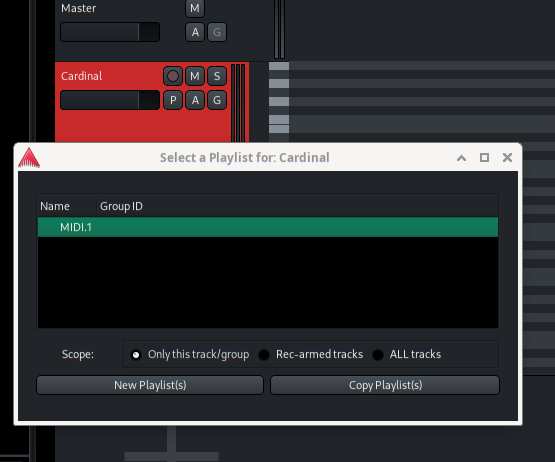
We have talked about track folders for a long time. The internal implementation of them is relatively easy, but the GUI side poses a lot of questions that we don’t are well answered in other DAWs, and we don’t have the answers we want yet. So nothing immediately planned.
2 Likes
Aha! See, something two days of messing around didn’t clue me into but is super simple! I’ll recall my sessions to see what shows up when I press the “P.” Thank you. I definitely need to sit down and read/watch some tutorials. RTFM, as they say.
That’s understandable, regarding track folders. I hope that gets figured out in a way that makes sense for the software.
1 Like
Just a wild guess: what do you mean with “region file view”?
Could that be the right pane in the editor, where you have the list of the regions? When you copy a region, or you just move it to another track, its name will get an increasing number at the end. This is not the file you recorded (that would be the “source”, also in the right pane), it is a “link” to the source file on the timeline. Check in the session folder (sessionname/interchange/sessionname/audiofiles/) if the actual .wav files you recorded are there.
1 Like
You’re absolutely correct. I realized that Pro Tools does the same thing. Everything in their region list will show the complete tracks plus newly named cuts and edits, so not everything that’s on the main timeline will correspond to the files in that list. It makes total sense that the count would keep going.
@paul I looked through my sessions, and it does appear that everything recorded to playlists still exists, so that wound up being a total user error. I had the track heights just small enough to hide the P icon, so knowing that those exist on the tracks now is beneficial for the future when I need to switch between them. I also learned about the “Discard Last Take” button in the Rec window when I was perusing the manual, which will come in handy in the future when I want to keep things tidy. That manual is very well written, by the way. I’ll be going through that more extensively so I can become as much of an expert user as I can.
2 Likes
While I can’t promise 24/7 individualized support, please understand that the experiences of new users who actually mostly get what they are doing is vitally important to us, so please do keep us in the loop as/if you encounter issues. The fastest way is the Help > Chat option from inside the application (though best hours for that are about 07:00 - 22:00 US Mountain Time (UST-7).
2 Likes
To add to that, bear in mind that:
- the Chat option is not a typical 1 to 1 Web chatbot - it’s an IRC/Matrix chat room where some Ardour users and devs hang out
- as it’s IRC, if you ask a question, you need to hang around to get an answer. If you close the browser/tab, you leave the chat channel and any subsequent reply anyone gives will, effectively, be lost
- as I said, it’s a chat room rather than a chatbot. This means answers will depend on when people are online and taking notice of the chatroom. People operate in different timezones, so questions may take time to be addressed
But, even if you don’t have specific questions, feel free to join the chat room and hang out with some other users.
Cheers,
Keith
3 Likes
Thank you both! I’ll be sure to utilize that option in the future.
1 Like
Hey, all!
I’ve been setting up a session for some vocal tracking I’m doing on Sunday and have been messing with recording empty takes to playlists. However, I’m not seeing an option to delete the playlists created. To be clear, I’m not referring to the regions recorded on the playlist, but the playlist itself. I can open up the playlist selection window and see each one that was created, but I don’t see any option to delete any of them to revert the track to a clean slate. Am I missing something?
Thanks!
Yeah, we haven’t implemented this as a direct action. I believe it is implicit in a session cleanup, which will remove (or gives the option to remove) all unused playlists as part of a broader operation.
1 Like
Got it. Thanks for the response, Paul.
This topic was automatically closed 28 days after the last reply. New replies are no longer allowed.