I am a Mac-user, but have been planning an eventual migration to the Linux world, and decided to try familiarizing myself with Ardour. I started by setting up all the tracks I’d need to route for a session I would be doing for a friend, and all seemed to be going well. I am using my TASCAM Model 24 as the audio interface, and everything was properly identified. When it came time to start the session, everything went mostly well. One mild issue I kept encountering was the Return key not working to send the cursor to the beginning of the timeline, which seemed to only happen on random song sessions. I got around this by using the Left arrow key to navigate there, or manually zeroed out the time. The biggest issue I had was regarding takes. Implementing them was easy enough, especially with being able to set a name when batch creating new ones. However, when I would complete each recording, some of the regions that had been recorded would vanish. I had seen something about this being a glitch, and decided to keep going. The next day, we continued working and went to recall specific takes. For one, I could not figure out how to select these, and when I selected to the Region file view, I was surprised to find multiple recordings named with take numbers far surpassing what I had stopped at. I also noticed that the tracks I thought were fine were completely absent. Not wanting to spend time trying to fix it, I created a new session in Ableton Live (I should have opted for Studio One or Pro Tools in retrospect) to move on, re-tracking everything with a slower, but stable workflow. I don’t want to give up on Ardour, so I’m wondering if there’s anything anyone might be able to clue me into to help me understand what went wrong, and have confidence to use Ardour as a main.
and to clarify, how do you go about creating “takes” (since this term doesn’t actually appear in Ardour’s interface, it can mean different things when used by users …)
Ah, i forgot about the rec window using the term …
Either way, I have not heard of this issue arising with either Mixbus (which is based on Ardour), or LiveTrax (which is also based on Ardour) or Ardour itself. So right now it is a complete mystery.
As I said, I’ve never heard of this before, and I’ve reached out to support people at Harrison to see if they’ve heard of it among their user base either.
It is entirely understandable that you’d want to move on from Ardour after this experience, but it would be very useful to us and other users to try to figure out what has happened on your system.
Right now, I don’t have much of an idea of the best way to do this. A first step would be to check if this happens reproduceably on other new sessions. If possible, could you try that and let us know the result? They don’t need to contain “real audio” - recording silence or noise would be just fine.
Absolutely, I will work on this outside of a legitimate recording session and let you know in a couple of days what my findings are. I’m hoping this is a me problem, having only spent a couple of days to familiarize myself with Ardour’s features.
I sincerely hope it is not a “you” issue - no user should be able to make this sort of thing happen, under any circumstances. System problem would be a little different, though still odd because I’d expect such a problem to interfere with the rest of the software you’re using.
That’s valid. What I meant by a “me” problem is the possibility that I had input monitoring enabled on those tracks, but forgot to record arm them. If that ends up being the case, I’ll feel quite embarrassed for having posted this. However, it still wouldn’t explain why the playlist numbers embedded on the region names surpassed the amount of actual takes recorded unless it’s keeping stopped and undone takes.
The ID (number) for a playlist will definitely not be adjusted by anything you can do with editing or mixing. Every time you create a new playlist for a track, it will get an ID that is one higher than the last created playlist for that track, regardless of what was done, undone, stopped, deleted etc.
We have some work still to be done on making comping workflow more, ahem, intuitive …
Ah, OK. That confirms that aspect of that then. That’s good to know.
As for comping workflows, I am very partial to the way Pro Tools handles playlists (a toggle menu allowing you to select which playlist is used on the main playback track), I have yet to see this down similarly in any other DAW, and would love to see Ardour incorporate it, if possible. As for other implementations, are there any plans for track folders at all?
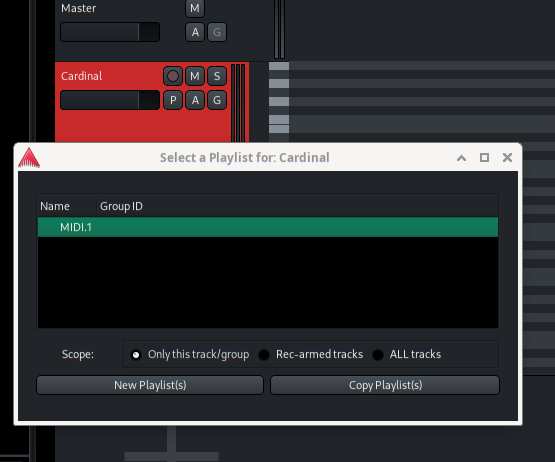
We do provide that playlist selector, right on the “P” button in the track header, and then “Select”
We have talked about track folders for a long time. The internal implementation of them is relatively easy, but the GUI side poses a lot of questions that we don’t are well answered in other DAWs, and we don’t have the answers we want yet. So nothing immediately planned.