Okay, that’s a shame.
Thanks for all your efforts.
There is no platform specific code there. The only platform specific parts here are backends ALSA vs CoreAudio.
That is what is strange.
Why do Rosegarden, Qtractor, Seq24, Renoise, and SooperLooper work perfectly well on the same platform, with the same hardware and the same MIDI clock, but Ardour doesn’t?
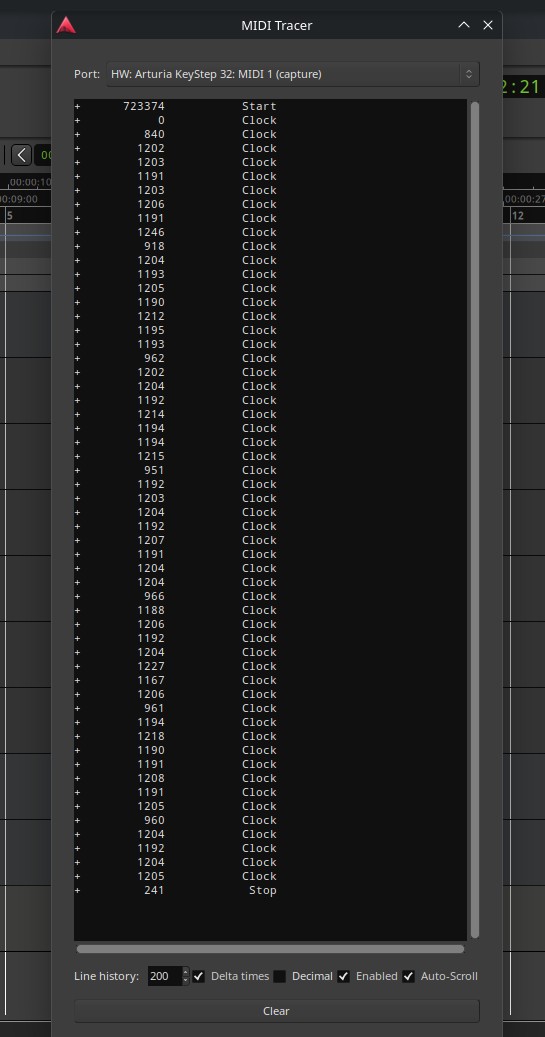
Please run the MIDI tracer window with “delta time” enabled, and show us the result.
Also, at this point, I am not entirely clear what “not working” actually means here …
… and only on your system.
Also the MIDI trace you posted [1] looks correct. It does not show a “Start” message; so if that is missing Ardour would not roll, but I assume it’s just somewhere above.
So let’s try to get to the bottom of things.
Could you first check if a minimal test setup works? Assuming that you use JACK or pipewire/jack . Please apt install jack-midi-clock which can generate a MIDI-clock from JACK transport.
jack_midi_clock -B -b 110
jack_transport on the commandline)If that works, then perhaps replay a recording of your hardware generated clock…
Attached is a screenshot of the MIDI clock input settings.
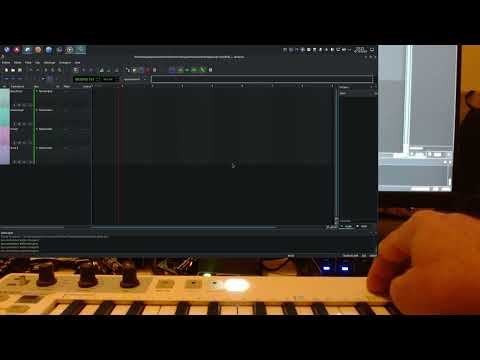
Ardour starts up on the “start” command, but as soon as I stop, it won’t start again—or it does so with major glitches.
Here is a link to a video showing the behavior:
Thank you so much for your patience; I don’t want to bother you any further.
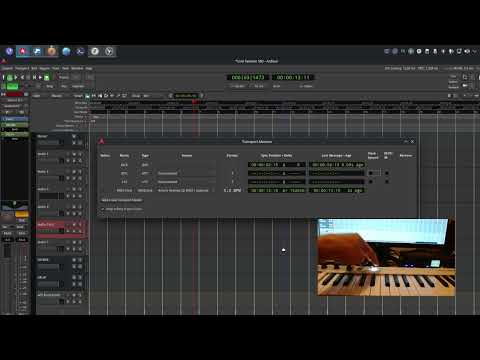
Can you reshoot the ardour part of that with the transport masters window visible at all times?
You are not bothering us with this - there may be a bug in Ardour, and we want to get it fixed.
Also the BPM jumps around (as can also be seen by the editor’s Grid moving). There is some significant jitter on the clock signal.
Ardour uses a 2nd order DLL to smooth then BPM, but looking at delta times: 1200, 900 is rather significant difference… but that’s a different issue.
If that helps, then all the better.
Good night, everyone.
Aha there’s a clue.
So when you start again, Ardour vari-speeds to catch up.
You can see the delta time decreasing steadily. If you’re more patient before pressing stop again, it’ll eventually sync again.
Now the question is why that happens. Seeing a “start” message ardour should locate to 0, but apparently doesn’t.
Should be fixed now in Ardour 9.8-195-ga9b2904868 (or later),
available from https://nightly.ardour.org/ in a few hours from now.
As a comparison I tried this with a Novation Launchkey 37 mk3, and it seems to be working.
I could not get Ardour to follow the clock when I only had MIDI Clock selected in transport masters, and had the keyboard MIDI output connected to MIDI Clock but not MMC In. Once I also connected MMC In to the MIDI stream and changed the transport sync to MIDI clock I could start and stop the transport from the keyboard transport control buttons, and the ardour tempo would follow the tempo set on the keyboard.
Is it possible to have the MIDI clock only control the Ardour tempo, and still use the Ardour transport keys to start and stop? My keyboard has transport keys, so not being able to lock to clock when not using the MMC In doesn’t affect me much. Maybe every keyboard that can supply a clock will also supply start and stop messages and so it isn’t a practical problem.
When changing the tempo quickly on the keyboard the Ardour transport tempo would stutter a little and take a few seconds to slew to the new tempo. I assume that is due to the DLL time constants, so not really unexpected, but something to be aware of if using a device which allows programming tempo changes.
I verified with both ALSA and Pipewire-JACK backends (although I think it was pointed out previously the MIDI clocking should not be different with different audio backends, so expected).
I did manage at some point to start the transport with the start message, but then Ardour would not respond to the stop message. I had to change from external to internal tranport control on the transport bar and then the tranport stopped. I don’t really have time to investigate that right now, perhaps in the future I will see if I can duplicate that behavior and understand what triggers that.
The Novation does have some clock jitter, but I think not quite as much as shown from the Arturia. See below.
So I began this post expecting to perhaps duplicate the original report (since the Novation keyboard I have is something similar to the Arturia of the OP), but I do not see the original problem.
Although I apparently get distracted and take too long to type up posts, because I see that there is a repository update with a change to transport delta calculation.
I did get the “ignored stop message” behavior to occur again, so that apparently isn’t too rare to duplicate.
I can see the stop messages scroll by in the MIDI tracer window, so I know they made it to Ardour. It did not seem to be just a case of missing one mesage, because I could hit the stop button multiple times and it never stopped transport after ardour was in the condition.
What are the units for these delta values, and what is the reference clock for timestamping?
Clock delta values, Novation LaunchKey 37 mk3 USB MIDI
968 Clock
853 Clock
982 Clock
878 Clock
1008 Clock
848 Clock
895 Clock
977 Clock
849 Clock
974 Clock
976 Clock
845 Clock
886 Clock
980 Clock
849 Clock
978 Clock
897 Clock
970 Clock
851 Clock
972 Clock
890 Clock
936 Clock
886 Clock
894 Clock
925 Clock
980 Clock
895 Clock
970 Clock
851 Clock
884 Clock
978 Clock
858 Clock
965 Clock
983 Clock
844 Clock
895 Clock
974 Clock
886 Clock
941 Clock
890 Clock
969 Clock
850 Clock
973 Clock
896 Clock
931 Clock
895 Clock
983 Clock
884 Clock
845 Clock
The unit in Ardour’s MIDI tracer are samples at sample-rate.
Thee absolute value is a monotonic count since start of the audio-engine.
OK, so those clock values I showed are in the 5ms variation range. Maybe reasonable for USB connected device.
I just tested version 9.8.201.
Thanks; it works perfectly with the MiniBrute 2S.
It works with the KeyStep 32 (older version) too, but it isn’t quite as stable—there are a few sync and graphics bugs.
Thanks again for this great update.
Could you test if this is still present in today’s build? I have fixed an issue pertaining to the start message, but not stop worked reliably here. So I cannot tell if I also fixed that…
I will make a point to check for that, but will be at the end of my work day and evening meal, probably ca. 8 hours after your post.
Missing the stop is still occurring in today’s build (rev 9.8-201-g363d29fd54), but only in a specific condition, as well as other unexpected behavior.
When I change the transport master from internal to M-Clk the tempo syncs very quickly now, but sending the Start message from the MIDI keyboard causes the transport play button to light up, and the metronome plays, but the transport doesn’t actually move, if I have dragged the playhead back to the beginning.
For some reason changing the sync from Int to M-Clk moves the playhead a few bars in, and if I leave the playhead there then sending the start message starts the transport as expected, and the stop message stops the transport as expected.
I have return to last playhead start selected, so when the stop message is received it goes back to the starting point (end of bar 6 in this session for some reason).
If I use the return to start transport button in the ardour transport bar, then start and stop work as expected. If I use the mouse to drag the playhead, then the start message causes the metronome to start, but the playhead does not move.
This topic was automatically closed 28 days after the last reply. New replies are no longer allowed.