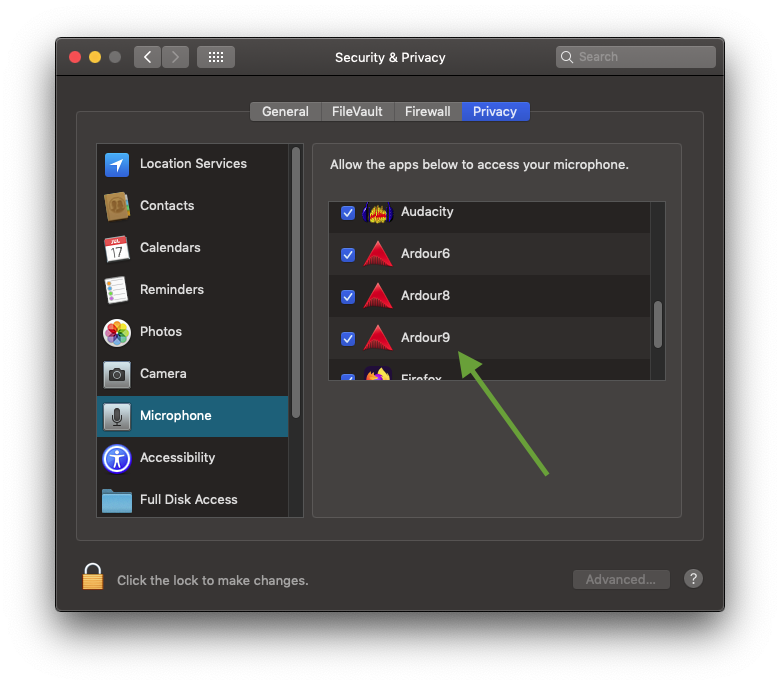
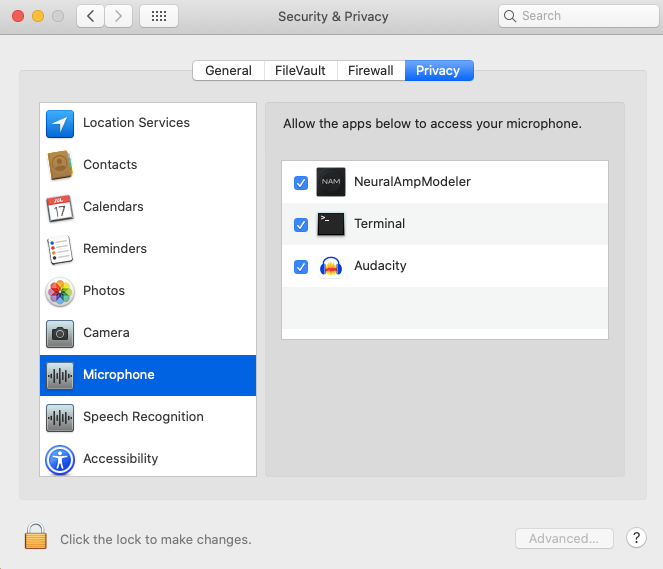
Basically, the issue in this post still appears in Ardour 9 running on Catalina. The workaround there is still valid to start it from the terminal and then it asks, but it can take a user a while to find that particular post and figure out why Ardour is not recording.
It sounded like from the post that it was supposed to be fixed, I just want to report that it persists. Maybe you don’t fix because it’s an old operating system, fine, but reporting it FWIW in case it is an easy fix.
Did you check if Ardour is listed in
System Settings > Privacy and Security > Microphone
?
I do not think this is a bug. On my system, ardour asked properly
The thing with those apple questions is, once they are answered, the system will never ask again. So you need to go either into the settings and reenable it, or muck about with tccutil on the commandline, which is terribly undocumented.
Edit: A little further explanation of why the terminal workarround will ask again.
The Transparency Consent and Control (sounds Orwellian, right?) system asks for the permissions for the first process requiring them, inheriting from there.
So in the case of ardour, let’s suppose you clicked “Deny” at some point, the system remembers this for ardour.
But when you start it from the terminal, the terminal will start ardour and the system will check if the terminal is allowed to access the microphone. Either directly, or by using another app (ardour in this case). That’s why it will ask again, and even allow access, if ardour itself was denied before. But you allow this for TERMINAL! Not ardour. Just something to keep in mind.
Edit2: For linux admins, this is apples mandatory access control. Kinda like selinux or apparmor, if I understand correctly. Recent versions of macOS are immutable and have MAC enabled by default. (MAC on a mac, talking about confusing acronyms )
Odd, It works here on macOS Tahoe (AppleSilicon) and BigSur (Intel). When the engine is started the first time for a given interface, a popup asking for permissions shows.
I believe it can happen if one accidentally disallows this once, but then re-downloading the .dmg (new file), and moving Ardour.app to /Applications again asks again.
Other than that one can manually configure this as @GhostsonAcid shows.
It never asks. I’m 99.9% certain I never denied, certainly not for Ardour9 which I just downloaded last week or so. To be sure, I deleted it from Applications, re-downloaded for new file per Robin’s instruction, and reinstalled. No mic prompt. I know what the dialog looks like, because Terminal just brought it up when I ran Ardour from it for the first time yesterday. Ardour does not appear in mic privacy in settings at all.
Ardour detects that there are microphones (I have both system and USB mic, they both show), I choose one in the audio setup on startup, they show up as inputs as if I can record from in Ardour, but they are dead, meters are all gray in the record view, as if they are muted. Restart Ardour from terminal, same project and config, the mic is live, bouncy green meters on the record view, records, works like one would expect.
If you ever want me to test a fix or this, happy to test a nightly build (maybe not immediately, but within, say, a week or so). Personally I am now fine, as I don’t mind starting Ardour from the terminal. Mostly I want to avoid others having this issue and spending time trying to figure out what it is. I’ve used Ardour on and off for a year or so, but never with a mic, so I thought I’d misconfigured something in terms of audio ports or something, took me about an hour of various searches and tries until I started wondering if it was an OS-specific issue and found the prior post I linked. Even an OS-version-specific message (if you can detect OS and only show a message on first start for Catalina, could even just link here) would probably be fine, so the user knows they may have an issue. Or maybe put a notice on the MacOS download page (“Microphone access on Catalina may require a workaround, see [URL]”).
Or maybe you just wait to see if any other Catalina users complain to ensure it’s not some other idiosyncratic thing about my machine before spending time on it, I don’t know. Likely very few Catalina users these days, may not be worth developer time.
Nope. tccutil reset microphone said “failed to rest microphone” so I did “tccutil reset all” which did remove all prior permission grants (for microphone and I’m sure many other things I’ll be discovering as I re-grant them).
Ran Ardour 9 from the launcher, no request for mic. Ran it from terminal, did get the request for mic.
Take a look inside the Ardour bundle. There should be a plist file. Take a look inside, if I remember correctly, apps requiring the microphone need to list that in that file. But this is just from the top of my head, no time to look at the docs rn. Sry.
 )
)