Sorry to bring this up, a bug like this has to have been covered already, but I can’t find it on the forum – at least not yet.
Anyway, I can’t start Ardour. The GUI starts up, the Resent Sessions dialog appears (I select New), I also select to use an empty Template, The Audio/MIDI Setup Dialog apears (I select Start), i then get yhe warning that my system has a limit for the amount of locked memory (I’ve alwasy gotten that), I cleck the OK button, and then CRASH. I’ve tried Ardour 8.12, and 9.2 and 9.5.
I try and start it from the command line and it gives me a “Floating point exception (core dumped) ./ardour9” error.
I haven’t used Ardour for several months now, hoping this error would resolve itself, but I hasn’t yet.
Not much:
I had that on at least on linux distribution which uses pipewire as soundserver. Also if i have chosen “alsa” in ardour, iirc i also tried to stop pipewire.
I didn’t really investigate long, so i couldn’t figure it out (i just removed pipewire and installed jack, which i don’t need for ardour, but for other things).
Perhaps if you add the info which distribution and which soundserver you use someone else has got an idea (as far i can tell most distributions now use pipewire per default). As pipewire works fine in other distributions, like AV Linux, this might well be unrelated.
Good luck.
Hi,
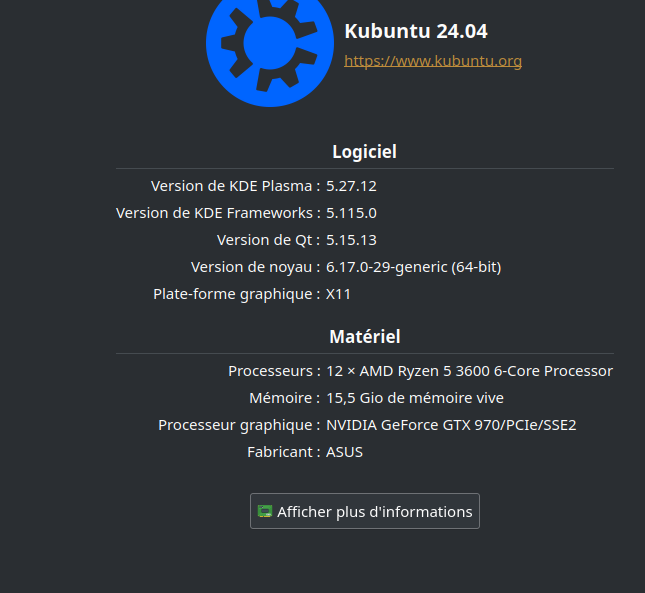
This surprise morning: my ardour 9.5 crash at startup while it was working previously. I use kubuntu with the jack server.
Since I had installed the latest version “nightly”, I tested to remove my ardour9 config in the .config directory.
I start ardour again 9.5 and … it works. I rescanned my preferences and rescan my plugins.
We’ll see if it works in the long run.
my conclusion: beware of “nightly”
I’m going to try changing my sound server tonight when I get home from work. I didn’t use the nightly build, but I do think my problem lies with the sound server Kunbuntu (I’m using version 26.4) uses by default (pipewire). I let you folks know how it turns out.
It seems to me that kubuntu lts does not use wayland yet… anyway with me, it uses x11 well
I understand and I guess, as a developer, you’re annoyed by our sound server hacks.
But me, jack has always worked and as long as it works, I will systematically remove pipewire from my linux installation to make sound and will continue to use you jack and qjackctl. (with ajmidid and the bridge pulse audio)
I use a dual boot with another linux distribution for gaming and other… and eventually finally test a usable version of pipewire.
I’m not annoyed by anybody’s choices or “soundserver hacks”. It’s just that they are not likely to be relevant, which appears to be confirmed by the OP’s responses so far.
FIXED IT!!! Thanks guys! The problem seems to have been Wayland. After the GUI gets fully loaded, I’ll let my computer sit untouched for over ten seconds (oddly, this still isn’t enough time), then I’ll go check my email or something. and finally I’ll start using Ardour, and all works well!
This is a known issue with wayland, and once you get past this “memory limit” step it should be fine for future sessions.
The issue: [X]Wayland allows you to interact with the main Ardour window before it is fully set up. This should not be possible while any dialog window is shown.
If I am not mistaken, the memory limit warning can be addressed by setting up realtime scheduling. The JACK FAQ has instructions on how to do this, but they may need adjustment depending on where the relevant file is housed in Kubuntu. I believe it used to be stored at /etc/security/limits.d/audio.conf, but I don’t know if that has changed in recent versions. More information is here:
My understanding is that Wayland won’t be the default in Ubuntu (and flavors like Kubuntu etc) until 26.04. I also believe that GNOME desktops in 26.04 won’t support X11 at all and XWayland will be required to run X11 apps; not sure how KDE-based distros will handle all that.
All are most excellent reasons for staying on 24.04.4 LTS for as long as possible IMHO. Certainly not upgrading to 26.04 LTS until the .1 release comes out in August.
It appears that XNest is a better option for using X11 applications inside Wayland than XWayland, at least as of late spring 2026. It certainly behaves better when those applications open multiple windows.