The Dragonfly line of reverbs (VST3 and LV2) look like this on Ardour 9.
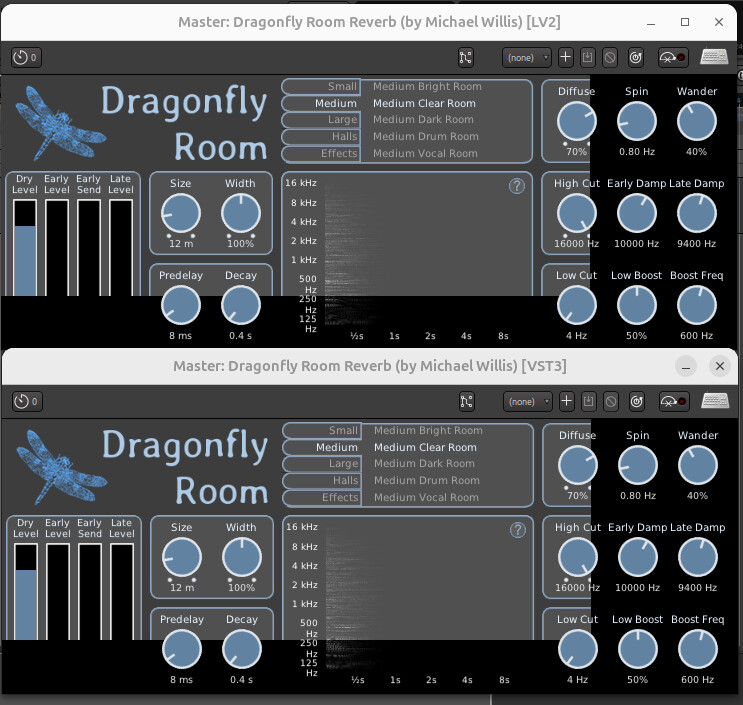
They look normal on Ardour 8.12 (and Reaper 6.83)
@Michael_Willis
@x42
Any Suggestions ? Bug ?
The Dragonfly line of reverbs (VST3 and LV2) look like this on Ardour 9.
They look normal on Ardour 8.12 (and Reaper 6.83)
@Michael_Willis
@x42
Any Suggestions ? Bug ?
Do you use UI scaling?
Yes, No scaling on Ardour 8.12, but scaling on Ardour 9.
Does resetting Ardour Preferences > Appearance > Size and Scale to 100% make the plugin UIs appear normal?
Ardour informs LV2 plugins about the scaling. via https://lv2plug.in/ns/extensions/ui#scaleFactor and it looks like the overall knob layout scales but not the background.
Yes, That fixes LV2, but not VST3, like you implied.
VST3 works upon restart of Ardour.
Yeah, Arodur also informs VST3 plugins… and you have to either reload the session or set Prefs > Plugins > GUI … Closing a Plugin GUI Window … destroys the GUI instance, releasing resources
When you load the plugin in Reaper, does the GUI scale correctly?
I do not use scaling in Reaper…these GUI’s do not seem to scale to plugin window when it is adjusted like certain plugins either.
So I guess this is a known issue with Ardour and scaling …
Thank you for the quick response!
It appears to be an issue with the DPF framework in Dragonfly.
I cloned the Dragonfly source and updated dpf and its pugl-upstream to more recent versions, and after compiling and installing the background got scaled as well :
git submodule update --init --recursive

pushd dpf && git checkout main && git pull && git checkout 3fb96a349b1f61
popd
for var in early-reflections hall-reverb plate-reverb room-reverb ; do  sed -i 's/FILE_BROWSER_DISABLED = true/USE_FILE_BROWSER = false/' plugins/dragonfly-${var}/Makefile ; done
sed -i 's/FILE_BROWSER_DISABLED=true/USE_FILE_BROWSER=false/'  Makefile

pushd dpf/dgl/src/pugl-upstream && git checkout main && git pull && git checkout 21cb3c8b480f4c
popd
Edit : dpf commit 4900b15dd2b55c1a7 and pugl-upstream commit 0452a367a89ac4 also appear to work and are more recent than 3fb96a349b and 21cb3c8b4
Edit 2: The VST3 version does respond a bit badly to scale changes, even with the fixes above.
If you have Ardour scaled at, say, 50% and add both the VST3 and LV2 versions they scale correctly.
But if you close the plugins, rescale Ardour to 100% and open them only the LV2 gets correctly scaled and the VST3 remain at the previous scale and you need to remove and re-add it to get the correct scale. The VST3 also remains large if you add it with Ardour at 100% and then scale down and reopen it.
The LV2 OTOH has problems in scaling from large to small, where the plugin graphics shrink as you scale down but the surrounding window remains the same size as before the scale. That can easily be resolved by manually shrinking the window, though.
This topic was automatically closed 91 days after the last reply. New replies are no longer allowed.